WAEC Data Processing 2025 past questions and answers

42 questions. Try each one, then open the answer to check yourself and read the explanation.

Question 1

History of Computers

The Difference Engine was developed by

  1. A.Blaise Pascal.
  2. B.Charles Babbage.
  3. C.Herman Hollerith.
  4. D.John Von Neumann.
Show the answer and explanation

Answer: B (Charles Babbage.)

Explanation

Charles Babbage designed the Difference Engine in the 1820s.

Open this question

Question 2

Number Systems

Convert AOBHEX to a number in binary.

  1. A.101001011,
  2. B.101101010,
  3. C.101000001011,
  4. D.101100001010,
Show the answer and explanation

Answer: C (101000001011,)

Explanation

Each hex digit is 4 bits: A = 1010, 0 = 0000, B = 1011, giving 101000001011.

Open this question

Question 3

Data and Information

Audio data are produced from

  1. A.animations.
  2. B.graphics.
  3. C.pictures.
  4. D.sounds.
Show the answer and explanation

Answer: D (sounds.)

Explanation

Audio data is recorded sound.

Open this question

Question 4

Data and Information

Which of the following variables is an example of numeric data?

  1. A.568
  2. B.B2
  3. C.₦10.00
  4. D.Twenty-five
Show the answer and explanation

Answer: A (568)

Explanation

568 is made of digits only; the others contain letters or a currency symbol.

Open this question

Question 5

History of Computers

The generation of computers in which transistor was first introduced is the

  1. A.fifth generation.
  2. B.fourth generation.
  3. C.second generation.
  4. D.third generation.
Show the answer and explanation

Answer: C (second generation.)

Explanation

Transistors replaced vacuum tubes in the second generation.

Open this question

Question 6

ICT in Society

One application of ICT in medicine is

  1. A.Computer Aided Learning.
  2. B.Computer Aided Manufacturing.
  3. C.Computerized Axial Tomography.
  4. D.Optical Character Recognition.
Show the answer and explanation

Answer: C (Computerized Axial Tomography.)

Explanation

CAT/CT scanning uses computers to image the inside of the body.

Open this question

Question 7

Computer Hardware

Which one of the following reasons justifies the prevalence of Personal Digital Assistance devices? They

  1. A.are light weight and are very expensive.
  2. B.are very portable and can be used everywhere.
  3. C.have limited capabilities when compared to desktop and laptop computers.
  4. D.have small keyboard for input operation.
Show the answer and explanation

Answer: B (are very portable and can be used everywhere.)

Explanation

PDAs are popular because they are small, portable and usable anywhere.

Open this question

Question 8

Computer Hardware

Which one of the following actions can be achieved by right-clicking a computer mouse?

  1. A.Closing of the current windows
  2. B.Display of dialog box
  3. C.Minimizing of active windows
  4. D.Opening of contextual menus
Show the answer and explanation

Answer: D (Opening of contextual menus)

Explanation

Right-clicking opens a context (shortcut) menu.

Open this question

Question 10

Information Processing

Which one of the following statements does not explain information processing?

  1. A.Act of saving documents
  2. B.Changing of information detectable by an observer
  3. C.Conversion of raw data into information
  4. D.Process that describes everything that happens to a piece of information
Show the answer and explanation

Answer: A (Act of saving documents)

Explanation

Saving a document only stores it; it does not change or process the information.

Open this question

Question 11

Information Processing

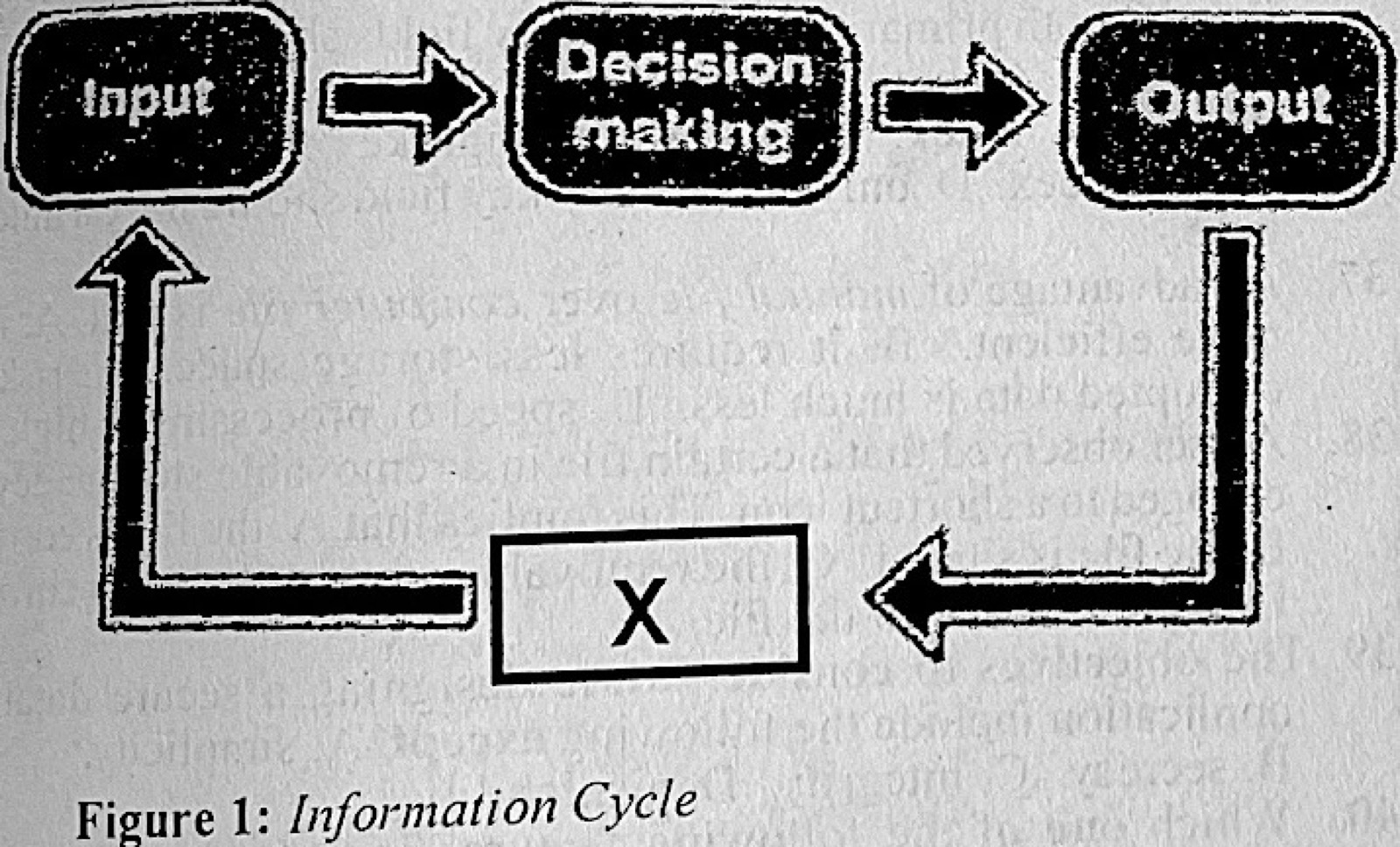
The part labelled X in Figure 1 is called

Diagram for this question
  1. A.analysis.
  2. B.evaluation.
  3. C.feedback.
  4. D.retreat.
Show the answer and explanation

Answer: C (feedback.)

Explanation

The arrow from output back to input carries feedback.

Open this question

Question 12

Information Transmission

Which one of the following gadgets allows the transmission of both visual and audio information?

  1. A.Facsimile
  2. B.Radio
  3. C.Television
  4. D.Walkie-Talkie
Show the answer and explanation

Answer: C (Television)

Explanation

Television carries both pictures and sound.

Open this question

Question 13

Computer Networks

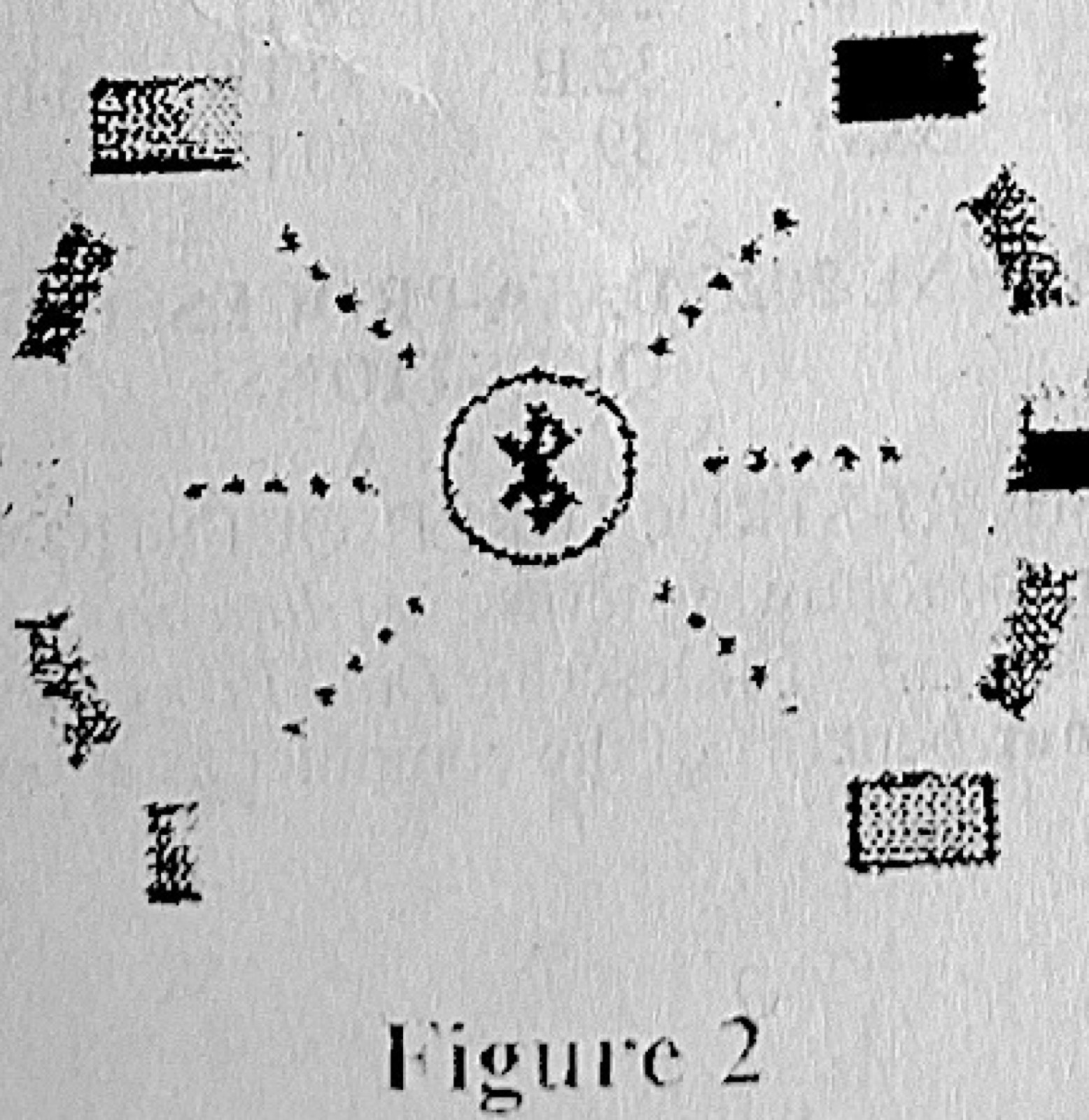
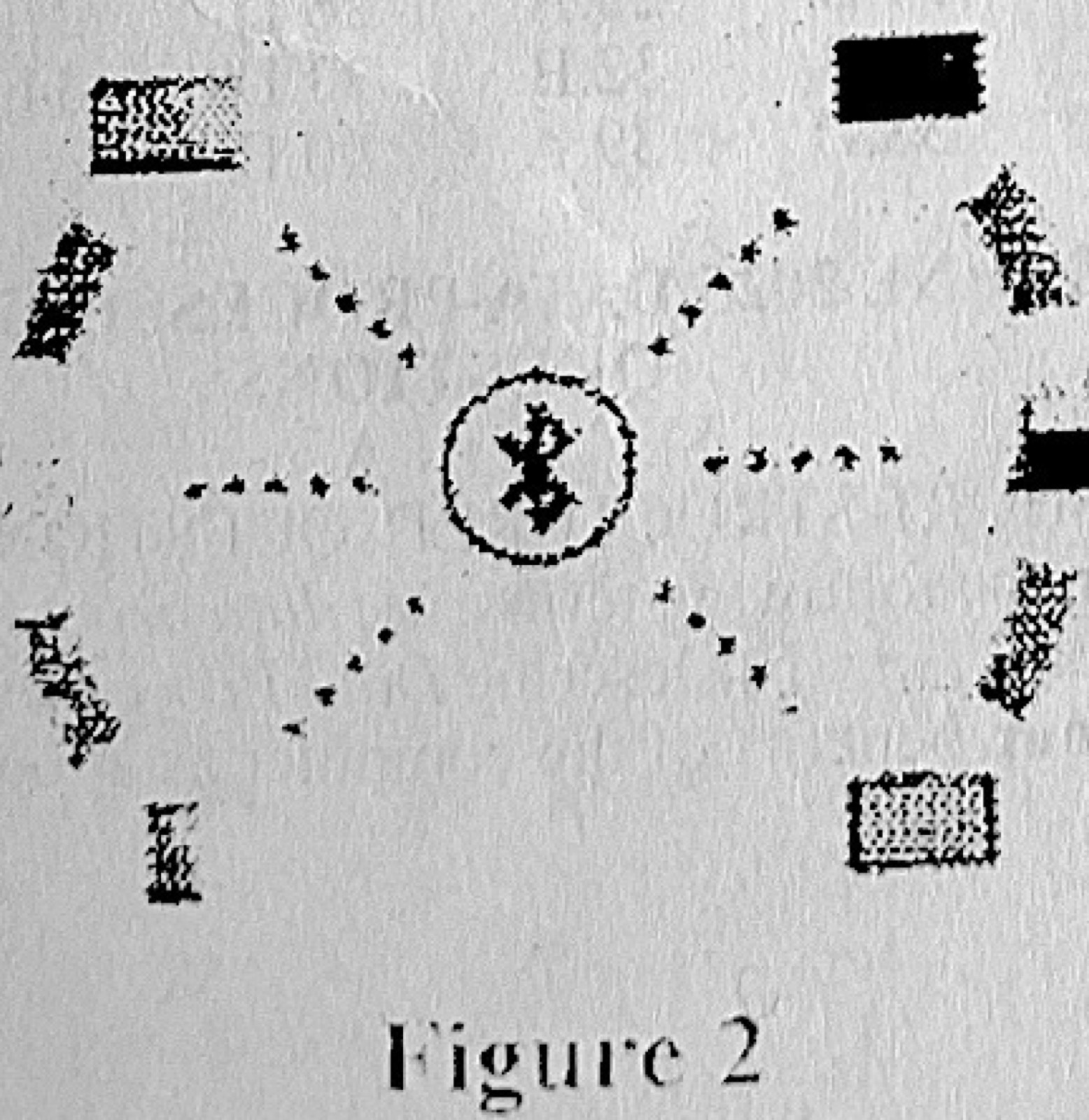
Use Figure 2 to answer questions 13 and 14.
The underlying technology in the network connection in Figure 2 is called

Diagram for this question
  1. A.Bluetooth.
  2. B.Ethernet.
  3. C.Laser Jet.
  4. D.Optical Fibre.
Show the answer and explanation

Answer: A (Bluetooth.)

Explanation

The symbol in the middle of Figure 2 is the Bluetooth logo, linking nearby devices wirelessly.

Open this question

Question 14

Computer Networks

One limitation of the network type in Figure 2 is that

Diagram for this question
  1. A.cost of maintenance is high.
  2. B.distance covered is short.
  3. C.resources that can be shared are selective.
  4. D.weather can affect the rate of data sharing.
Show the answer and explanation

Answer: B (distance covered is short.)

Explanation

Bluetooth only works over a short range, about 10 metres.

Open this question

Question 15

Internet

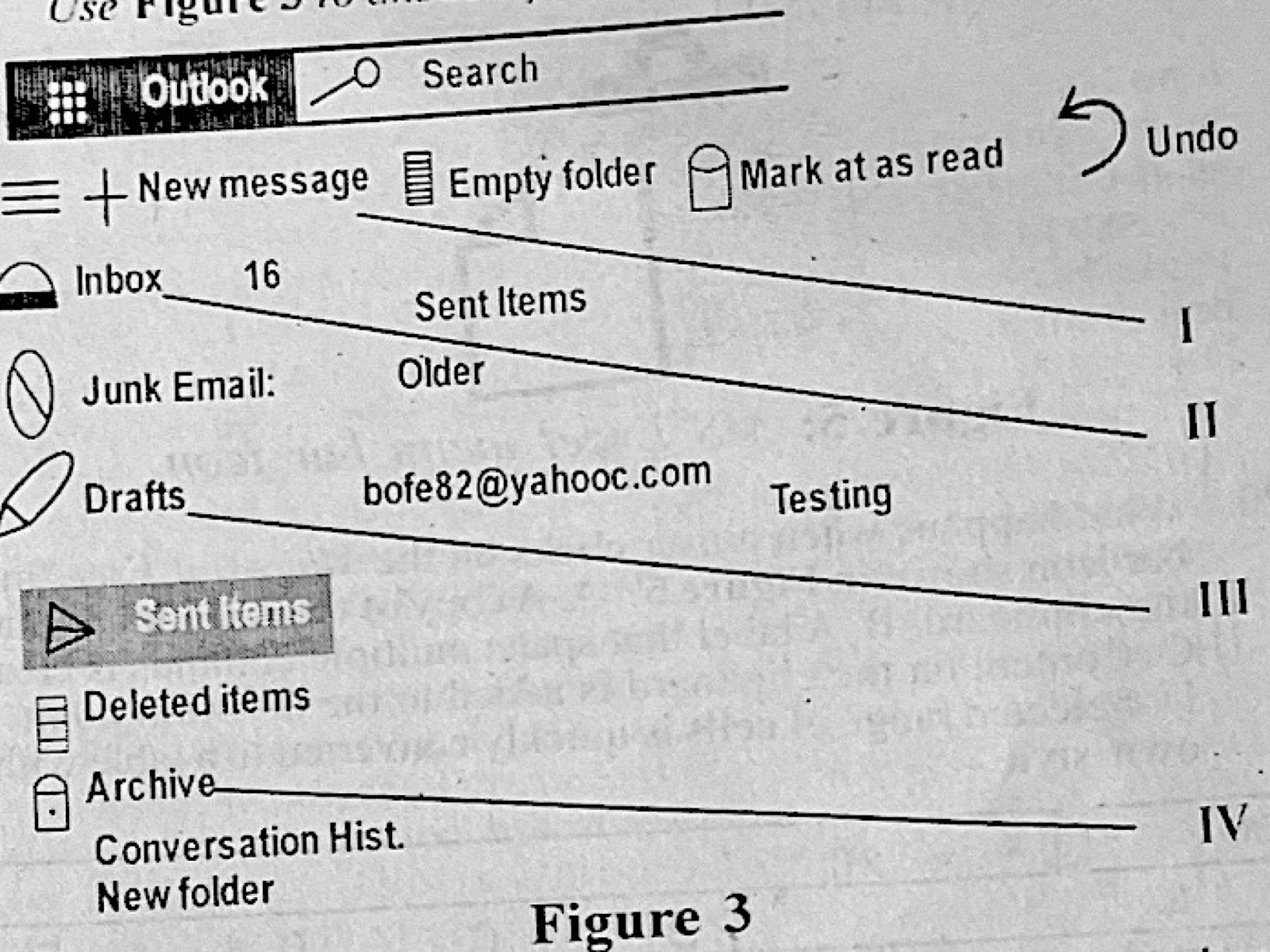
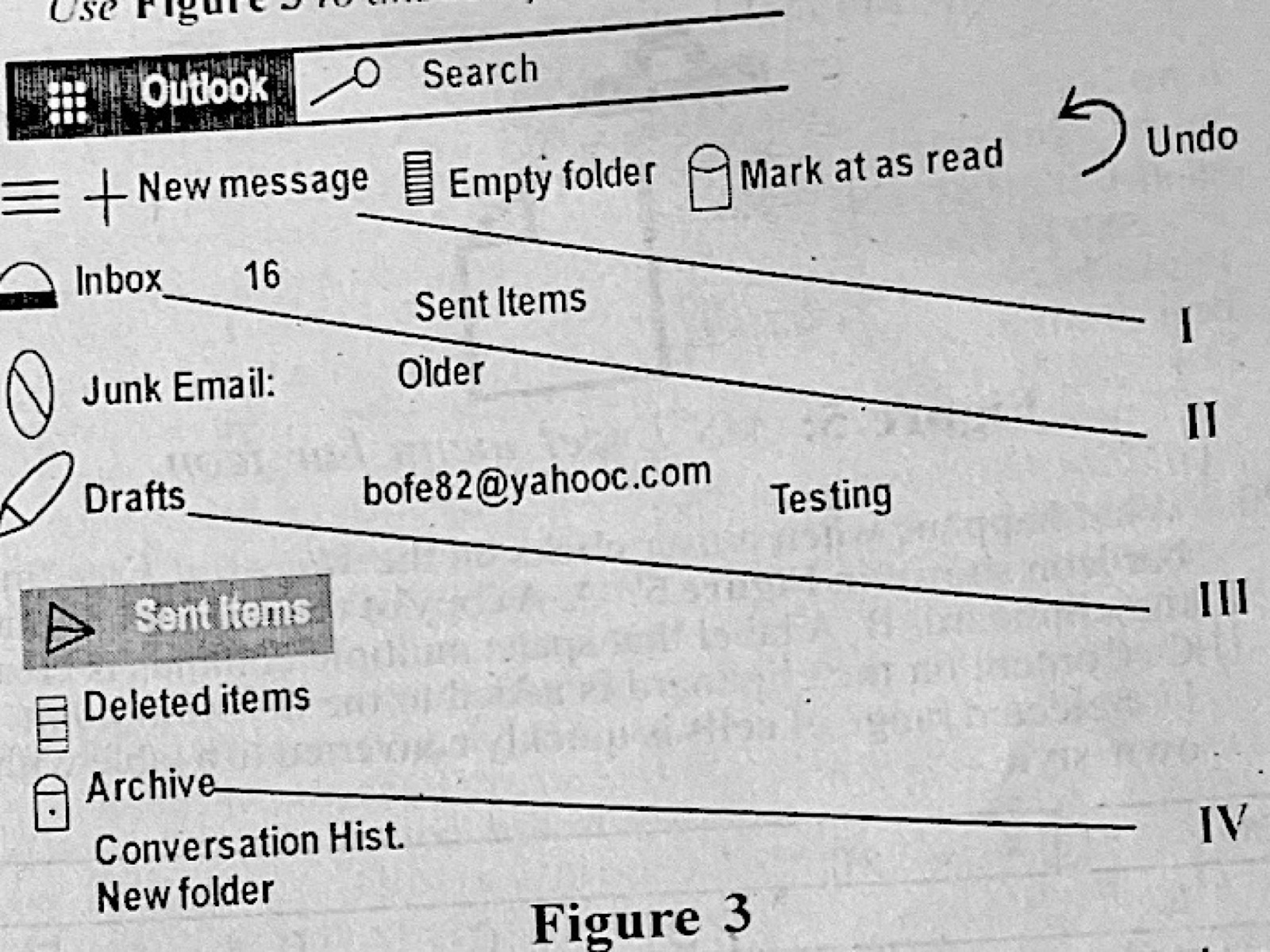
Use Figure 3 to answer questions 15 and 16.
The interface in Figure 3 is used for

Diagram for this question
  1. A.creating new sites.
  2. B.creating portable documents.
  3. C.sending and receiving e-mails.
  4. D.sending and receiving SMS.
Show the answer and explanation

Answer: C (sending and receiving e-mails.)

Explanation

Figure 3 is Outlook mail, with Inbox, Drafts and Sent Items.

Open this question

Question 16

Internet

The part labelled III in Figure 3 is used for

Diagram for this question
  1. A.keeping draft sites.
  2. B.keeping unfinished sites.
  3. C.saving portable documents.
  4. D.saving unsent e-mails.
Show the answer and explanation

Answer: D (saving unsent e-mails.)

Explanation

III points to Drafts, where unsent messages are saved.

Open this question

Question 17

Software and Operating Systems

What happens when the Shift key is pressed down while deleting a file from the computer in windows? The file is

  1. A.uninstalled from the computer.
  2. B.permanently deleted from the computer.
  3. C.deleted and sent to the Recycle bin.
  4. D.deleted and kept in the clipboard.
Show the answer and explanation

Answer: B (permanently deleted from the computer.)

Explanation

Shift + Delete skips the Recycle Bin and deletes the file permanently.

Open this question

Question 18

Word Processing

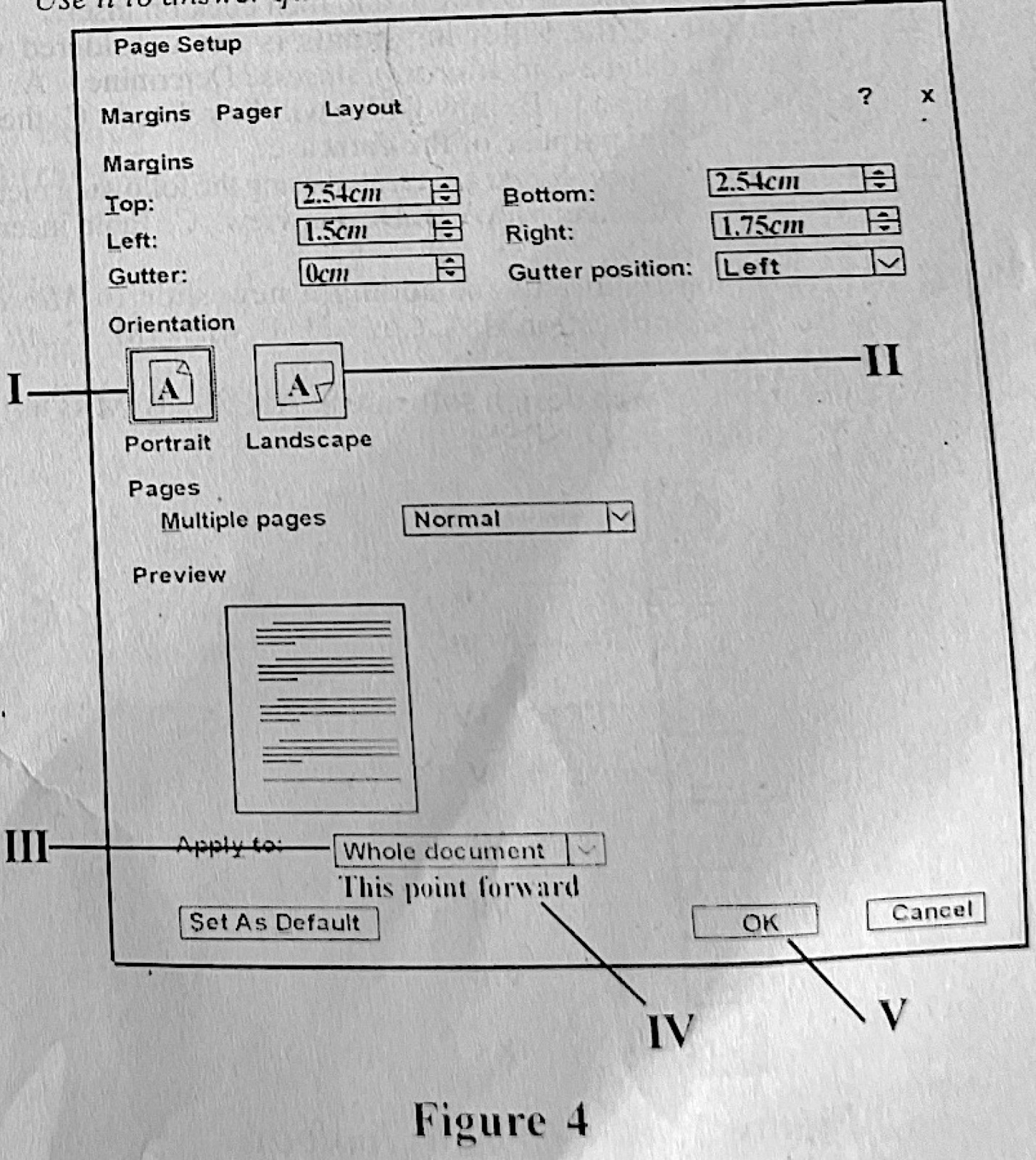
Figure 4 is a full set of page formatting options captured from MS Word application. Use it to answer questions 18 and 19.
A user who was typing a document in portrait orientation decided to complete the next few pages in landscape orientation. Which one of the following options illustrates the correct order of steps the user must follow by clicking on the labelled parts to achieve this?

Diagram for this question
  1. A.I, III and V
  2. B.I, IV and V
  3. C.II, III and V
  4. D.II, IV and V
Show the answer and explanation

Answer: D (II, IV and V)

Explanation

Choose Landscape (II), set Apply to: This point forward (IV) so earlier pages stay portrait, then click OK (V).

Open this question

Question 19

Word Processing

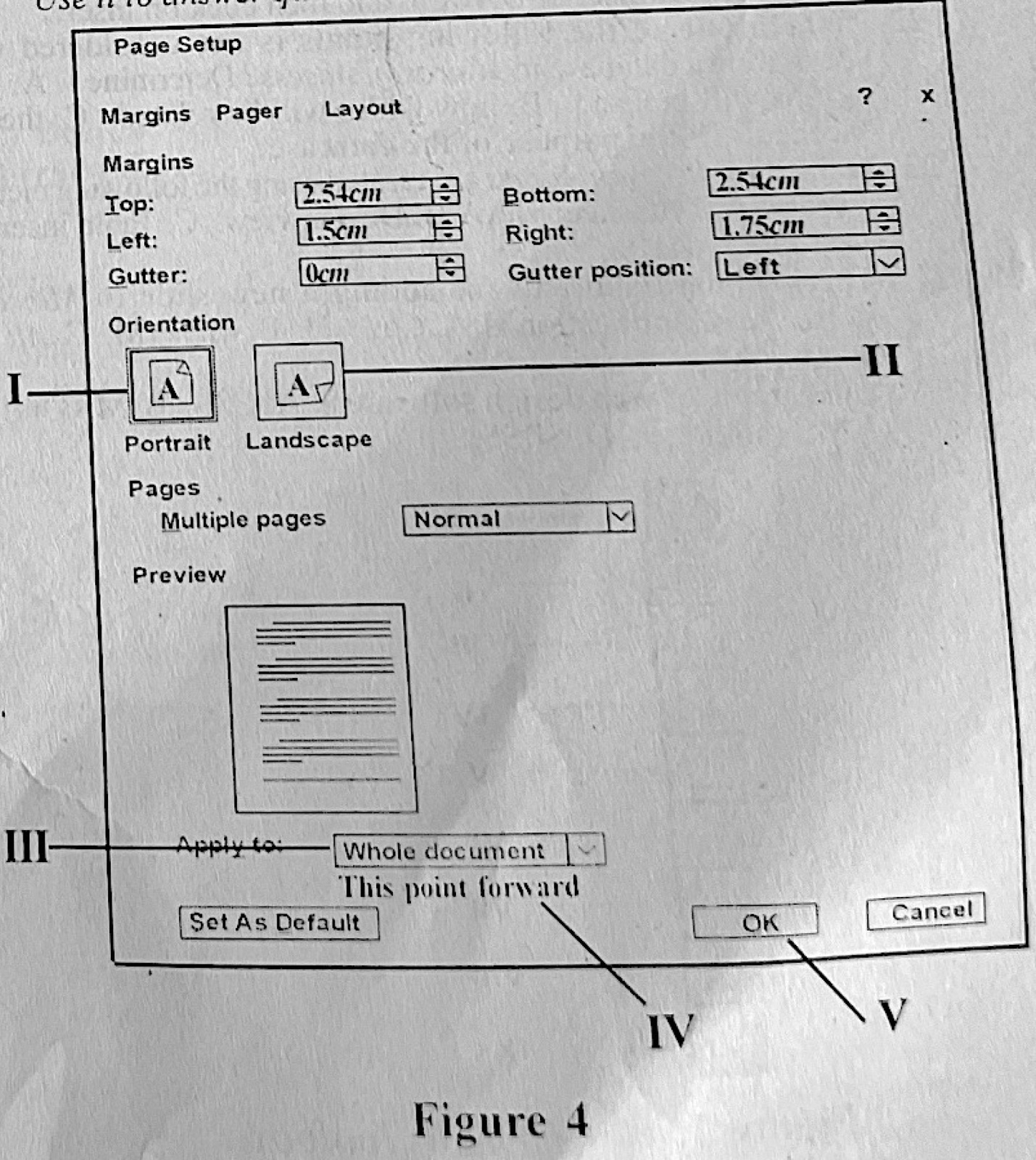
Figure 4 is a full set of page formatting options captured from MS Word application. Use it to answer questions 18 and 19.
Which one of these options gives the correct order of steps to revert to portrait orientation after typing in landscape orientation for a while?

Diagram for this question
  1. A.I, III and V
  2. B.I, IV and V
  3. C.II, III and V
  4. D.II, IV and V
Show the answer and explanation

Answer: B (I, IV and V)

Explanation

Choose Portrait (I), Apply to: This point forward (IV) so the landscape pages already typed stay, then OK (V).

Open this question

Question 20

Spreadsheet

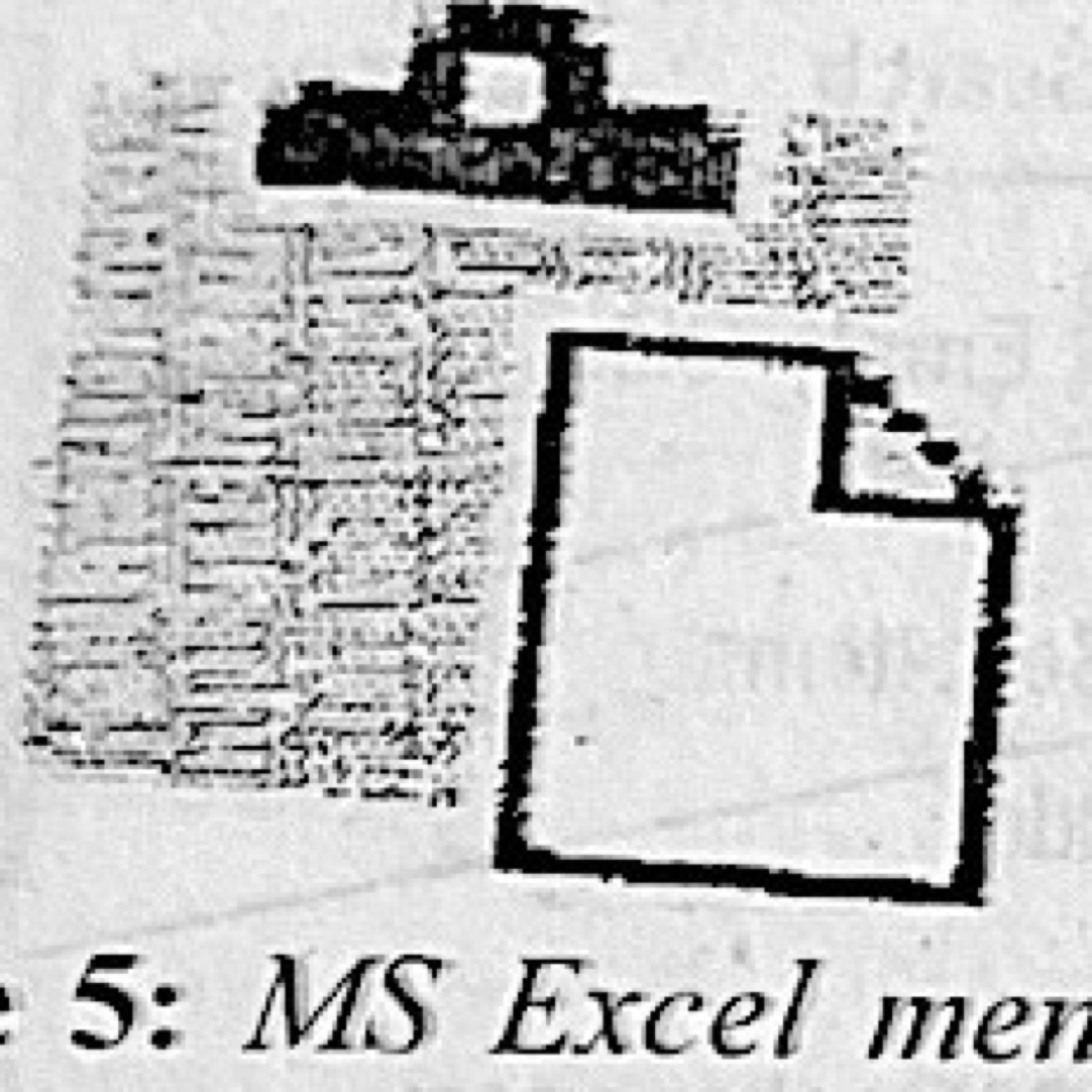
What happens when a user clicks on the Microsoft Excel menu bar icon shown in Figure 5?

Diagram for this question
  1. A.A copy of the selection is put on the clipboard
  2. B.A label that spans multiple columns is created
  3. C.Content on the clipboard is added to the insertion point
  4. D.Selected range of cells is quickly converted to a table with its own style
Show the answer and explanation

Answer: C (Content on the clipboard is added to the insertion point)

Explanation

The clipboard-with-page icon is Paste, which puts the clipboard's content at the selected cell.

Open this question

Question 21

Spreadsheet

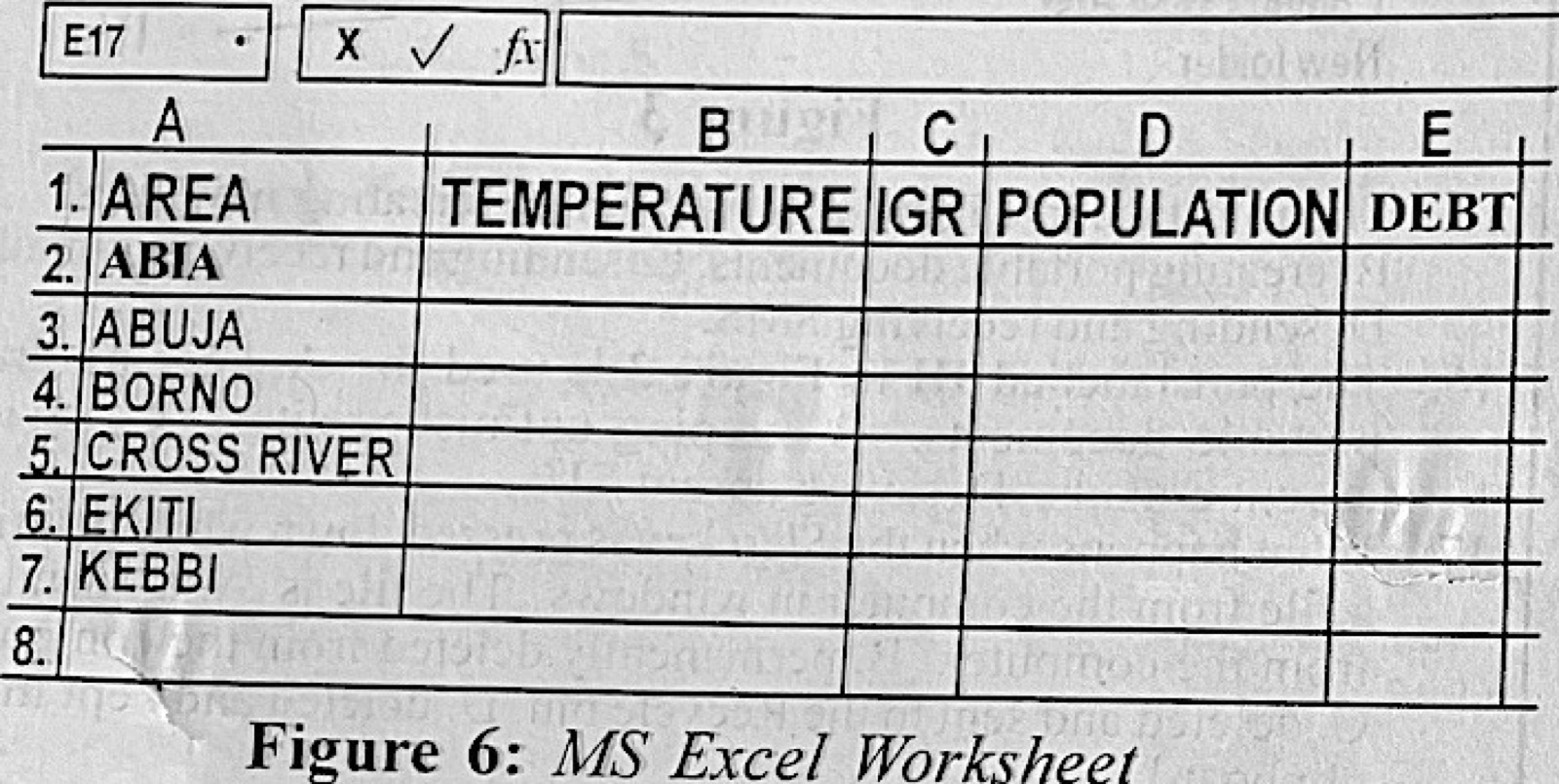
To add a new row above EKITI on the MS Excel interface shown in Figure 6, the user would right-click on

Diagram for this question
  1. A.cell A5 and then click on insert.
  2. B.cell A6 and then click on insert.
  3. C.row 5 and then click on insert.
  4. D.row 6 and then click on insert.
Show the answer and explanation

Answer: D (row 6 and then click on insert.)

Explanation

EKITI is in row 6; inserting at row 6 adds a full new row above it.

Open this question

Question 22

Database Management

Which one of the following points is not considered when designing a database in Microsoft Access? Determine

  1. A.how forms will be used.
  2. B.how tables will be related.
  3. C.the data needed.
  4. D.the purpose of the database.
Show the answer and explanation

Answer: A (how forms will be used.)

Explanation

Design starts with the purpose, the data needed and the table relationships; forms come later.

Open this question

Question 23

Database Management

Tables in Microsoft Access are created using the following methods except

  1. A.Datasheet view.
  2. B.Design view.
  3. C.Table insertion.
  4. D.Table wizard.
Show the answer and explanation

Answer: C (Table insertion.)

Explanation

Tables are made in Datasheet view, Design view or with the Table Wizard; 'table insertion' is not an Access method.

Open this question

Question 24

Presentation Package

The keyboard shortcut for adding a new slide to Microsoft PowerPoint application is

  1. A.Ctrl + H.
  2. B.Ctrl + M.
  3. C.Alt + H.
  4. D.Alt + M.
Show the answer and explanation

Answer: B (Ctrl + M.)

Explanation

Ctrl + M inserts a new slide.

Open this question

Question 27

Computer Maintenance

The erratic movement of the mouse pointer is usually caused by

  1. A.bad connection.
  2. B.dirty mouse ball.
  3. C.driver error.
  4. D.hardware failure.
Show the answer and explanation

Answer: B (dirty mouse ball.)

Explanation

Dirt on the ball and rollers makes the pointer jump.

Open this question

Question 28

Computer Maintenance

The suitable method of removing particles from the keyboard is by

  1. A.cleaning with dripping wet cloth.
  2. B.cleaning with iron brush.
  3. C.using compressed air.
  4. D.using hot air.
Show the answer and explanation

Answer: C (using compressed air.)

Explanation

Compressed air blows out dust without damaging the keys.

Open this question

Question 29

Data Security

Which one of the following statements is true about preventing phishing?

  1. A.Ensure that antivirus is updated regularly
  2. B.Do not click on links in e-mails from unknown sources
  3. C.Do not download from untrusted sites
  4. D.Use a strong password at all times
Show the answer and explanation

Answer: B (Do not click on links in e-mails from unknown sources)

Explanation

Phishing tricks people into clicking fake links, so never click links in e-mails from unknown senders.

Open this question

Question 30

Computer Maintenance

Preventive maintenance measures in the computer room include the following except

  1. A.good ventilation.
  2. B.maintaining dust-free environment.
  3. C.proper illumination.
  4. D.the use of rugs on the floor.
Show the answer and explanation

Answer: D (the use of rugs on the floor.)

Explanation

Rugs collect dust and static, so they are not a good measure.

Open this question

Question 31

Computer Maintenance

When cleaning the computer system, it is advisable to

  1. A.restart the computer first.
  2. B.turn off the computer and disconnect from power source.
  3. C.use antiglare cover to protect the screen.
  4. D.use multimeter tester for earthing.
Show the answer and explanation

Answer: B (turn off the computer and disconnect from power source.)

Explanation

Switch off and unplug before cleaning to avoid shocks and damage.

Open this question

Question 33

Computer Virus

Which one of the following programs is not a type of virus?

  1. A.Boot sector virus
  2. B.Logic bomb
  3. C.Polymorphic virus
  4. D.Trojan horse
Show the answer and explanation

Answer: D (Trojan horse)

Explanation

A Trojan horse is malware but not a virus, because it does not copy itself.

Open this question

Question 34

Computer Virus

The computer virus accesses the user's computer and waits for a trigger during the

  1. A.dormant phase.
  2. B.execution phase.
  3. C.propagation phase.
  4. D.trigger phase.
Show the answer and explanation

Answer: A (dormant phase.)

Explanation

In the dormant phase the virus is present but idle, waiting for its trigger.

Open this question

Question 35

Database Management

The SQL constraint used to ensure the accuracy and consistency of data in a relational database is called

  1. A.default constraint.
  2. B.index constraint.
  3. C.integrity constraint.
  4. D.unique constraint.
Show the answer and explanation

Answer: C (integrity constraint.)

Explanation

Integrity constraints keep data accurate and consistent.

Open this question

Question 36

Database Management

To create a one-to-one relationship in database, it is necessary that

  1. A.both primary and foreign key fields should have multiple key index.
  2. B.both primary and foreign key fields should have unique key index.
  3. C.only the foreign key field should have a unique index.
  4. D.only the primary key field should have a unique index.
Show the answer and explanation

Answer: B (both primary and foreign key fields should have unique key index.)

Explanation

In a one-to-one link each value can appear only once on both sides, so both keys must be unique.

Open this question

Question 37

File Organisation

An advantage of manual file over computer file is that

  1. A.it is more efficient.
  2. B.it requires less storage space.
  3. C.risk of corrupted data is much less.
  4. D.speed of processing is high.
Show the answer and explanation

Answer: C (risk of corrupted data is much less.)

Explanation

Paper files cannot be corrupted by viruses or disk errors.

Open this question

Question 38

Computer Virus

A user observed that a certain file in a removable storage device changed to a shortcut icon. This implies that

  1. A.the file is corrupt.
  2. B.the file is shared.
  3. C.the removable storage device is corrupt.
  4. D.there is a link to the file.
Show the answer and explanation

Answer: D (there is a link to the file.)

Explanation

A shortcut icon is a link pointing to a file stored elsewhere.

Open this question

Question 39

Data Security

The objectives to consider while designing a secure database application include the following except

  1. A.simplicity.
  2. B.secrecy.
  3. C.integrity.
  4. D.availability.
Show the answer and explanation

Answer: A (simplicity.)

Explanation

The security objectives are secrecy (confidentiality), integrity and availability.

Open this question

Question 40

Distributed and Parallel Databases

Which one of the following features is not an advantage of distributed database?

  1. A.Better response
  2. B.Lower communication cost
  3. C.Improved reliability
  4. D.Need for complex software
Show the answer and explanation

Answer: D (Need for complex software)

Explanation

Needing complex software is a disadvantage of distributed databases.

Open this question

Theory question 101

Information Processing

Paper 2, Section A: Short-structured questions
(a) Explain the following terms: (i) data processing; (ii) data collation. (b) Describe Data Processing Cycle. (c) State four benefits of the computer as a tool for processing data.

Show the model answer
Model answer

(a)(i) Data processing is carrying out operations on raw data (sorting, calculating, summarising) to turn it into useful information.
(ii) Data collation is gathering data from different sources and putting it together in an organised form ready for processing.
(b) The data processing cycle is the repeated series of stages that turn data into information: input (collect and enter data) → processing (sort, calculate, analyse) → output (present the information) → storage (save data/information for later), with feedback from the output used to correct or improve the next input.
(c) Any four: speed; accuracy; large storage; automation; reliability; versatility; easy retrieval and sharing; high productivity.

Explanation

Name the stages in order: input, processing, output, storage.

Open this question

Theory question 102

Computer Hardware

Paper 2, Section A: Short-structured questions
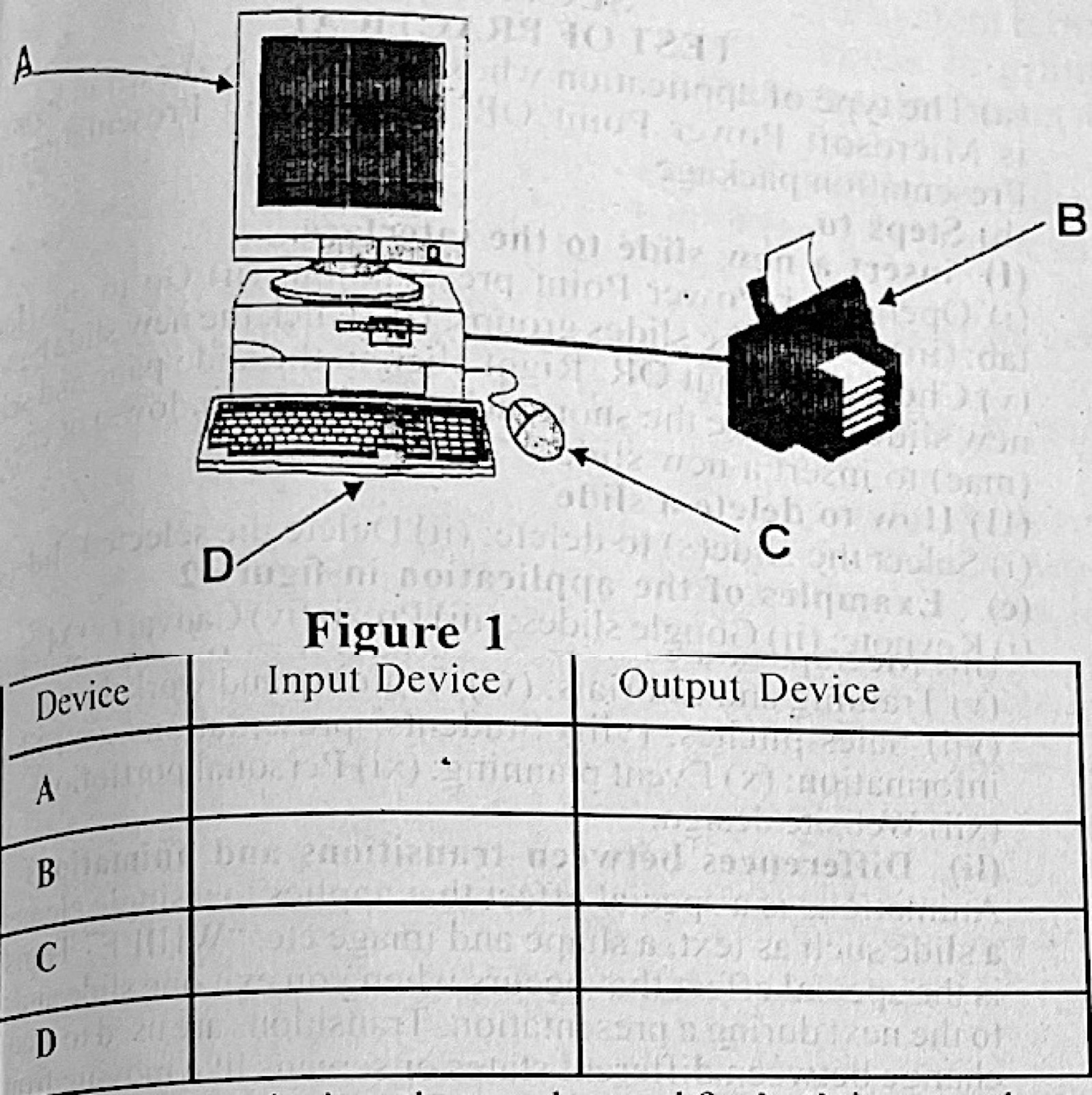
Figure 1 is a setup of computer system. Use the setup to answer questions 2(a) to 2(c). (a) Identify the part labelled: (i) A; (ii) B; (iii) C; (iv) D. (b) For each device in the setup, tick (√) the box to show if it is an input device or an output device. (c) Name two devices that can be used for both input and output operations.

Diagram for this question
Show the model answer
Model answer

(a)(i) A – monitor. (ii) B – printer. (iii) C – mouse. (iv) D – keyboard.
(b) A (monitor) – output; B (printer) – output; C (mouse) – input; D (keyboard) – input.
(c) Any two: touch screen; modem; headset with microphone; multifunction printer (print and scan); network card; flash drive/disk drive (storage read and write).

Explanation

A device for both must take data in and send data out, e.g. a touch screen.

Open this question

Theory question 103

Information Transmission

Paper 2, Section A: Short-structured questions
(a) With the aid of well-labelled diagram, explain the following modes of information transmission: (i) simplex; (ii) half duplex; (iii) full duplex. (b) State one example of: (i) simplex; (ii) half duplex; (iii) full duplex, mode of information transmission. (c) Name one component of a data communication system.

Show the model answer
Model answer

(a)(i) Simplex – data flows in one direction only, from sender to receiver (Sender → Receiver).
(ii) Half duplex – data can flow both ways, but only one way at a time (Sender ⇄ Receiver, taking turns).
(iii) Full duplex – data flows both ways at the same time (two arrows in opposite directions at once).
(b)(i) Radio or TV broadcast (or keyboard to computer). (ii) Walkie-talkie. (iii) Telephone/mobile phone call.
(c) Any one: sender (source); receiver; transmission medium; message; protocol.

Explanation

Draw sender and receiver boxes with arrows for each mode.

Open this question

Theory question 104

Internet

Paper 2, Section A: Short-structured questions
(a) Differentiate between hackers and spammers. (b) State one importance of add-in in MS Excel. (c) Explain the following terms in computing: (i) cookies; (ii) plugin; (iii) web crawlers.

Show the model answer
Model answer

(a) A hacker breaks into computer systems or networks without permission, while a spammer sends large numbers of unwanted messages (spam) to many people.
(b) An add-in adds extra commands or features to Excel (e.g. Analysis ToolPak, Solver) for special tasks.
(c)(i) Cookies are small files a website stores on the user's computer to remember information such as login and preferences.
(ii) A plugin is a small program added to a larger application (e.g. a browser) to give it a new feature, such as playing video.
(iii) Web crawlers (spiders) are programs used by search engines to visit web pages automatically and index them.

Explanation

Hackers break in; spammers flood inboxes.

Open this question

Theory question 105

Presentation Package

Paper 2, Section B: Test of Practical Work
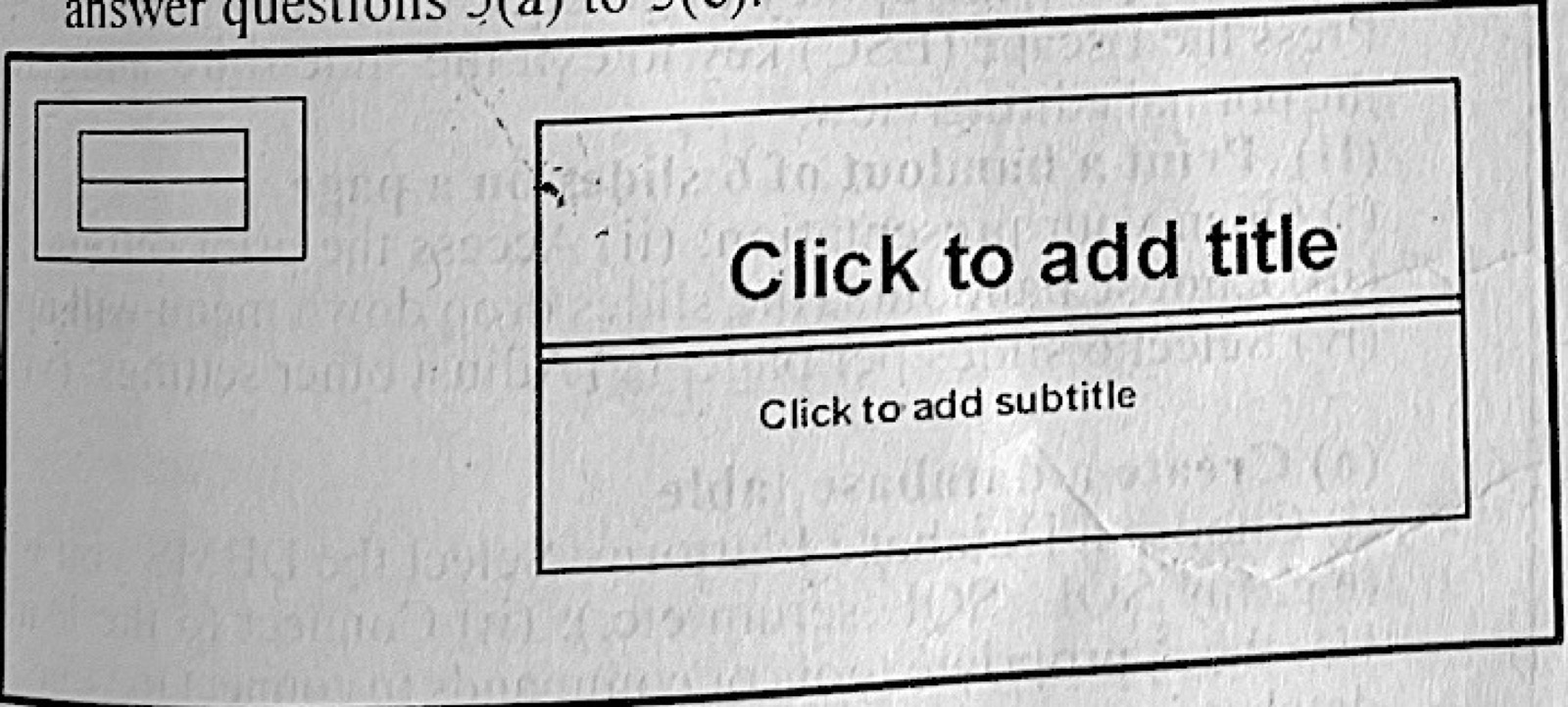
Figure 2 is an interface of an application software. Use it to answer questions 5(a) to 5(e). (a) Identify the type of application whose interface is shown in Figure 2. (b) Outline the steps to: (i) insert a new slide to the interface; (ii) delete a slide from the interface. (c) State two examples of the application in Figure 2. (d) Give two: (i) uses of the application in Figure 2; (ii) differences between transitions and animations in the application shown in Figure 2. (c) Highlight the steps to: (i) run slideshow in the application shown in Figure 2: (ii) print a handout of 6 slides on a page of the application shown in Figure 2.

Diagram for this question
Show the model answer
Model answer

(a) A presentation package (Microsoft PowerPoint).
(b)(i) Click Home → New Slide (or press Ctrl + M), choose a layout.
(ii) Select the slide in the slide pane → press Delete (or right-click → Delete Slide).
(c) Any two: Microsoft PowerPoint; Google Slides; Apple Keynote; LibreOffice Impress; Prezi.
(d)(i) Any two: preparing lessons and lectures; business presentations; seminars and workshops; adverts and product launches; school projects.
(ii) Transitions are effects when moving from one slide to the next; animations are effects on objects (text, pictures) within a slide. Transitions apply to whole slides; animations apply to individual items.
(last part)(i) Click Slide Show → From Beginning (or press F5).
(ii) Click File → Print; under Settings choose Handouts → 6 Slides Horizontal/Vertical; click Print.

Explanation

Transitions are between slides; animations are on objects within a slide.

Open this question

Theory question 106

Word Processing

Paper 2, Section B: Test of Practical Work
You are provided with a list of existing contacts in a database. Describe in detail. the step-by-step approach to: (a) create: (b) preview and complete. a mail merge using a template in MS Word.

Show the model answer
Model answer

(a) Open MS Word and choose a template (File → New → letter template, or open the letter); click Mailings → Start Mail Merge → Letters; click Select Recipients → Use an Existing List; browse to the contacts database, choose the table and click OK; place the cursor where each detail should go and click Insert Merge Field (e.g. Title, First Name, Address), or use Address Block and Greeting Line.
(b) Click Preview Results and use the arrows to check each letter; correct any problem; click Finish & Merge → Edit Individual Documents (to create all letters) or Print Documents / Send E-mail Messages; click OK.

Explanation

The Mailings tab holds every mail-merge step in order.
Open this question