Two computers, X and Y are such that the processor in X has a word size of 32 bits while that of Y is 16 bits. Which of the following statements is true?
A.X can process half as much data as Y at the same time.
B.X can process the same amount of data as Y at the same time.
C.X can process two times as much data as Y at the same time.
D.X can process four times as much data as Y at the same time.
Show the answer and explanation
Answer: C (X can process two times as much data as Y at the same time.)
Explanation
Word size is how many bits a processor handles at once; 32 bits is twice 16 bits.
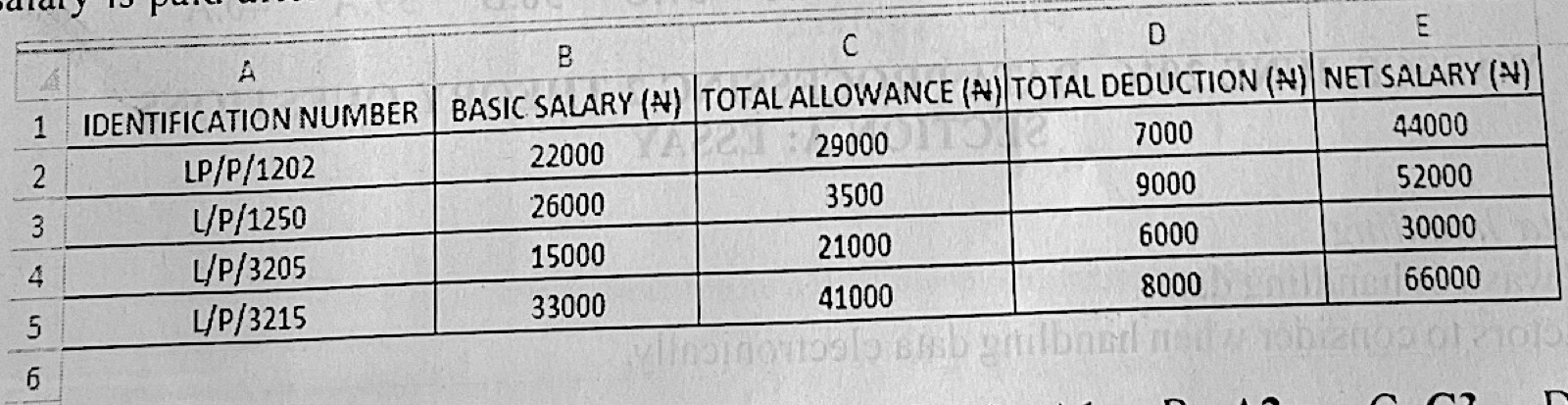
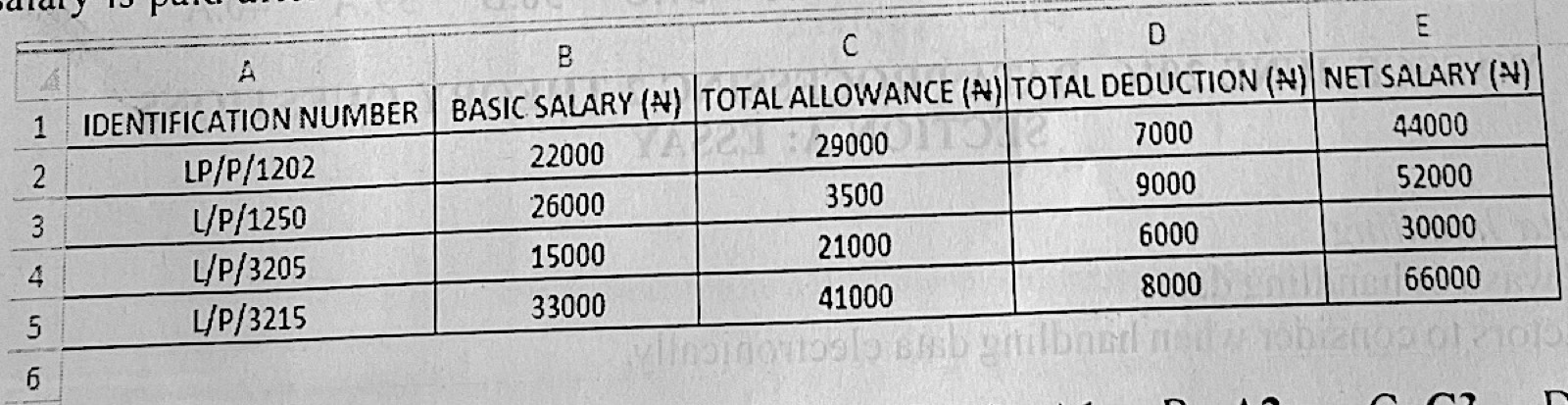
The MS Excel worksheet below shows the salary distribution for four staff of a company. The net salary is paid after deductions have been made. Which of the following cells contain numeric data?
A.A1
B.A2
C.C3
D.E1
Show the answer and explanation
Answer: C (C3)
Explanation
C3 holds 3500, a number; A1 and E1 hold headings and A2 holds the code LP/P/1202, which is text.
The MS Excel worksheet below shows the salary distribution for four staff of a company. The net salary is paid after deductions have been made. Which of the following formulas would be used to obtain the value in cell E2?
Paper 2, Section A: Essay (a) Describe data handling. (b) Explain two ways of handling data. (c) State four factors to consider when handling data electronically.
Show the model answer
Model answer
(a) Data handling is the process of collecting, recording, storing, processing and presenting data (and later archiving or disposing of it) in a secure way that keeps it accurate. (b) Electronic method – using computers and electronic storage (hard disks, flash drives, CDs) to capture, store, process and share data. Manual (non-electronic) method – using paper files, registers, notebooks and filing cabinets to record and keep data by hand. (c) Any four: security of data (passwords, encryption); accuracy/validation of data; integrity of data; regular backup; type and volume of data; type of storage medium; access control; virus protection; power supply; regular updating.
Explanation
Name each method and say what it uses; give short, distinct factors.
Paper 2, Section A: Essay (a) Define Information Processing. (b) State four steps involved in information processing. (c) Mention three advantages of using computers for information processing. (d) Highlight three disadvantages of using computers for information processing.
Show the model answer
Model answer
(a) Information processing is the acquiring, organising, analysing, storing, retrieving and presenting of information, usually by computer. (b) Any four: collection (gathering) of information; collation/organisation; analysis; interpretation; storage; retrieval; dissemination (presentation). (c) Any three: high speed; accuracy; large storage; easy retrieval; reliability; automation; easy sharing of information. (d) Any three: high cost of buying and maintaining computers; job losses; need for trained staff; risk of viruses and hacking; power dependence; health problems such as eye strain.
Explanation
Use one clear word or phrase for each step or point.
(a) (i) With the aid of a simple diagram, explain information transmission. (ii) Give one example of information transmission. (b) Give one example of each of the following: (i) single user, single tasking operating system; (ii) single user, multitasking operating system; (iii) multi user operating system. (c) List four features of a Graphical User Interface.
Show the model answer
Model answer
(a)(i) Information transmission is sending information from a sender (source) through a channel (medium) to a receiver. Diagram: SENDER → (encoder) → CHANNEL/MEDIUM → (decoder) → RECEIVER, with feedback from receiver to sender. (ii) Any one: telephone call; e-mail; radio/television broadcast; SMS; fax; town crier or drum message. (b)(i) MS-DOS (or Palm OS). (ii) Windows (e.g. Windows 7/10) or Mac OS. (iii) UNIX, Linux or Windows Server. (c) Any four: windows; icons; menus; pointer (mouse); buttons; dialogue boxes; toolbars; scroll bars.
Explanation
Draw a labelled block diagram: sender, medium, receiver.
(a) Mention four qualities of a good computer professional. (b) List four computer professional bodies in Nigeria. (c) Write the full meaning of the following: (i) WiFi (ii) GUI
Show the model answer
Model answer
(a) Any four: honesty/integrity; good knowledge and skill; keeping up with new technology; confidentiality; good communication; hard work and dedication; respect for copyright and the law; good problem-solving ability. (b) Any four: Computer Professionals (Registration Council) of Nigeria (CPN); Nigeria Computer Society (NCS); Information Technology Industry Association of Nigeria (ITAN); Nigeria Internet Group (NIG); Institute of Software Practitioners of Nigeria (ISPON); Nigerian Women in Information Technology (NIWIIT); Association of Telecommunication Companies of Nigeria (ATCON). (c)(i) WiFi – Wireless Fidelity. (ii) GUI – Graphical User Interface.
Explanation
Write full names of the bodies, with abbreviations.
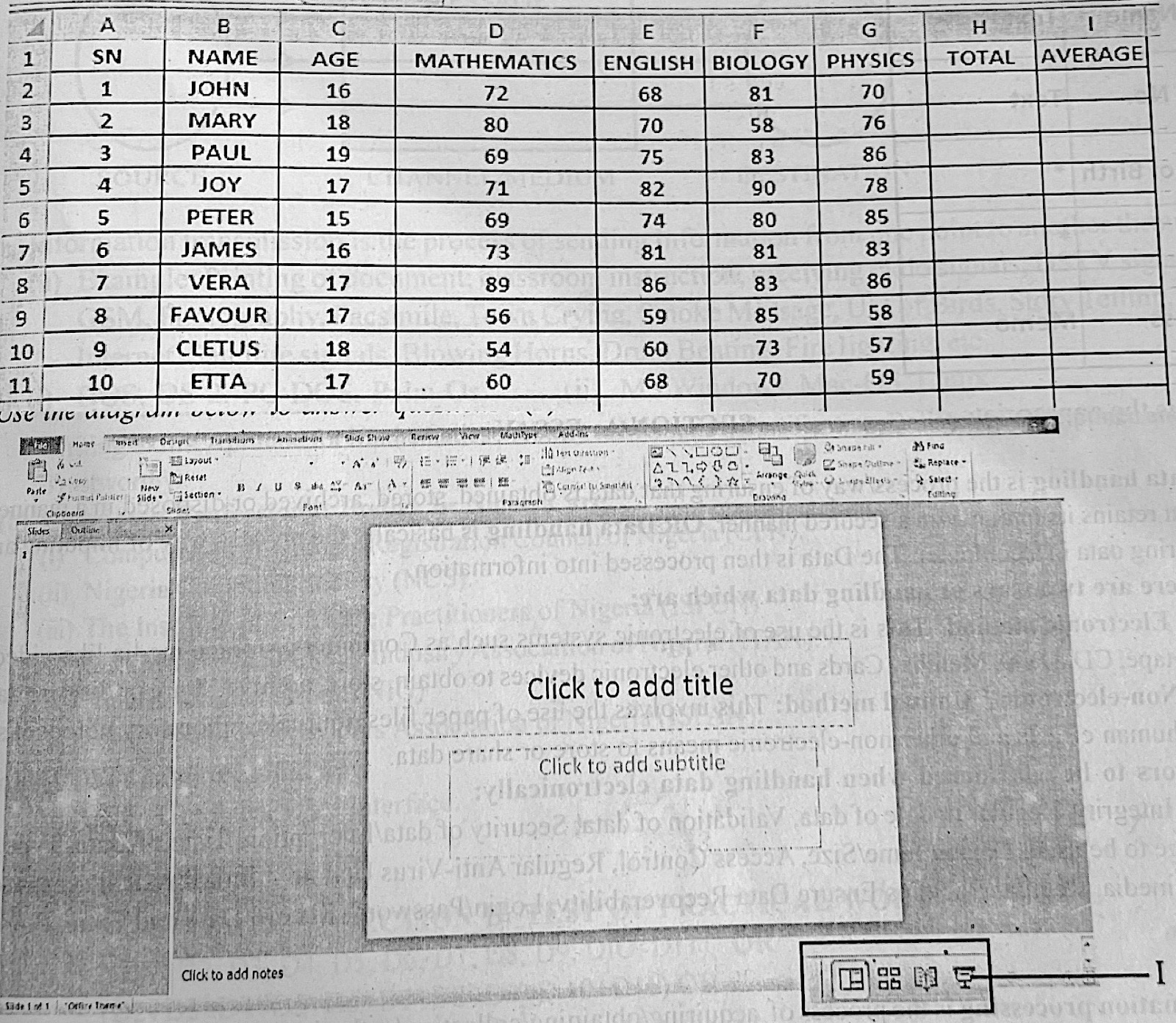
Paper 2, Section B (a) Use the information in the spreadsheet below to answer questions 5(a) i - v (i) Write the formula to calculate the total score in Mathematics. (ii) Write two spreadsheet formulas to calculate Paul's average score in the four subjects. (iii) What spreadsheet function can be used to determine the highest score in English? (iv) Outline the procedure for calculating Vera's total score in all the subjects and give the result in cell H8. (v) If the minimum pass mark is an average score of 60, write a formula to determine if Etta passed or failed. (b) Use the diagram below to answer questions 5(b) i - vii (the diagram is shown on the second picture) (i) What is the name of the application shown in the diagram? (ii) State one use of the application mentioned in 5 (b) (i) (iii) Outline the procedure to launch the application from its short cut on the desktop. (iv) After launching the application, what is the name of the slide that appears by default? (v) Identify the part labelled I. (vi) Write the keyboard shortcut that would also perform the function of the part labelled I. (vii) Mention three functions that can be performed by the insert button.
Show the model answer
Model answer
(a)(i) =SUM(D2:D11) (ii) =AVERAGE(D4:G4) and =SUM(D4:G4)/4 (or =(D4+E4+F4+G4)/4) (iii) The MAX function: =MAX(E2:E11) (iv) Click cell H8; type =SUM(D8:G8) (or select D8:G8 and click AutoSum); press Enter. Result: 89 + 86 + 83 + 86 = 344. (v) =IF(AVERAGE(D11:G11)>=60,"PASSED","FAILED") (or =IF(I11>=60,"PASSED","FAILED") if I11 holds her average). Etta's average is (60 + 68 + 70 + 59)/4 = 64.25, so she passed. (b)(i) Microsoft PowerPoint. (ii) Creating and showing slide presentations (e.g. for lessons, seminars, adverts). (iii) Double-click the PowerPoint shortcut icon on the desktop (or right-click it and choose Open). (iv) Title Slide. (v) Slide Show (view) button. (vi) Shift + F5 (starts the show from the current slide); F5 starts from the beginning. (vii) Any three: insert pictures/clip art; insert shapes; insert tables; insert charts or SmartArt; insert text box or WordArt; insert sound or video; insert header and footer.
Explanation
Use the cell references shown in the sheet; Paul is in row 4, Vera in row 8 and Etta in row 11.
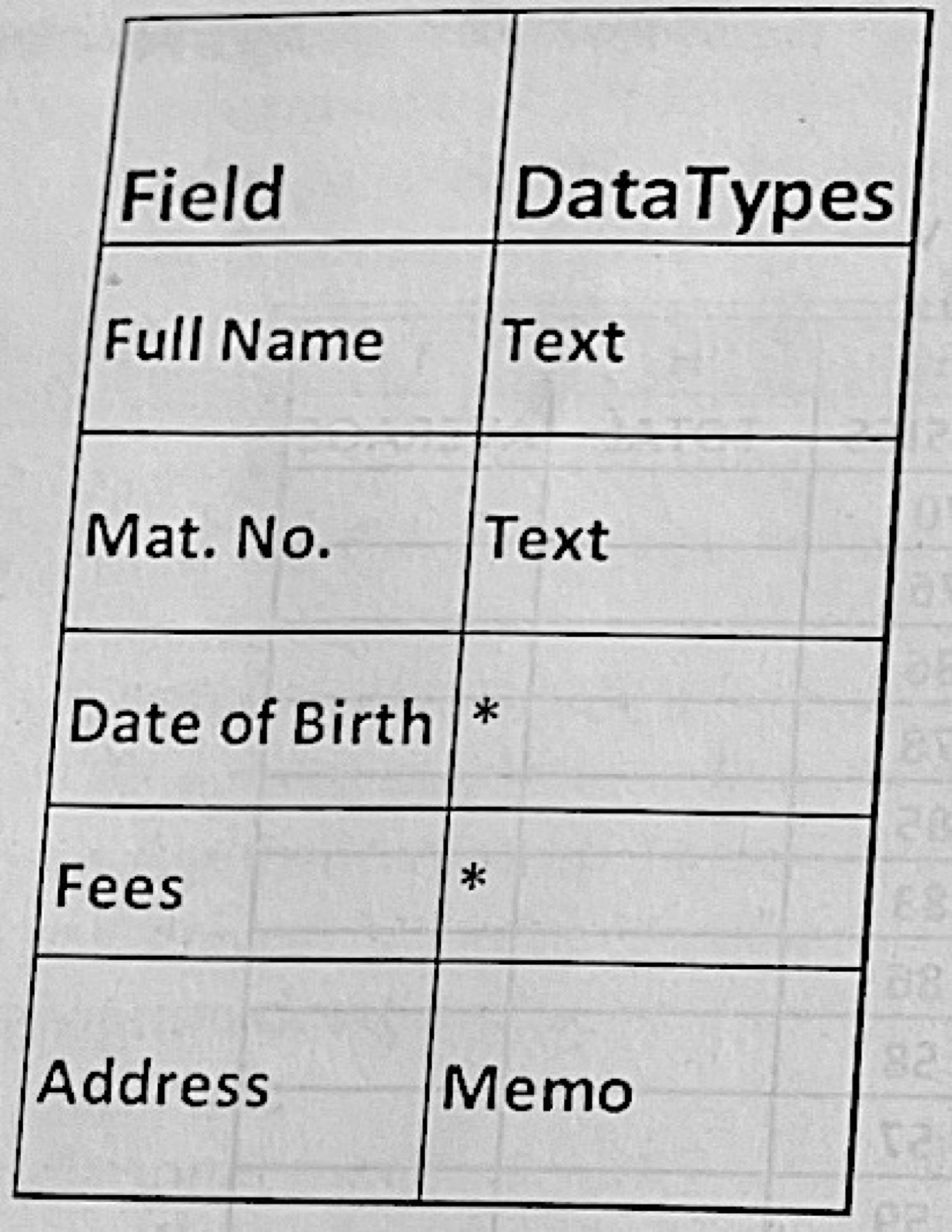
Paper 2, Section B (a) Folders are used for storing files in the computer. List the steps for carrying out the following operations: (i) creating a folder on the desktop; (ii) giving name to the folder; (iii) sending a file from "My Documents" folder into the folder created in 6 (a) (i); (iv) Changing the name of the folder in 6 (a) (ii) to "RESULTS". (b) The table below shows selected fields and DataTypes in MS Access. Use it to answer questions 6 (b) (i) and 6 (b) (ii) (i) What is the appropriate data type for: I. Date of Birth Field; II. Fees Field? (ii) If MS Access is running, describe the procedure to: I. create a table with the fields as given above using design view; II. set the Mat. No Field as the primary key; III. set the Full Name Field to a maximum of 50 characters
Show the model answer
Model answer
(a)(i) Right-click an empty part of the desktop → New → Folder. (ii) Type the name while 'New folder' is highlighted and press Enter. (iii) Open My Documents; right-click the file → Cut (or Copy); open the new folder on the desktop; right-click → Paste (or drag the file onto the folder). (iv) Right-click the folder → Rename; type RESULTS; press Enter (or select it and press F2). (b)(i) I. Date of Birth – Date/Time. II. Fees – Currency. (ii) I. Click Create → Table Design; type Full Name, Mat. No., Date of Birth, Fees and Address in the Field Name column and choose Text, Text, Date/Time, Currency and Memo in the Data Type column; save the table with a name. II. Click the Mat. No. row → click Primary Key on the Design toolbar (a key symbol appears). III. Click the Full Name row → in Field Properties set Field Size to 50 → save.
Explanation
Give steps in order with the exact menu or button names.