Theory question 105
SpreadsheetPaper 2, Section B
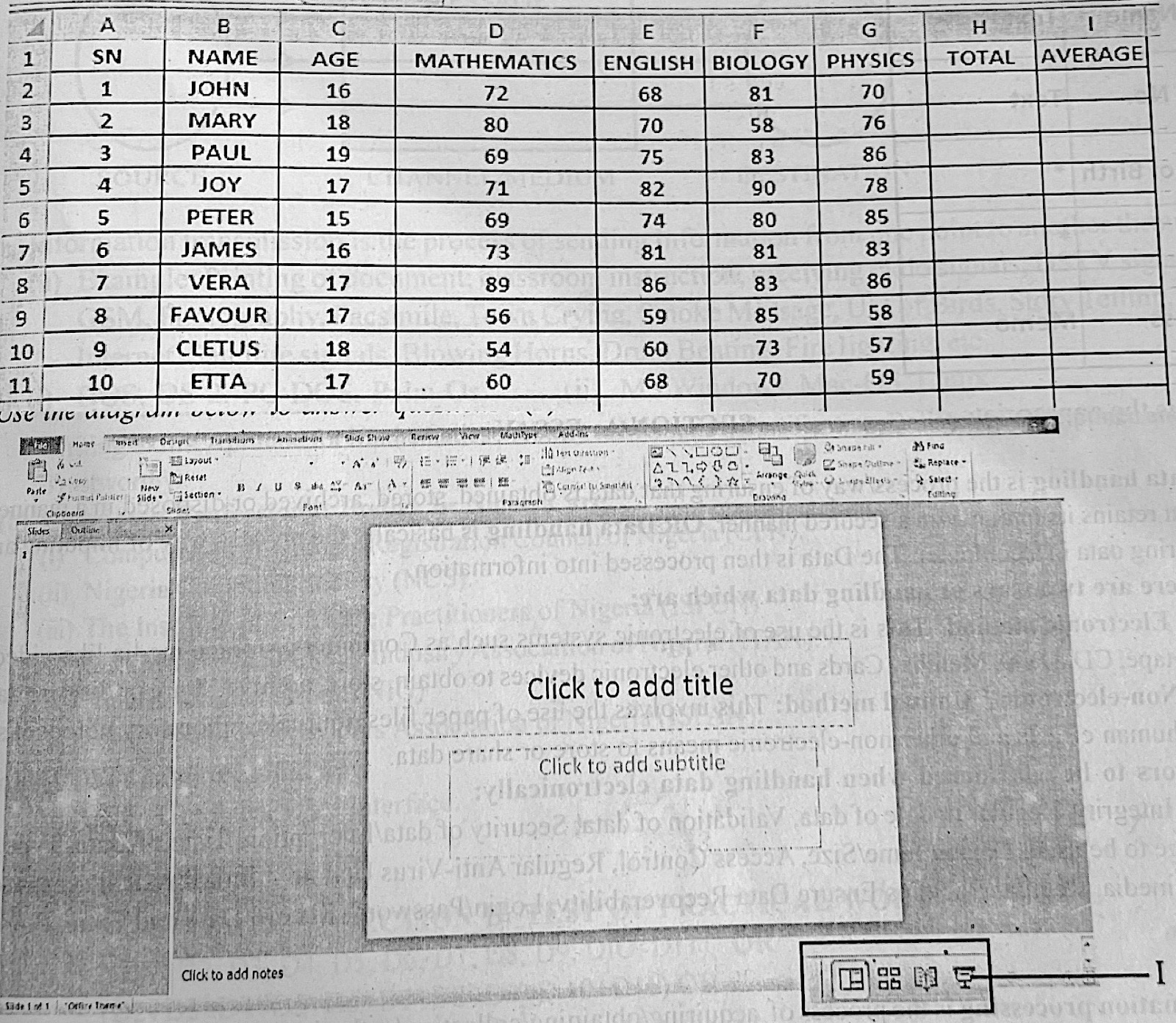
(a) Use the information in the spreadsheet below to answer questions 5(a) i - v
(i) Write the formula to calculate the total score in Mathematics.
(ii) Write two spreadsheet formulas to calculate Paul's average score in the four subjects.
(iii) What spreadsheet function can be used to determine the highest score in English?
(iv) Outline the procedure for calculating Vera's total score in all the subjects and give the result in cell H8.
(v) If the minimum pass mark is an average score of 60, write a formula to determine if Etta passed or failed.
(b) Use the diagram below to answer questions 5(b) i - vii (the diagram is shown on the second picture)
(i) What is the name of the application shown in the diagram?
(ii) State one use of the application mentioned in 5 (b) (i)
(iii) Outline the procedure to launch the application from its short cut on the desktop.
(iv) After launching the application, what is the name of the slide that appears by default?
(v) Identify the part labelled I.
(vi) Write the keyboard shortcut that would also perform the function of the part labelled I.
(vii) Mention three functions that can be performed by the insert button.
Show the model answer
(a)(i) =SUM(D2:D11)
(ii) =AVERAGE(D4:G4) and =SUM(D4:G4)/4 (or =(D4+E4+F4+G4)/4)
(iii) The MAX function: =MAX(E2:E11)
(iv) Click cell H8; type =SUM(D8:G8) (or select D8:G8 and click AutoSum); press Enter. Result: 89 + 86 + 83 + 86 = 344.
(v) =IF(AVERAGE(D11:G11)>=60,"PASSED","FAILED") (or =IF(I11>=60,"PASSED","FAILED") if I11 holds her average). Etta's average is (60 + 68 + 70 + 59)/4 = 64.25, so she passed.
(b)(i) Microsoft PowerPoint.
(ii) Creating and showing slide presentations (e.g. for lessons, seminars, adverts).
(iii) Double-click the PowerPoint shortcut icon on the desktop (or right-click it and choose Open).
(iv) Title Slide.
(v) Slide Show (view) button.
(vi) Shift + F5 (starts the show from the current slide); F5 starts from the beginning.
(vii) Any three: insert pictures/clip art; insert shapes; insert tables; insert charts or SmartArt; insert text box or WordArt; insert sound or video; insert header and footer.
Use the cell references shown in the sheet; Paul is in row 4, Vera in row 8 and Etta in row 11.