Theory question 106
Software and Operating SystemsPaper 2, Section B
(a) Folders are used for storing files in the computer. List the steps for carrying out the following operations: (i) creating a folder on the desktop; (ii) giving name to the folder; (iii) sending a file from "My Documents" folder into the folder created in 6 (a) (i); (iv) Changing the name of the folder in 6 (a) (ii) to "RESULTS".
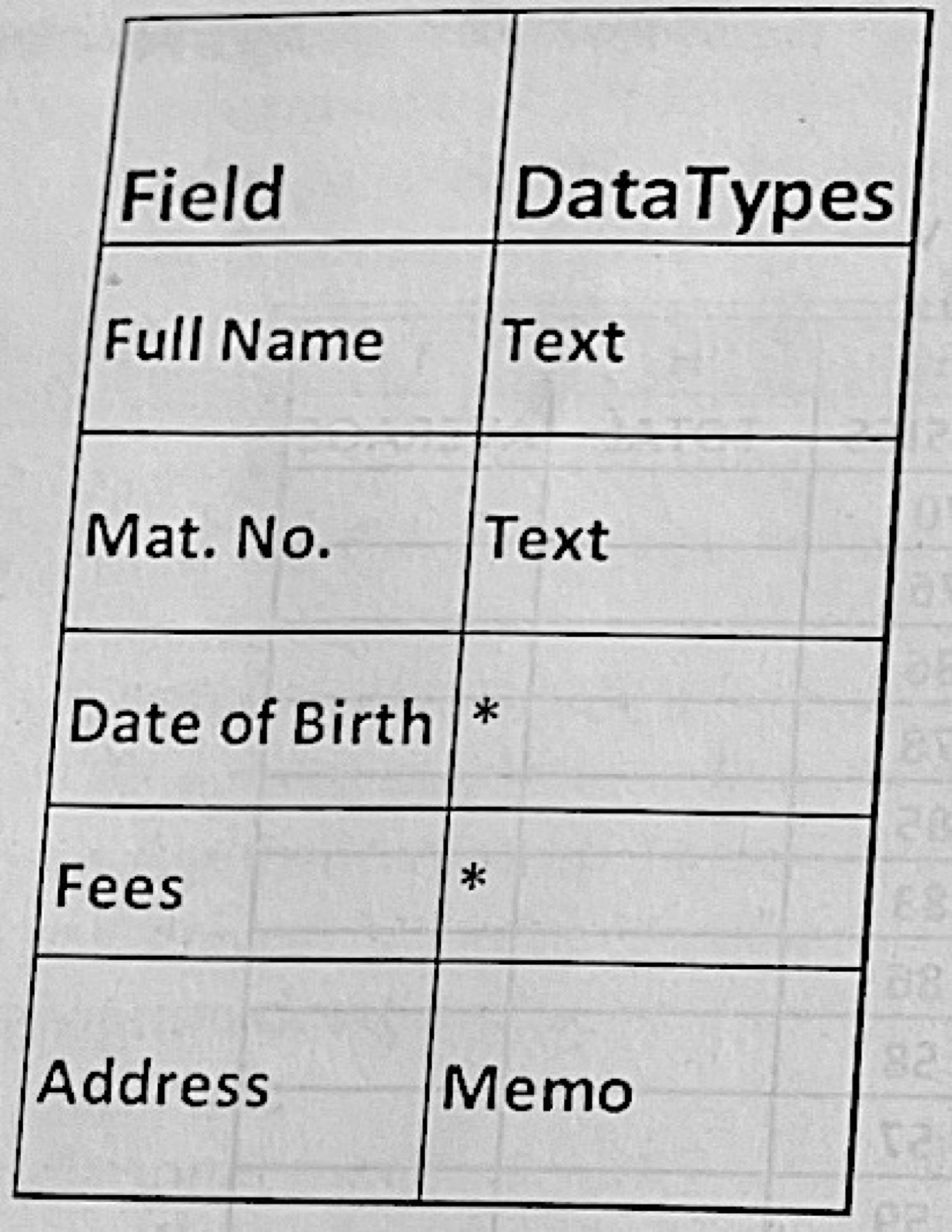
(b) The table below shows selected fields and DataTypes in MS Access. Use it to answer questions 6 (b) (i) and 6 (b) (ii)
(i) What is the appropriate data type for: I. Date of Birth Field; II. Fees Field?
(ii) If MS Access is running, describe the procedure to: I. create a table with the fields as given above using design view; II. set the Mat. No Field as the primary key; III. set the Full Name Field to a maximum of 50 characters
Show the model answer
(a)(i) Right-click an empty part of the desktop → New → Folder.
(ii) Type the name while 'New folder' is highlighted and press Enter.
(iii) Open My Documents; right-click the file → Cut (or Copy); open the new folder on the desktop; right-click → Paste (or drag the file onto the folder).
(iv) Right-click the folder → Rename; type RESULTS; press Enter (or select it and press F2).
(b)(i) I. Date of Birth – Date/Time. II. Fees – Currency.
(ii) I. Click Create → Table Design; type Full Name, Mat. No., Date of Birth, Fees and Address in the Field Name column and choose Text, Text, Date/Time, Currency and Memo in the Data Type column; save the table with a name.
II. Click the Mat. No. row → click Primary Key on the Design toolbar (a key symbol appears).
III. Click the Full Name row → in Field Properties set Field Size to 50 → save.
Give steps in order with the exact menu or button names.