WAEC Data Processing 2024 past questions and answers

40 questions. Try each one, then open the answer to check yourself and read the explanation.

Question 1

History of Computers

The Stepped Reckoner was developed by.

  1. A.Gottfied Leibnitz.
  2. B.Herman Hollerith.
  3. C.John Von Neumann.
  4. D.William Schickard.
Show the answer and explanation

Answer: A (Gottfied Leibnitz.)

Explanation

Gottfried Leibniz built the Stepped Reckoner, a mechanical calculator, in the 1670s.

Open this question

Question 2

Number Systems

The binary number 1001012 can be written in denary as

  1. A.25.
  2. B.37.
  3. C.45.
  4. D.211.
Show the answer and explanation

Answer: B (37.)

Explanation

100101₂ = 32 + 4 + 1 = 37.

Open this question

Question 3

Information Processing

The first stage in computer data processing procedure is

  1. A.collection of data.
  2. B.communication of information.
  3. C.conversion of data
  4. D.manipulation of data
Show the answer and explanation

Answer: A (collection of data.)

Explanation

Data must be collected before it can be processed.

Open this question

Question 4

Information Processing

One advantage of electronic data processing is that it

  1. A.involves special skill.
  2. B.deals only with simple data.
  3. C.is completely error-free.
  4. D.handles complex data.
Show the answer and explanation

Answer: D (handles complex data.)

Explanation

Computers can handle large and complex data quickly.

Open this question

Question 5

Classification of Computers

The type of computer that has the ability of counting in discrete form is referred to as.

  1. A.analogue computer.
  2. B.digital computer.
  3. C.hybrid computer.
  4. D.versatile computer
Show the answer and explanation

Answer: B (digital computer.)

Explanation

Digital computers count in discrete steps (digits).

Open this question

Question 6

ICT in Society

One reason for using Computer Aided Design in manufacturing is that.

  1. A.it uses few system resources.
  2. B.manufacturing time is reduced.
  3. C.designers do not need training to use it.
  4. D.3D designs are easily produced with it.
Show the answer and explanation

Answer: B (manufacturing time is reduced.)

Explanation

CAD speeds up designing and changing products, so they reach production faster.

Open this question

Question 7

Internet

Which one of the following statements is true about Voice Over IP? It.

  1. A.converts voice and video data into a digital signal and transfers it over the Internet.
  2. B.converts voice and video data into a digital signal and broadcasts it via a transmitter.
  3. C.is a voice over communication system which is cyber-attack proof.
  4. D.is a circuit-switched data communication system.
Show the answer and explanation

Answer: A (converts voice and video data into a digital signal and transfers it over the Internet.)

Explanation

VoIP turns voice into digital packets and sends them over the internet.

Open this question

Question 8

Computer Hardware

Which one of the following sets of devices can be used to store data during processing?

  1. A.Cache, RAM and Register
  2. B.Cache, Register and ROM.
  3. C.Flash Drive, ROM and Hard Disk Drive.
  4. D.RAM, Register and Zip Drive.
Show the answer and explanation

Answer: A (Cache, RAM and Register)

Explanation

Registers, cache and RAM hold data while the CPU is working on it.

Open this question

Question 9

Information Processing

The process of inspecting, transforming and modeling data to get useful information is known as

  1. A.collation.
  2. B.interpretation.
  3. C.execution.
  4. D.analysis.
Show the answer and explanation

Answer: D (analysis.)

Explanation

Data analysis inspects and transforms data to find useful information.

Open this question

Question 10

Information Processing

One disadvantage of using computer for information processing is.

  1. A.need for staff retraining.
  2. B.increased running cost in the long run.
  3. C.the increase in storage space.
  4. D.redundancy of computers in the long run
Show the answer and explanation

Answer: A (need for staff retraining.)

Explanation

Staff must be retrained to use computers, which costs time and money.

Open this question

Question 11

Information Transmission

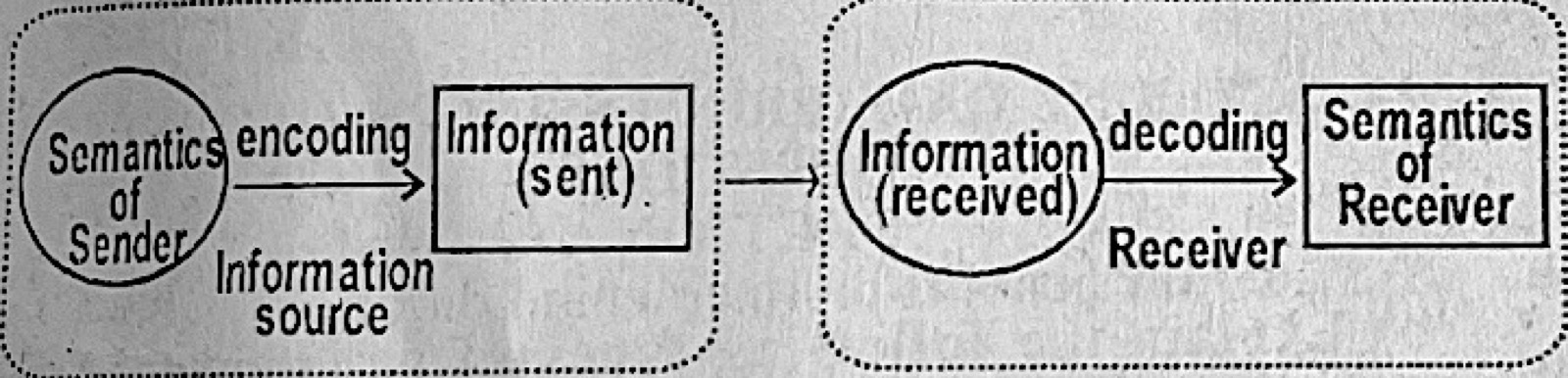
The diagram in figure 1 illustrates a process called

Diagram for this question
  1. A.Information processing.
  2. B.information transmission.
  3. C.modulation.
  4. D.synchronization.
Show the answer and explanation

Answer: B (information transmission.)

Explanation

Figure 1 shows a sender encoding information, sending it, and a receiver decoding it: information transmission.

Open this question

Question 12

Information Transmission

The transmitter in communication is the component that

  1. A.decodes sender's signal by interpretation.
  2. B.encodes interpreted data by using machine language.
  3. C.broadcasts synchronous signals.
  4. D.launches signal into air.
Show the answer and explanation

Answer: D (launches signal into air.)

Explanation

A transmitter sends the signal out over the medium (e.g. radio waves into the air); decoding is done by the receiver.

Open this question

Question 13

Computer Networks

Which of the following resources is not usually shared in a network?

  1. A.VGA projector.
  2. B.Laserjet printer.
  3. C.Folder.
  4. D.File
Show the answer and explanation

Answer: A (VGA projector.)

Explanation

Printers, folders and files are shared over networks; a VGA projector is plugged into one computer.

Open this question

Question 14

Data Security

Factors to be considered when creating a backup system in a computer network include

  1. A.amount of RAM, amount of data and time of backup.
  2. B.amount of RAM, type of data and frequency of backup.
  3. C.media to use, amount of data and frequency of backup.
  4. D.media to use, type of data and time of backup.
Show the answer and explanation

Answer: C (media to use, amount of data and frequency of backup.)

Explanation

A backup plan depends on the storage media, how much data there is and how often to back up; RAM is irrelevant.

Open this question

Question 15

Internet

The URL www. exams.edu.ng represents the website of

  1. A.an examination body.
  2. B.a Nigerian-based learning institution.
  3. C.an educational institution in Niger.
  4. D.a research institution in Niger.
Show the answer and explanation

Answer: B (a Nigerian-based learning institution.)

Explanation

.edu means an educational institution and .ng means Nigeria.

Open this question

Question 16

Internet

The Post Office Protocol (POP) is used to

  1. A.interconnect devices on the Internet.
  2. B.retrieve email from a mail server.
  3. C.transfer file from a server to a client.
  4. D.send email from one user to another.
Show the answer and explanation

Answer: B (retrieve email from a mail server.)

Explanation

POP is used by e-mail programs to download (retrieve) mail from the mail server.

Open this question

Question 18

Word Processing

Header and Footer are added to a document in MS Word by just clicking on the.

  1. A.Edit menu.
  2. B.Format menu
  3. C.Insert menu
  4. D.View menu
Show the answer and explanation

Answer: C (Insert menu)

Explanation

Header and Footer are on the Insert menu/tab.

Open this question

Question 19

Word Processing

A typist positioned the insertion point at the beginning of a line of text in a word processor and then pressed down the Shift key and clicked at the opposite end of the text. What would be the result of this action? The text will be.

  1. A.copied into the clipboard
  2. B.cut into the clipboard.
  3. C.deleted from the storage.
  4. D.highlighted on the screen.
Show the answer and explanation

Answer: D (highlighted on the screen.)

Explanation

Shift + click selects (highlights) all the text between the two points.

Open this question

Question 20

Spreadsheet

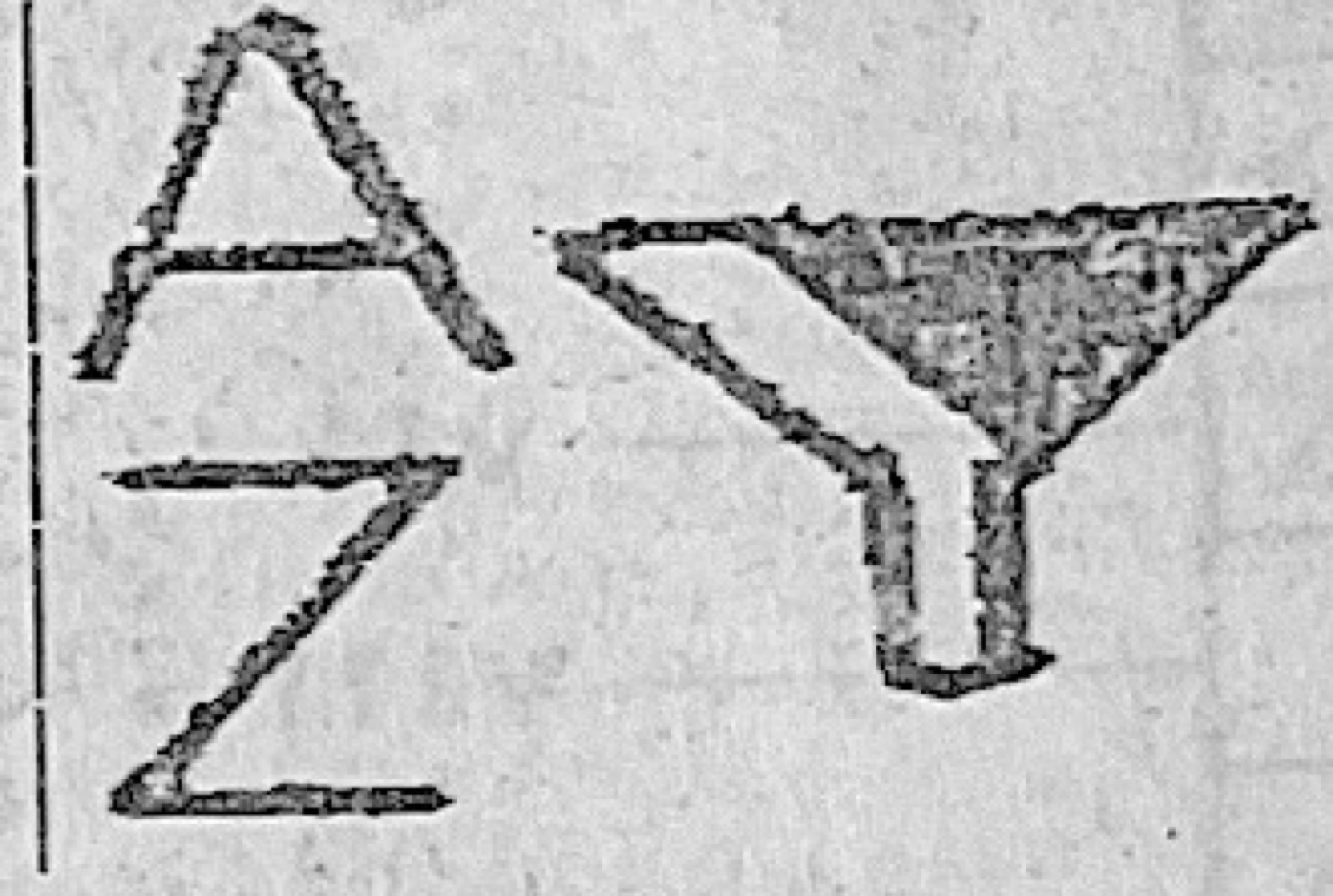
The Microsoft Excel menu bar icon shown in Figure 2 is used to

Diagram for this question
  1. A.automatically add up selected values.
  2. B.create label that spans multiple columns.
  3. C.spot trends and patterns in user's data using bars, columns and icons.
  4. D.organize data for easy analysis.
Show the answer and explanation

Answer: D (organize data for easy analysis.)

Explanation

The A–Z and funnel icon is Sort & Filter, which arranges and filters data for easy analysis.

Open this question

Question 21

Spreadsheet

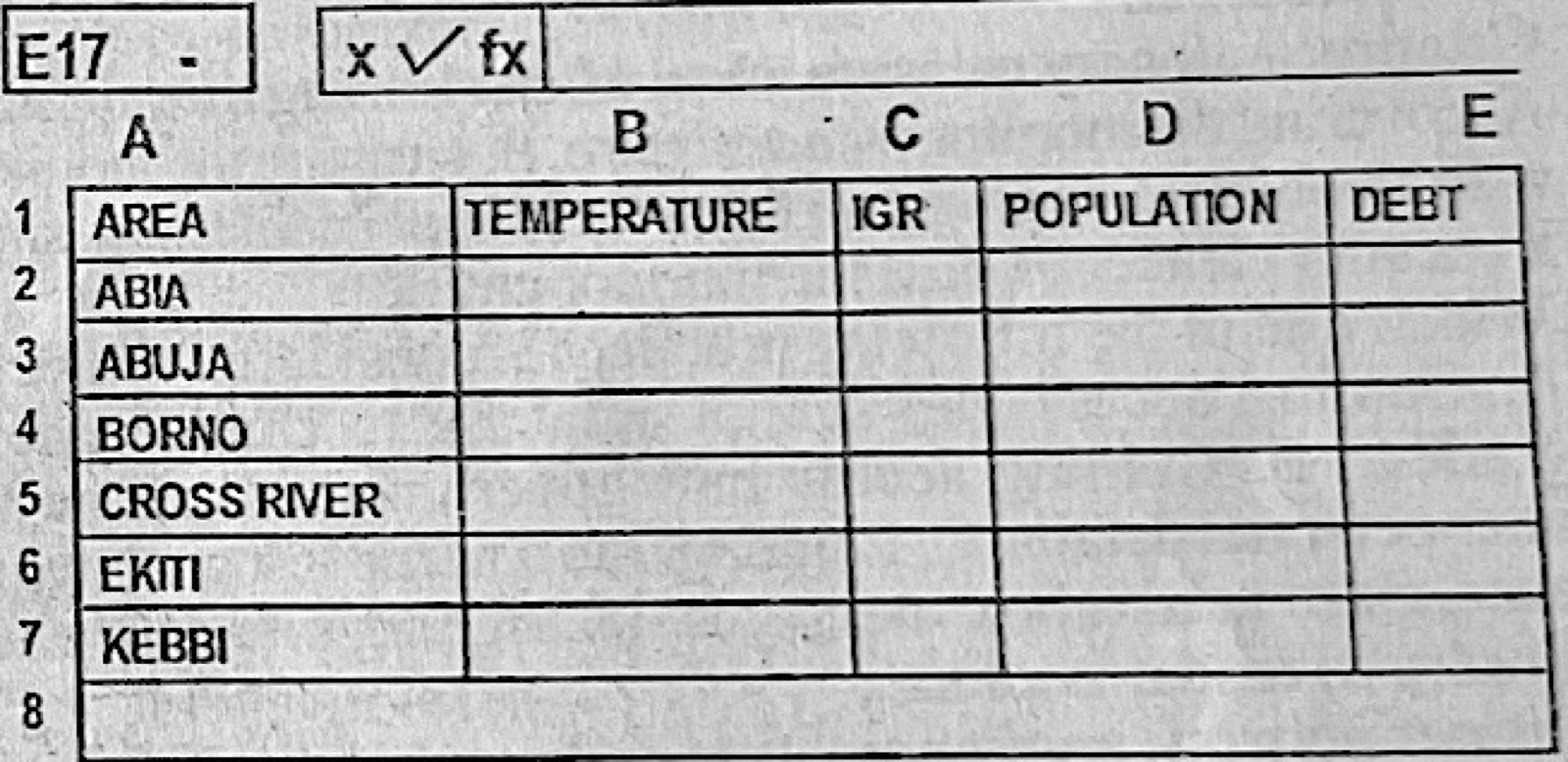
To add a new column to the right of the IGR column on the interface in Figure 3, the user would.

Diagram for this question
  1. A.right-click on cell C1 and then click on insert.
  2. B.right-click on cell D1 and then click on insert.
  3. C.right-click on column C and then click on insert.
  4. D.right-click on column D and then click on insert.
Show the answer and explanation

Answer: D (right-click on column D and then click on insert.)

Explanation

Excel inserts a new column to the left of the selected one, so right-clicking column D (POPULATION) puts it just after IGR (column C).

Open this question

Question 22

Database Management

The function of the foreign key in a database is to

  1. A.uniquely identify tuples in a table.
  2. B.provide a link between data in two tables.
  3. C.uniquely identify an entity occurrence.
  4. D.uniquely identify each record in a table.
Show the answer and explanation

Answer: B (provide a link between data in two tables.)

Explanation

A foreign key links a record to a related record in another table.

Open this question

Question 24

Database Management

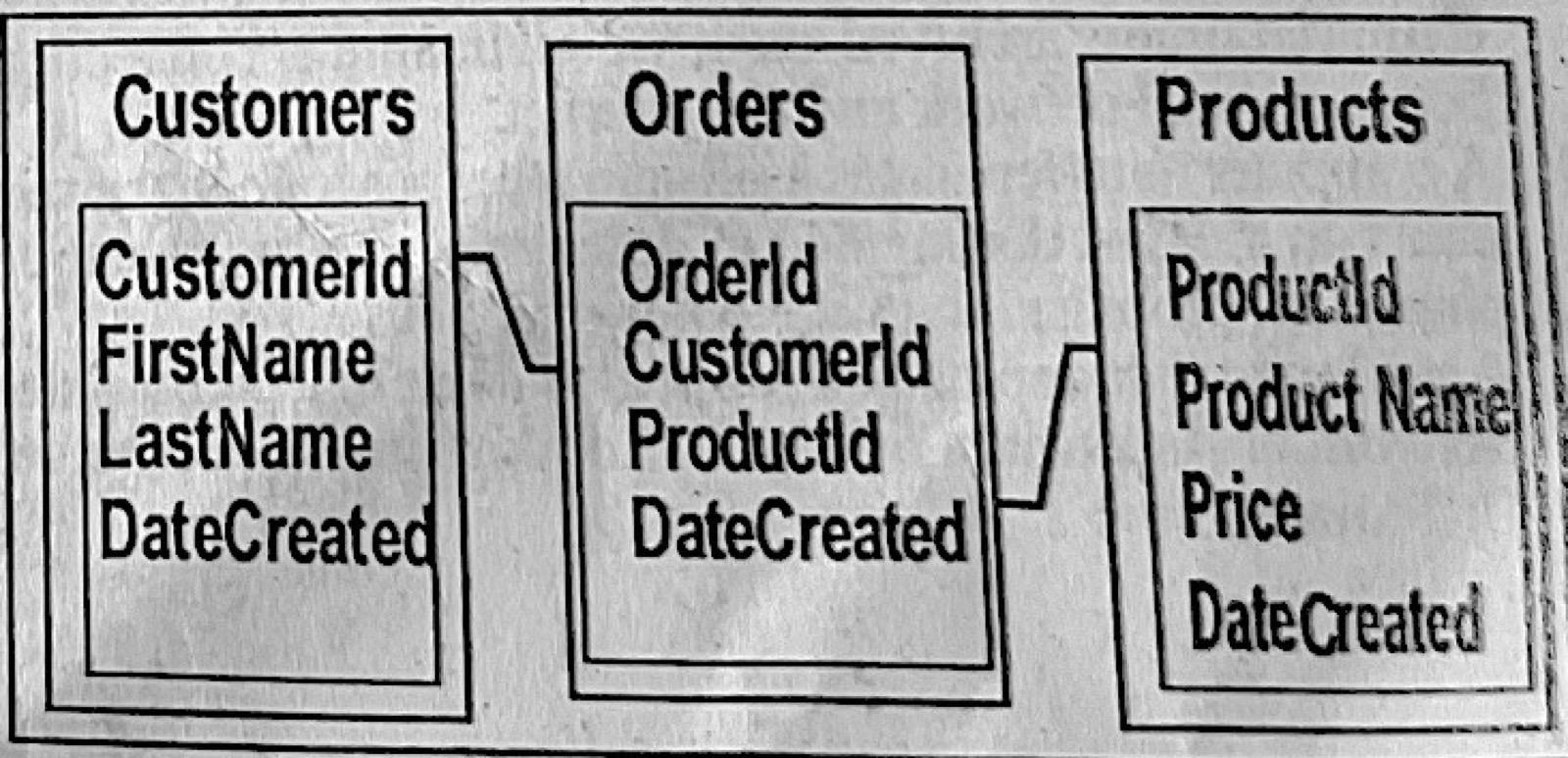
Use Figure 4 to answer questions 23 and 24.
Which of the following lists contains the primary keys in Figure 4?

Diagram for this question
  1. A.Customers, Orders and Products.
  2. B.customerId, OrderId, ProductId.
  3. C.CustomerId, FirstName, LastName and DateCreated.
  4. D.Customers, CustomerId, FirstName, LastName and DateCreated.
Show the answer and explanation

Answer: B (customerId, OrderId, ProductId.)

Explanation

Each table's primary key is its ID field: CustomerId, OrderId and ProductId.

Open this question

Question 27

Computer Maintenance

One precautionary measure taken when cleaning a monitor is

  1. A.covering the monitor with antiglare.
  2. B.cleaning the monitor with alcohol.
  3. C.unplugging the power supply cable.
  4. D.using a vacuum cleaner to dust the monitor casing
Show the answer and explanation

Answer: C (unplugging the power supply cable.)

Explanation

Unplug the monitor before cleaning it, to avoid electric shock.

Open this question

Question 28

Computer Ethics and Safety

Which one of the following practices is considered ethical?

  1. A.Gaining access into school database to change one's grades.
  2. B.Gaining access into government database to alter personal details.
  3. C.Logging into a friend's social media account to read inbox messages.
  4. D.Signing into school e-library to read e-books.
Show the answer and explanation

Answer: D (Signing into school e-library to read e-books.)

Explanation

Using the school e-library you are allowed to use is ethical; the others are unauthorised access.

Open this question

Question 29

Computer Maintenance

Proper network implementation and good ICT policies are types of

  1. A.adaptive measures.
  2. B.corrective measures.
  3. C.perfective measures.
  4. D.preventive measures.
Show the answer and explanation

Answer: D (preventive measures.)

Explanation

They stop problems before they happen, so they are preventive measures.

Open this question

Question 30

Computer Maintenance

Preventive maintenance measures in the computer room include the following options except

  1. A.good ventilation.
  2. B.proper illumination.
  3. C.the use of rugs.
  4. D.the use of tiles.
Show the answer and explanation

Answer: C (the use of rugs.)

Explanation

Rugs gather dust and static, which harm computers.

Open this question

Question 32

Computer Professionals

A database administrator is responsible for the following tasks except

  1. A.controlling and monitoring user access to the database.
  2. B.enrolling users and maintaining system security.
  3. C.maintaining archived data.
  4. D.maintaining connection between local network and the Internet.
Show the answer and explanation

Answer: D (maintaining connection between local network and the Internet.)

Explanation

The internet connection is the network administrator's job.

Open this question

Question 34

Computer Virus

A malware that copies and replicates itself using computer network and security flaws is

  1. A.Rootkit virus.
  2. B.Spyware.
  3. C.Trojan horse.
  4. D.Worm
Show the answer and explanation

Answer: D (Worm)

Explanation

A worm spreads by itself through networks and security holes.

Open this question

Question 35

Database Management

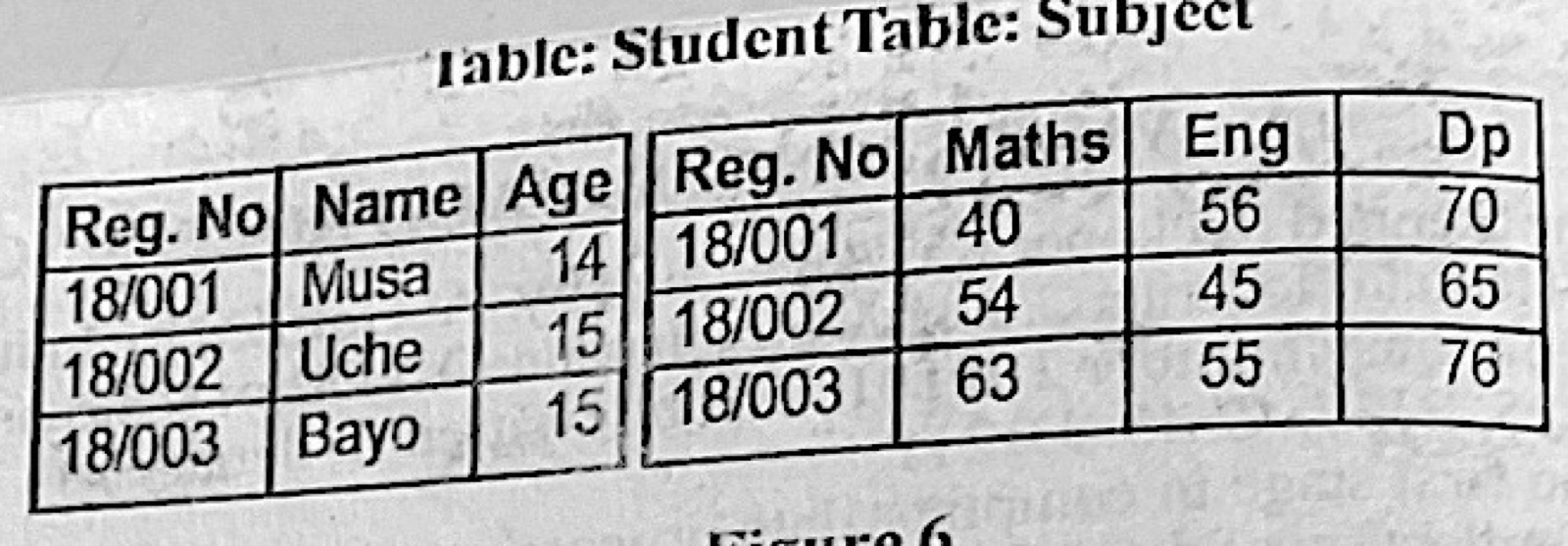
The entities in Figure 6 are named

Diagram for this question
  1. A.RegNo, Name and Age.
  2. B.Musa, Uche and Bayo
  3. C.Student and Subject.
  4. D.Maths, Eng and DP
Show the answer and explanation

Answer: C (Student and Subject.)

Explanation

The two tables (entities) are Student and Subject; RegNo, Name and Age are attributes.

Open this question

Question 36

Database Management

Which one of the following statements is true about database tables?

  1. A.All the tables in a database have a common name.
  2. B.A table may contain repeating groups.
  3. C.Entries in a column are from different domains based on datatype.
  4. D.There are no duplicate rows in a table.
Show the answer and explanation

Answer: D (There are no duplicate rows in a table.)

Explanation

In a relational table every row is unique.

Open this question

Question 37

File Organisation

The major difference between serial and sequential files is that sequential files are.

  1. A.given a key.
  2. B.sorted in a particular order.
  3. C.stored as they come.
  4. D.recorded in any storage medium
Show the answer and explanation

Answer: B (sorted in a particular order.)

Explanation

Serial files are stored as records arrive; sequential files are sorted in key order.

Open this question

Question 38

File Organisation

Which one of the following pairs contains computer file classification?

  1. A.Master file and Serial file.
  2. B.Random file and Master file.
  3. C.Reference file and Random file.
  4. D.Transaction file and Master file
Show the answer and explanation

Answer: D (Transaction file and Master file)

Explanation

Files are classified by use as master, transaction, reference, etc.; serial and random describe organisation.

Open this question

Question 39

Data Security

Which of the following statements support the goals of data backup? I. Need for duplication. II. Need for future reference. III. Protection against data loss.

  1. A.I and II only.
  2. B.I and III only
  3. C.II and III only.
  4. D.I,II and III
Show the answer and explanation

Answer: D (I,II and III)

Explanation

Backups duplicate data, keep it for later reference and protect against loss.

Open this question

Question 40

Distributed and Parallel Databases

Which of the following characteristics is associated with the architecture of parallel database?

  1. A.Communication cost and problems cannot be ignored
  2. B.Machines can be far from each other.
  3. C.Machines are physically close to each other.
  4. D.It is usually associated with shared-nothing architecture.
Show the answer and explanation

Answer: C (Machines are physically close to each other.)

Explanation

Parallel database processors are close together (often in one place); distributed ones are far apart.

Open this question

Theory question 101

Internet

Paper 2, Section A
(a) State four benefits of Internet in Education. (b) Explain the following types of maintenance in computing. (i) corrective; (ii) adaptive; (iii) preventive.

Show the model answer
Model answer

(a) Any four: access to a wide range of learning materials; online and distance learning; communication between teachers and students (e-mail, forums); research for assignments; online registration and results; educational videos and games; saves time and cost.
(b)(i) Corrective maintenance – fixing faults or errors in hardware or software after they occur.
(ii) Adaptive maintenance – changing software or hardware so it keeps working in a new environment (new OS, new rules).
(iii) Preventive maintenance – regular checks, cleaning and updates done to stop faults before they happen.

Explanation

Corrective = after the fault; preventive = before it.

Open this question

Theory question 102

File Organisation

Paper 2, Section A
(a) (i) Define the term file organization. (ii) Group the following file organization attributes under the appropriate heading as shown in Table I. (I) It does not support use of tapes. (II) Records are inserted one after the other. (III) It does not generate random keys to identify location. (IV) It generates random key to identify location.
(b) (i) State two safety rules observed in a computer laboratory. (ii) List three internet browsers.

Diagram for this question
Show the model answer
Model answer

(a)(i) File organisation is the way records are arranged in a file on a storage medium so they can be stored and retrieved efficiently.
(ii) Sequential file organisation: (II) records are inserted one after the other; (III) it does not generate random keys to identify location. Indexed file organisation: (I) it does not support use of tapes; (IV) it generates a key (index) to identify location.
(b)(i) Any two: no eating or drinking in the lab; do not touch internal components; switch off properly; keep the lab clean; no running.
(ii) Any three: Google Chrome; Mozilla Firefox; Microsoft Edge; Opera; Safari.

Explanation

Tapes can only be read in order, so they suit sequential files, not indexed ones.

Open this question

Theory question 103

Presentation Package

Paper 2, Section A
(a) Explain the use of Custom Slide Show in Microsoft Power Point application.
(b) State two functions of Rehearse Timings in Microsoft Power Point.
(c) List four types of illustrations that can be added to the presentation from the insert tab of Microsoft Powerpoint.

Show the model answer
Model answer

(a) Custom Slide Show lets you pick some slides of a presentation and arrange them in a new order, so that a shorter or different version can be shown to a particular audience without making a new file.
(b) Any two: records how long each slide is shown during a practice run; sets those times so the show advances automatically (self-running presentation); helps the presenter keep to the time allowed.
(c) Any four: pictures; clip art/online pictures; shapes; SmartArt; charts; icons; screenshots.

Explanation

Illustrations group on the Insert tab: Pictures, Shapes, SmartArt, Chart.

Open this question

Theory question 104

Data Security

Paper 2, Section A
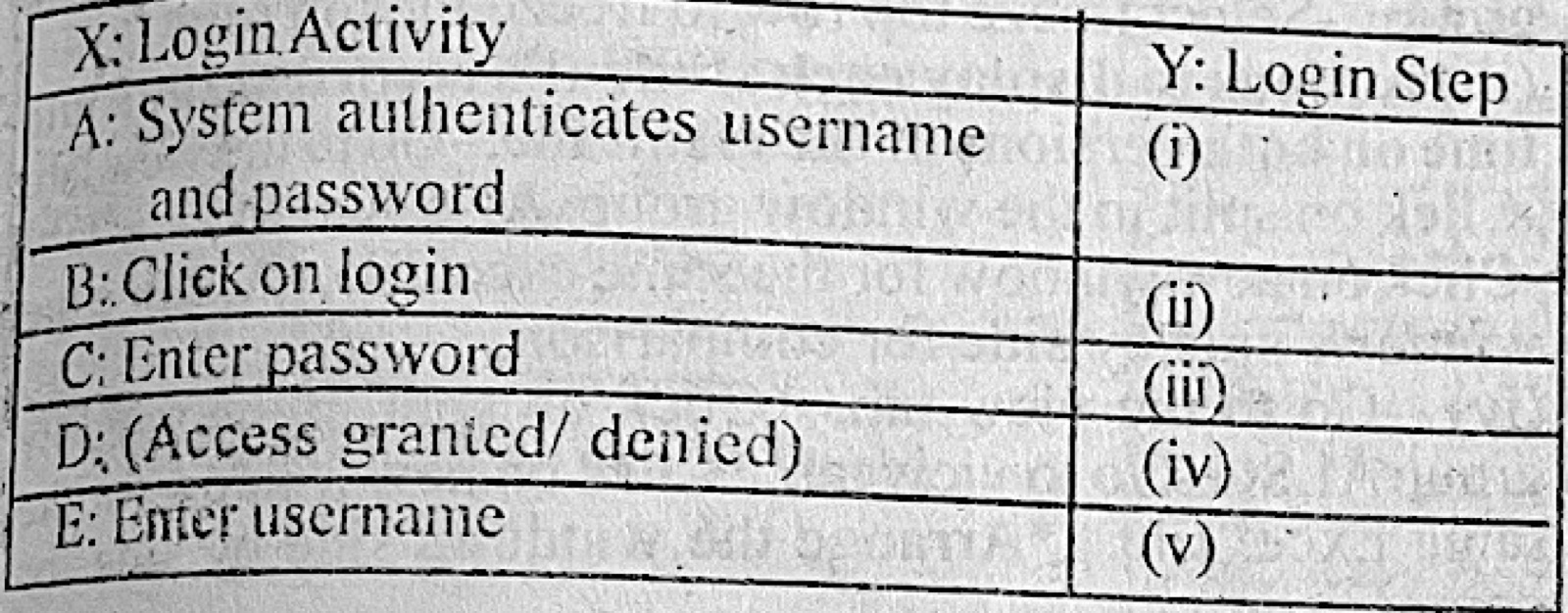
The Local Area Network (LAN) in a certain school is connected to the Internet. The school also has a Management Information System (MIS) which is used to enroll staff and students in the school. The system requires that users be authenticated before access is granted. Students are also allowed to use computers in the network during their leisure time. (a) (i) State two problems associated with an uncontrolled access to the internet by the students. (ii) How can the problem stated in 4a(i) be prevented? (b) Give one reason for users' authentication before access to the system is granted. (c) To use the MIS a staff is expected to log in using a registered username and password. Table 2 shows login activities and the login steps to the MIS. Specify the correct order or steps in the login process in column Y using the letter A-E attached to the login activities in column X.

Diagram for this question
Show the model answer
Model answer

(a)(i) Any two: visiting harmful or indecent websites; downloading viruses/malware; wasting time on games and social media; cyber fraud; using up bandwidth.
(ii) Any one: use a firewall or content filter to block bad sites; give each student a password-controlled account; supervise/monitor use; set an acceptable-use policy.
(b) Any one: to make sure only authorised people get in (security); to protect the data from being changed or stolen; to track who did what (accountability).
(c) (i) E – Enter username; (ii) C – Enter password; (iii) B – Click on login; (iv) A – System authenticates username and password; (v) D – Access granted/denied.

Explanation

The user acts first (username, password, login), then the system checks and replies.

Open this question

Theory question 105

Database Management

Paper 2, Section B: Test of Practical Work
Highlight the steps to perform the following: (a) creating a new table; (b) generating a query; (c) creating a split form; (d) printing a report.

Show the model answer
Model answer

(a) Open the database in MS Access; click Create → Table Design; type the field names and choose data types; set the primary key; save and name the table.
(b) Click Create → Query Design (or Query Wizard); add the table(s); add the fields needed; type any criteria; click Run; save the query.
(c) Select the table or query in the navigation pane; click Create → More Forms → Split Form; adjust the layout; save the form.
(d) Open the report; click File → Print (Ctrl + P); choose the printer, pages and copies; click OK.

Explanation

Each object is started from the Create tab.

Open this question

Theory question 106

Word Processing

Paper 2, Section B: Test of Practical Work
(a) A document is created in MS Word but the user realizes that parts of the document are cut off when it is print previewed in portrait orientation. Highlight the steps to change the orientation to landscape and print the document on A4 paper.
(b) A teacher working on student's results broadsheet in Microsoft Excel needed to keep the headings in “view” while scrolling through the results. The teacher also needed to compare each student's record with a version of the file earlier submitted to the Head of Department (HOD) to effect all suggestions. (i) Name the concept of keeping the headings visible while scrolling through a worksheet in Microsoft Excel. (ii) Outline the steps to keep the headings fixed while scrolling in Microsoft Excel Worksheet. (iii) Identify two actions to display each student's record at the same time on both versions of the result file. (iv) Highlight the steps to achieve the named actions in 6b(iii).
(c) List two gadgets needed to display the contents of a laptop computer to an audience in an auditorium.

Show the model answer
Model answer

(a) Click Layout (Page Layout) → Orientation → Landscape; click Size → A4; click File → Print (Ctrl + P), check the preview, choose the printer and click Print.
(b)(i) Freeze Panes.
(ii) Click the cell just below the heading row (e.g. A2); click View → Freeze Panes → Freeze Panes (or Freeze Top Row).
(iii) View Side by Side and Synchronous Scrolling (or New Window and Arrange All).
(iv) Open both versions of the file; click View → View Side by Side (choose the HOD's version); make sure Synchronous Scrolling is on so both scroll together.
(c) Any two: multimedia projector; projector screen/large TV; HDMI or VGA cable; speakers/public address system.

Explanation

Freeze Panes keeps headings in view; View Side by Side compares two files.
Open this question