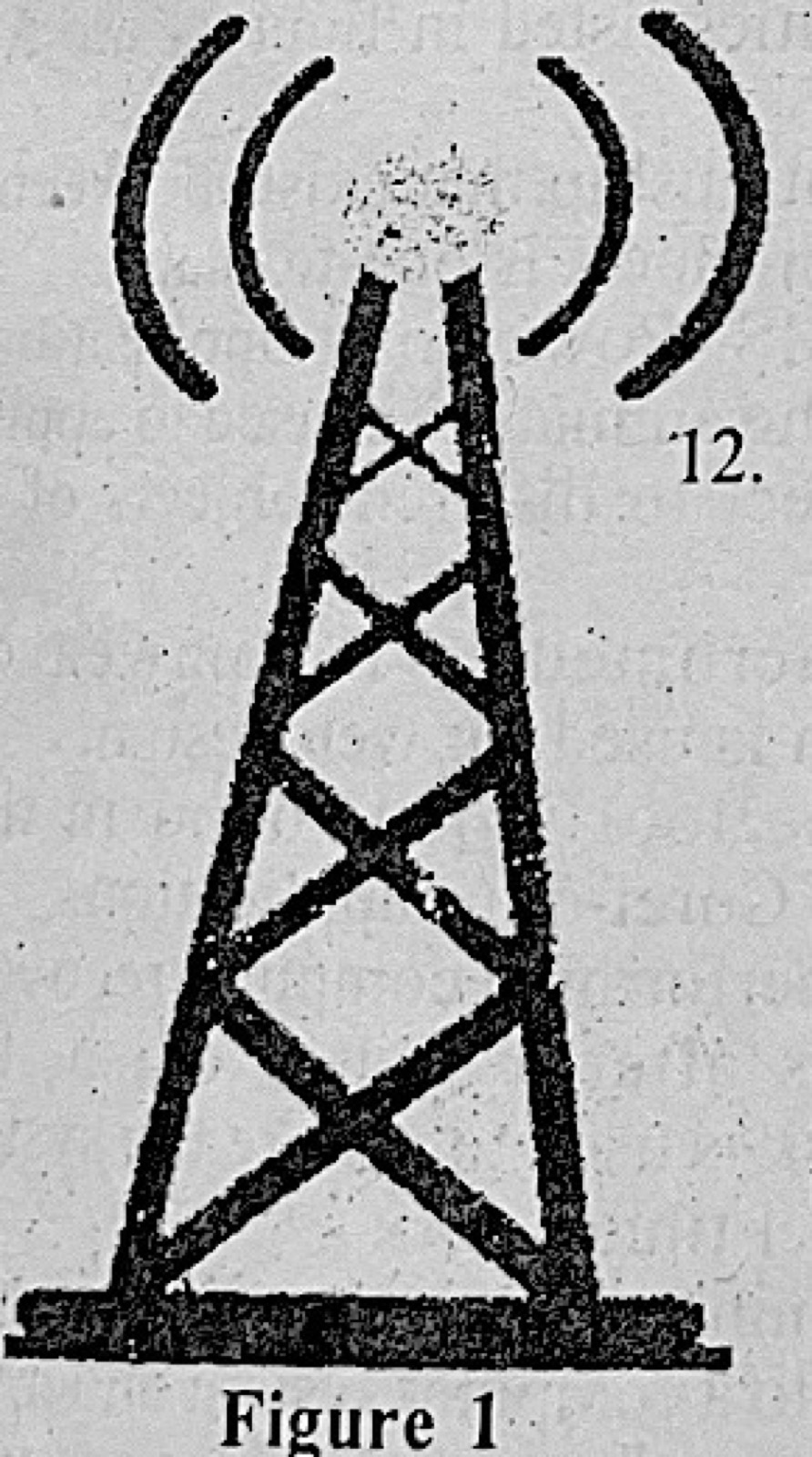
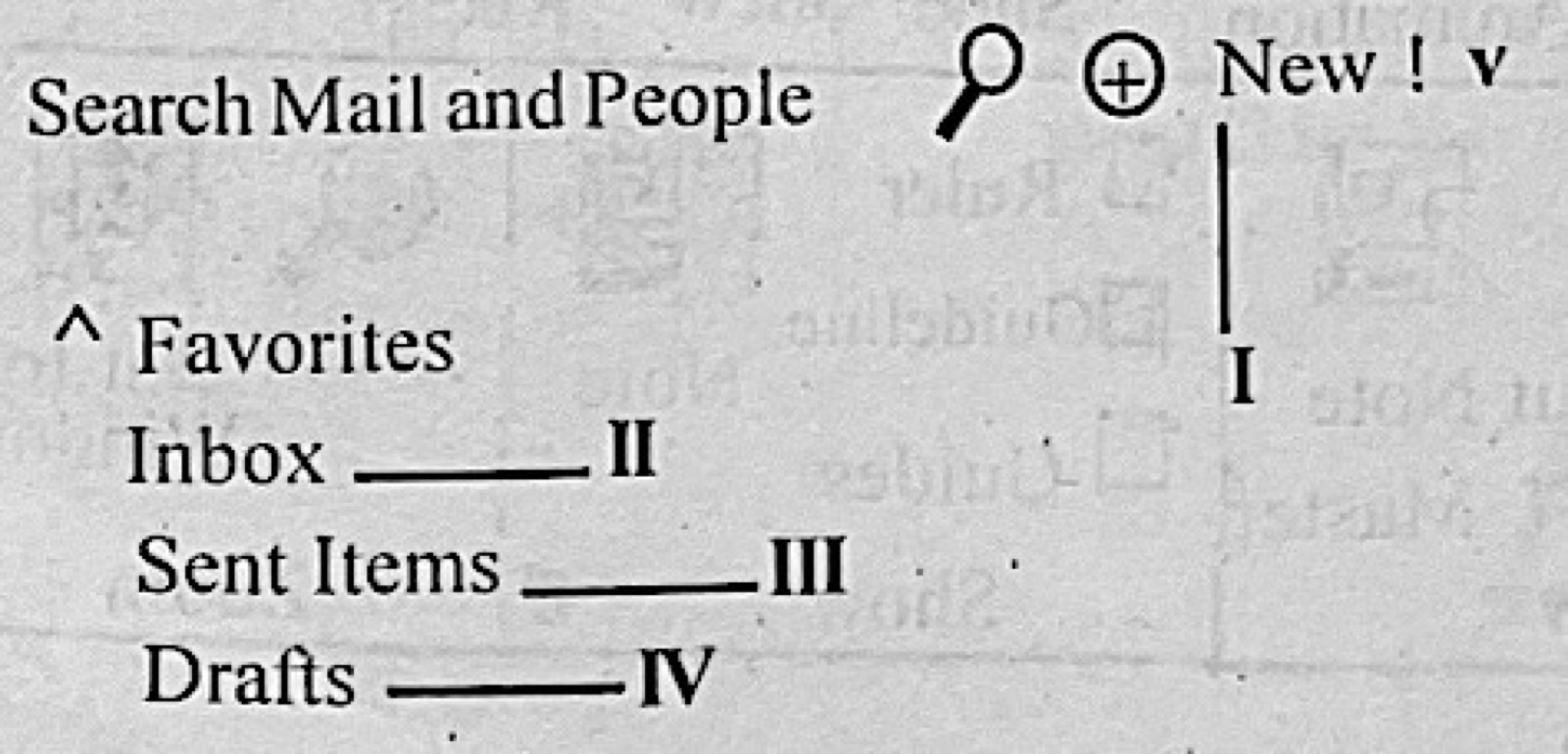
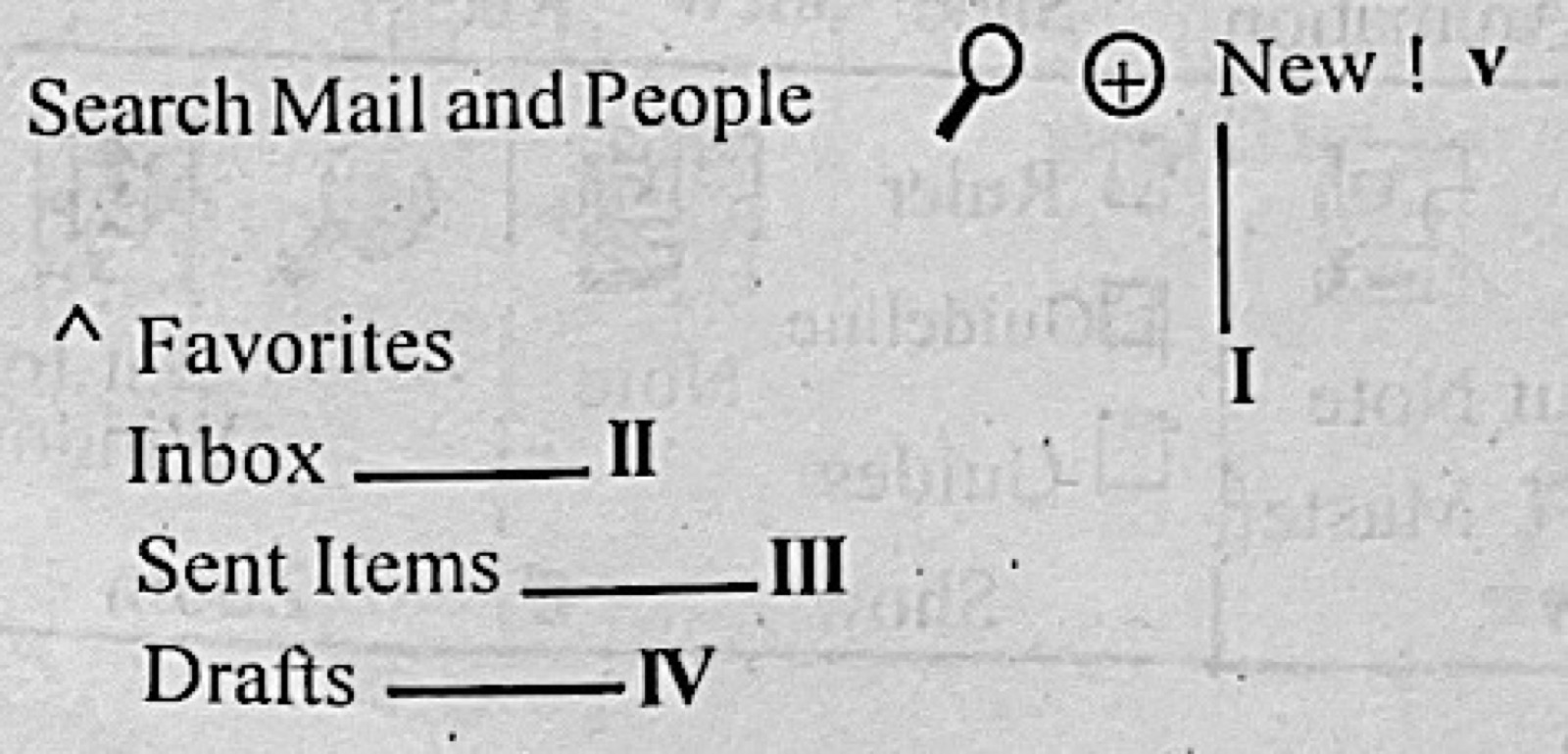
A student in the school hostel was able to upload some personal details on the school portal via the school's WiFi. The ISP and the hostel are both domiciled in the school premises. What type of network is illustrated above?
A.LAN
B.MAN
C.PAN
D.WAN
Show the answer and explanation
Answer: A (LAN)
Explanation
Everything is within the school premises, a small area, so it is a LAN.
A student in the school hostel was able to upload some personal details on the school portal via the school's WiFi. The ISP and the hostel are both domiciled in the school premises. The physical infrastructure through which internet traffic are exchanged between the ISP in the school illustrated above and other ISPs is called
A.internet exchange point.
B.server farms.
C.subscriber end points.
D.switch racks.
Show the answer and explanation
Answer: A (internet exchange point.)
Explanation
An Internet Exchange Point (IXP) is where different ISPs connect to swap traffic.
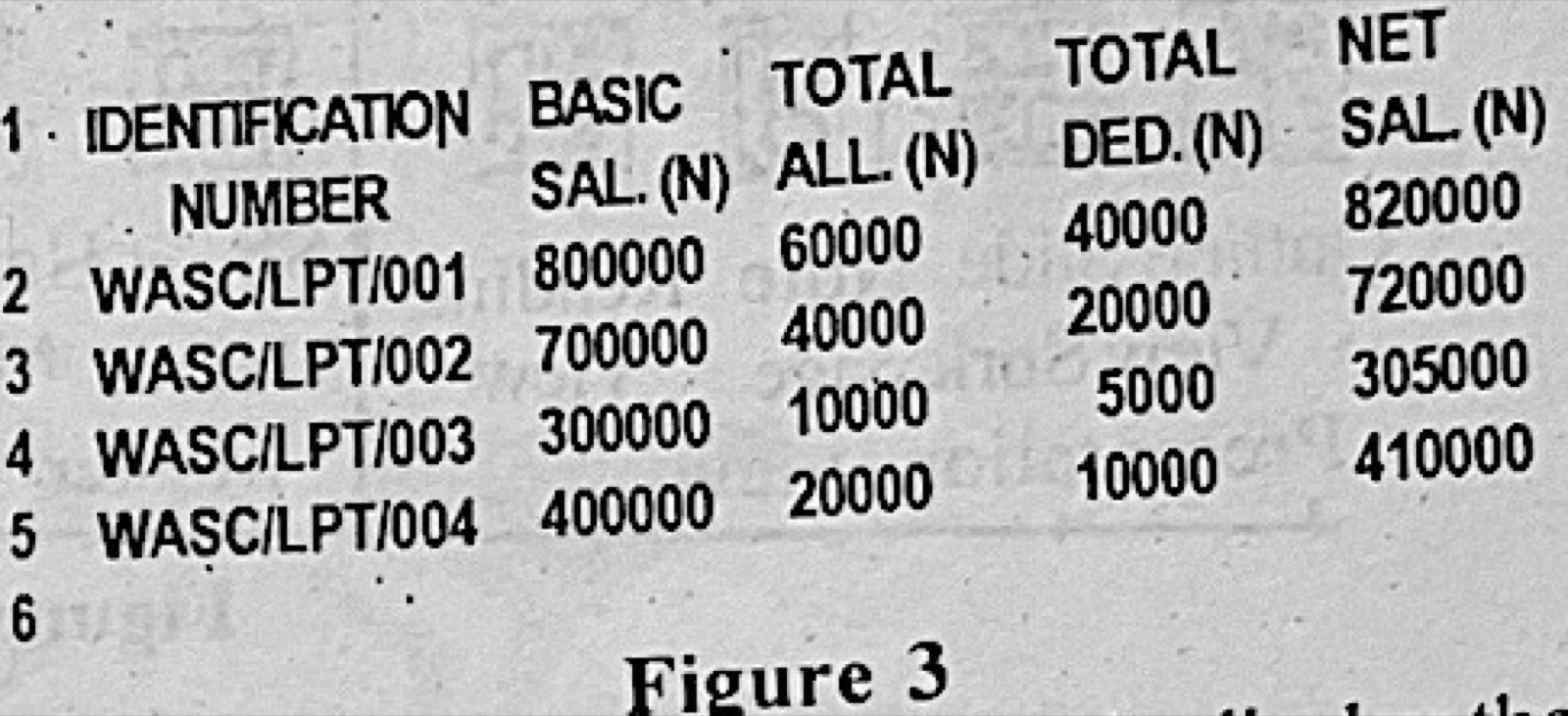
Figure 3 is a Microsoft Excel Worksheet. Use it to answer questions 20 and 21. What formula will correctly display the total number of individuals involved in the computation as shown in Figure 3?
A.= COUNT(A2:A5)
B.= COUNTA(A2:A5)
C.= COUNTIF(A2:A5)
D.= SUM (A2:A5)
Show the answer and explanation
Answer: B (= COUNTA(A2:A5))
Explanation
The ID numbers in A2:A5 are text (e.g. WASC/LPT/001); COUNTA counts non-empty cells, giving 4, while COUNT only counts numbers and gives 0.
A type of file organization that stores data in the order of their arrival is called
A.sequential file organization.
B.random file organization.
C.indexed-sequential file organization.
D.hashed file organization.
Show the answer and explanation
Answer: A (sequential file organization.)
Explanation
Of the options, sequential organisation is the one that stores records one after another as they are added (strictly, unsorted arrival order is called serial). Random, indexed-sequential and hashed files place records by a key.
Paper 2, Essay questions State one function for each of the following utility programs. (a) disk space analyser; (b) backup utility; (c) registry cleaner; (d) file manager; (e) uninstaller.
Show the model answer
Model answer
(a) Disk space analyser – shows which files and folders take up most space on the disk, so unneeded ones can be deleted. (b) Backup utility – makes copies of files and settings so they can be restored after loss. (c) Registry cleaner – finds and removes invalid or unused entries in the Windows registry to improve performance. (d) File manager – lets the user create, open, copy, move, rename and delete files and folders. (e) Uninstaller – removes unwanted programs completely, including their leftover files and settings.
Paper 2, Essay questions (a) (i) What is malware in computing? (ii) List three types of malware. (b) State three symptoms of malware infection. (c) Give two ways of preventing malware infection.
Show the model answer
Model answer
(a)(i) Malware (malicious software) is any program designed to harm a computer or its user, steal data or gain unauthorised access. (ii) Any three: virus; worm; Trojan horse; spyware; adware; ransomware; rootkit. (b) Any three: the computer becomes slow; frequent crashes or freezing; unexplained pop-up adverts; files missing or corrupted; strange error messages; browser home page changed. (c) Any two: install and regularly update antivirus; scan flash drives and downloads before opening; avoid pirated software and suspicious links/attachments; use a firewall; keep the operating system updated.
Explanation
Symptoms are things the user notices on the computer.
Paper 2, Essay questions (a) Name two computer professionals that use CorelDraw in the performance of their duties. (b) (i) List three tools in the CorelDraw tool box. (ii) Give one function of each tool listed in 3(b)(i). (c) State two uses of CorelDraw as an application software.
Show the model answer
Model answer
(a) Any two: graphic designer; web designer; desktop publisher; artist/illustrator; animator. (b)(i) and (ii) Any three, each with its function: Pick tool – selects, moves and resizes objects; Shape tool – edits the shape of an object by moving its nodes; Zoom tool – enlarges or reduces the view; Rectangle tool – draws rectangles and squares; Ellipse tool – draws ellipses and circles; Text tool – types text; Freehand tool – draws lines and curves; Fill tool – colours objects; Crop tool – removes unwanted parts. (c) Any two: designing logos; making posters, flyers and banners; designing greeting and business cards; magazine and book covers; editing drawings.
Paper 2, Essay questions (a) With reference to database management system, state: (i) one difference between fragmentation and replication. (ii) two advantages of replication. (b) List two: (i) types of fragmentation. (ii) examples of relational database management system.
Show the model answer
Model answer
(a)(i) Fragmentation splits a table into smaller parts stored at different sites, while replication stores full copies of the same data at several sites. (ii) Any two: data stays available if one site fails; faster local access/queries; reduced network traffic; load is shared among sites. (b)(i) Any two: horizontal fragmentation (by rows); vertical fragmentation (by columns); mixed/hybrid fragmentation. (ii) Any two: Microsoft Access; MySQL; Oracle; Microsoft SQL Server; PostgreSQL.
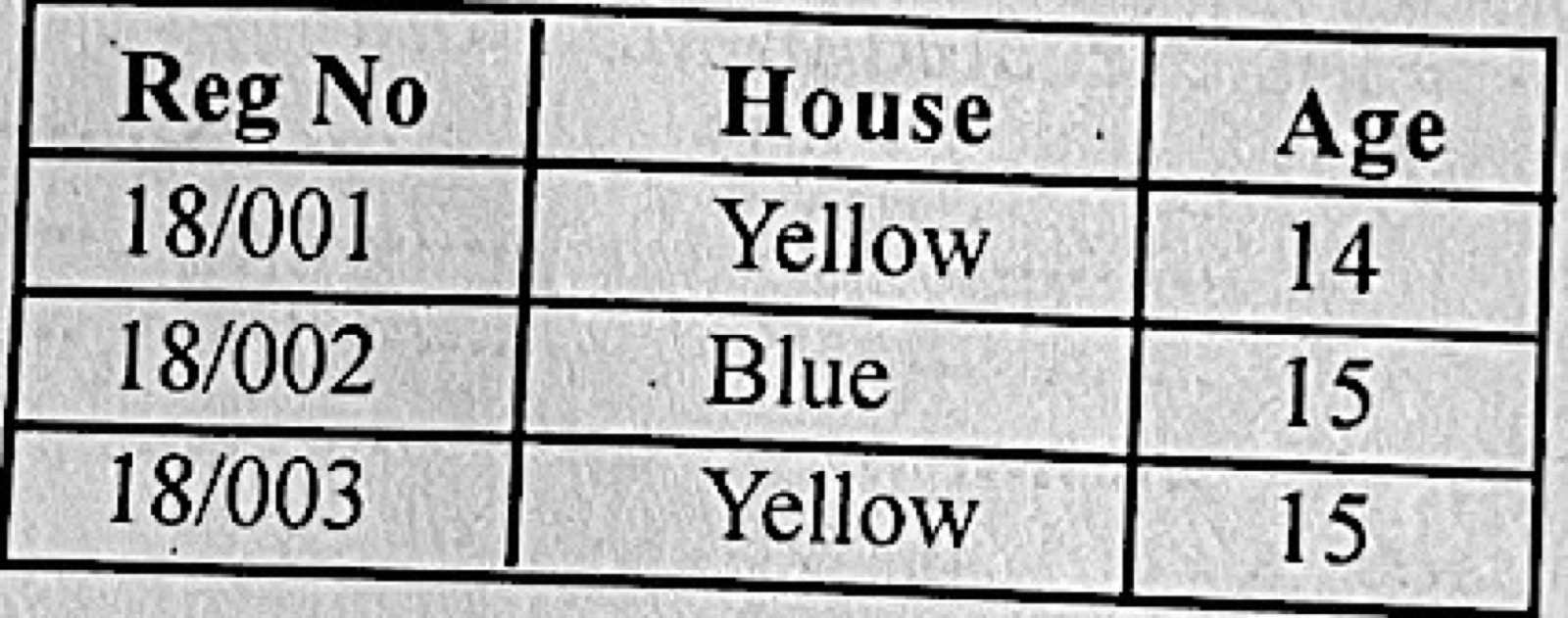
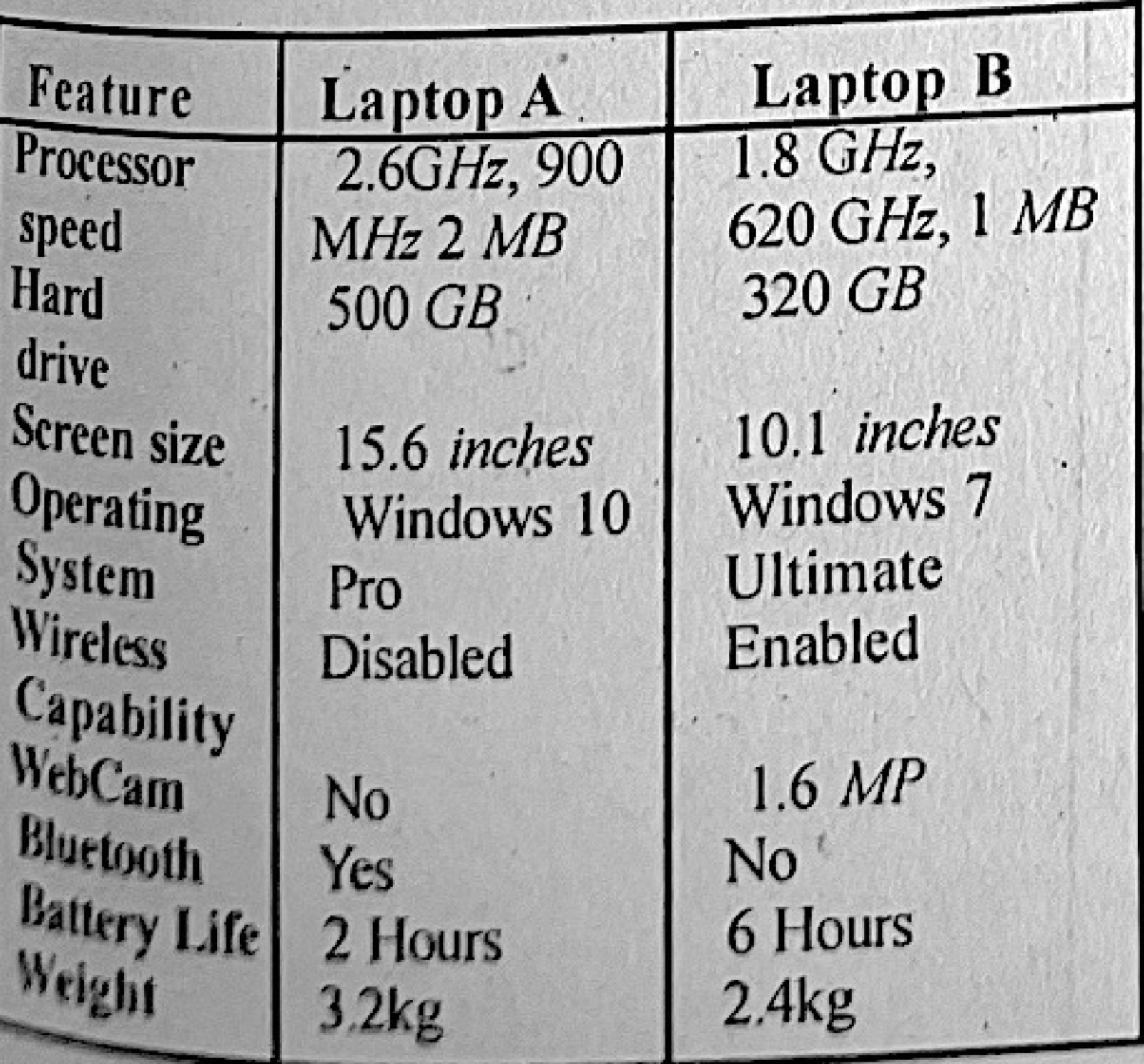
Paper 2, Essay questions Table 1 shows the specification of two laptop computers. Use the table to answer questions 5(a) to 5(e). (a) Which laptop will likely boot faster? (b) Calculate the maximum number of bytes of data that can be stored in the hard disk of: (i) Laptop A; (ii) Laptop B; (c) State the type of operating system installed in both laptop A and Laptop B. (d) State one function of the Bluetooth in Laptop A. (e) A certain salesperson makes a long trip by road as part of his job and also uses the computer for live communication with his customers. (i) Which of the laptops is more suitable for the salesperson? (ii) Name three features of the laptop chosen in 5(e)(i) that makes it more suitable than the other. (iii) Give one reason for choosing each of the features in 5(e)(ii).
Show the model answer
Model answer
(a) Laptop A – it has the faster processor (2.6 GHz against 1.8 GHz) and the newer operating system. (b)(i) 500 GB = 500 × 1024 × 1024 × 1024 = 536 870 912 000 bytes (500 000 000 000 bytes if 1 GB is taken as 10⁹). (ii) 320 GB = 320 × 1024³ = 343 597 383 680 bytes (320 000 000 000 bytes with 10⁹). (c) Microsoft Windows – a graphical user interface (GUI), single-user multitasking operating system (Windows 10 Pro on A, Windows 7 Ultimate on B). (d) Bluetooth lets the laptop connect wirelessly over a short distance to phones, headsets, mice or speakers, e.g. to transfer files. (e)(i) Laptop B. (ii) and (iii) Battery life of 6 hours – it can be used for long periods on the road without charging; 1.6 MP webcam – needed for live video communication with customers; wireless capability enabled – to connect to the internet (Wi-Fi/hotspot) while travelling; lighter weight (2.4 kg) and smaller screen – easier to carry.
Explanation
Pick features that matter on a long road trip with video calls.
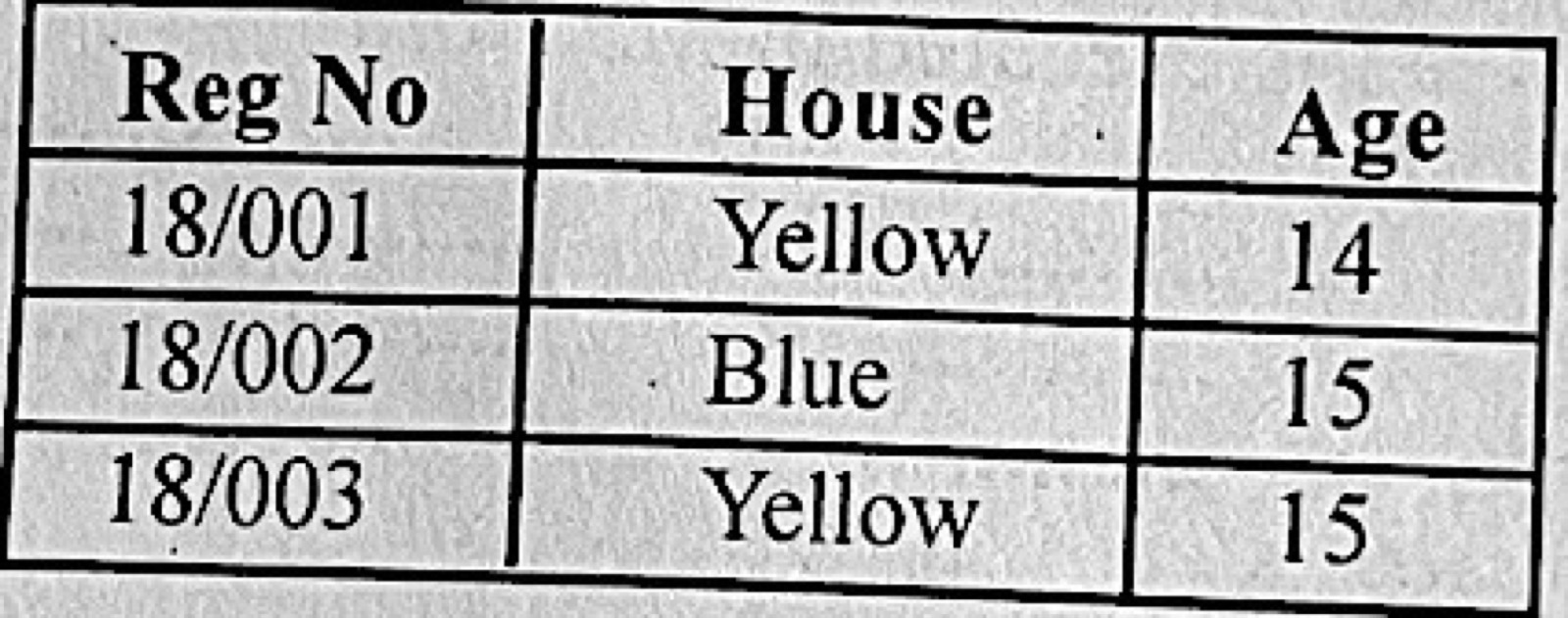
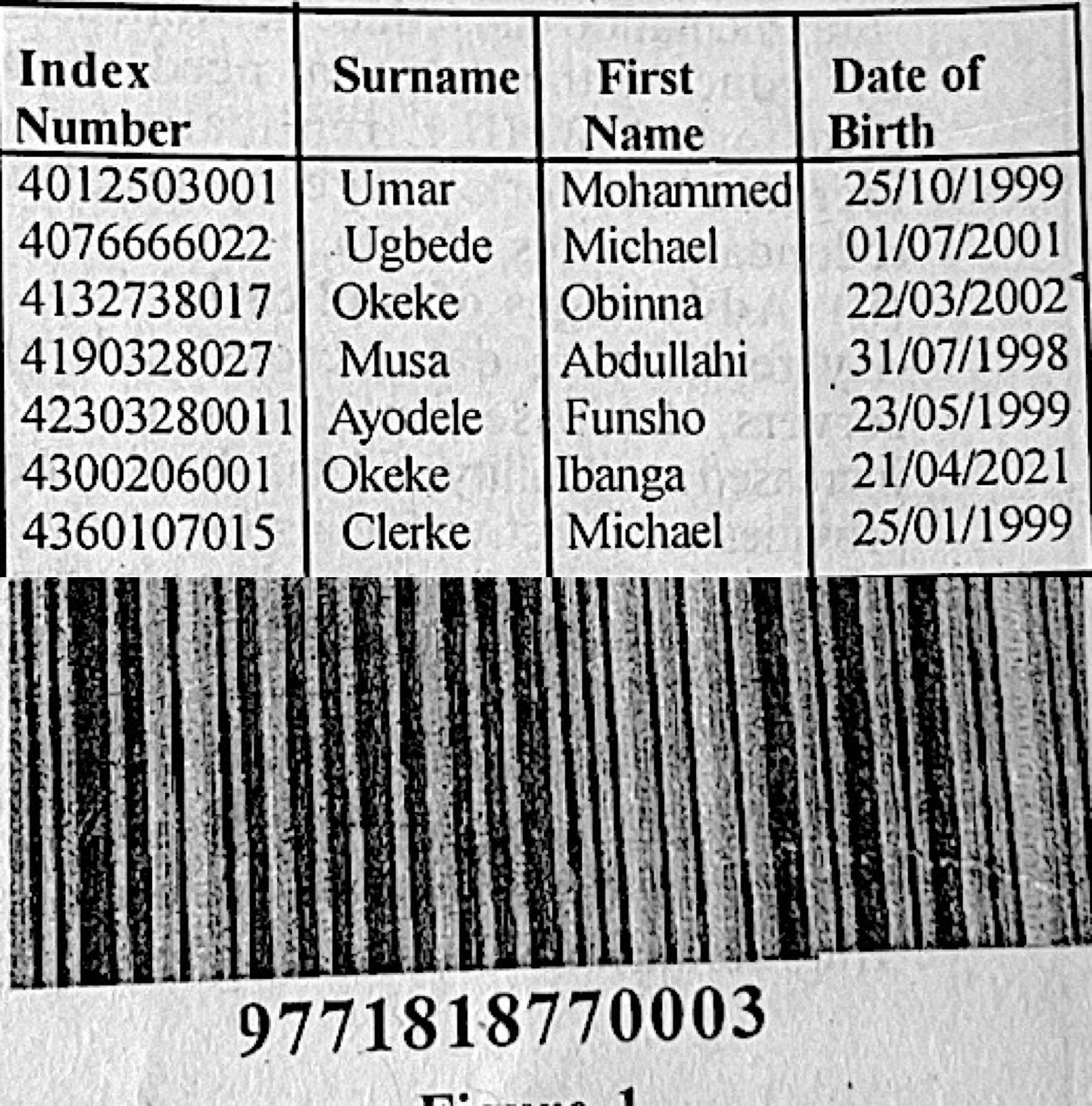
Paper 2, Essay questions (a) A class teacher uses a database to keep students' records. Table 2 shows part of the information in the database. (i) Identify the primary key; (ii) give one reason for the answer in 6(a)(i); (iii) explain three methods the teacher could employ in order to secure the students' data. (b) Outline the steps to create a drop-down list in an MS Excel worksheet. (c) The image in Figure 1 is captured from a product in a supermarket. Use the image to answer questions 6(c)(i) to 6(c)(iii). (i) identify the image in Figure 1. (ii) give two other application areas of the image in Figure 1. (iii) state three benefits of using the image in Figure 1.
Show the model answer
Model answer
(a)(i) Index Number. (ii) It is different for every student (unique); surnames, first names and dates of birth can repeat (e.g. Okeke, Michael). (iii) Any three, explained: password protection – only users with the password can open the database; encryption – data is coded so it is unreadable if stolen; regular backups – copies kept elsewhere so data can be restored; user access rights – give others read-only access; antivirus and firewall – protect against malware and hackers; physical security – lock the computer room. (b) Type the list items in a range of cells; select the cell(s) for the drop-down; click Data → Data Validation; under Allow choose List; in Source select the range (or type the items separated by commas); click OK. (c)(i) A barcode (product barcode read by a barcode reader). (ii) Any two: library books; stock/inventory control in warehouses; patient wristbands in hospitals; airline baggage tags; parcel tracking; ID cards and exam scripts. (iii) Any three: fast and accurate data entry at checkout; fewer human errors; automatic stock updating; quick price look-up and changes; itemised receipts; saves labour.