Theory question 106
Database ManagementPaper 2, Essay questions
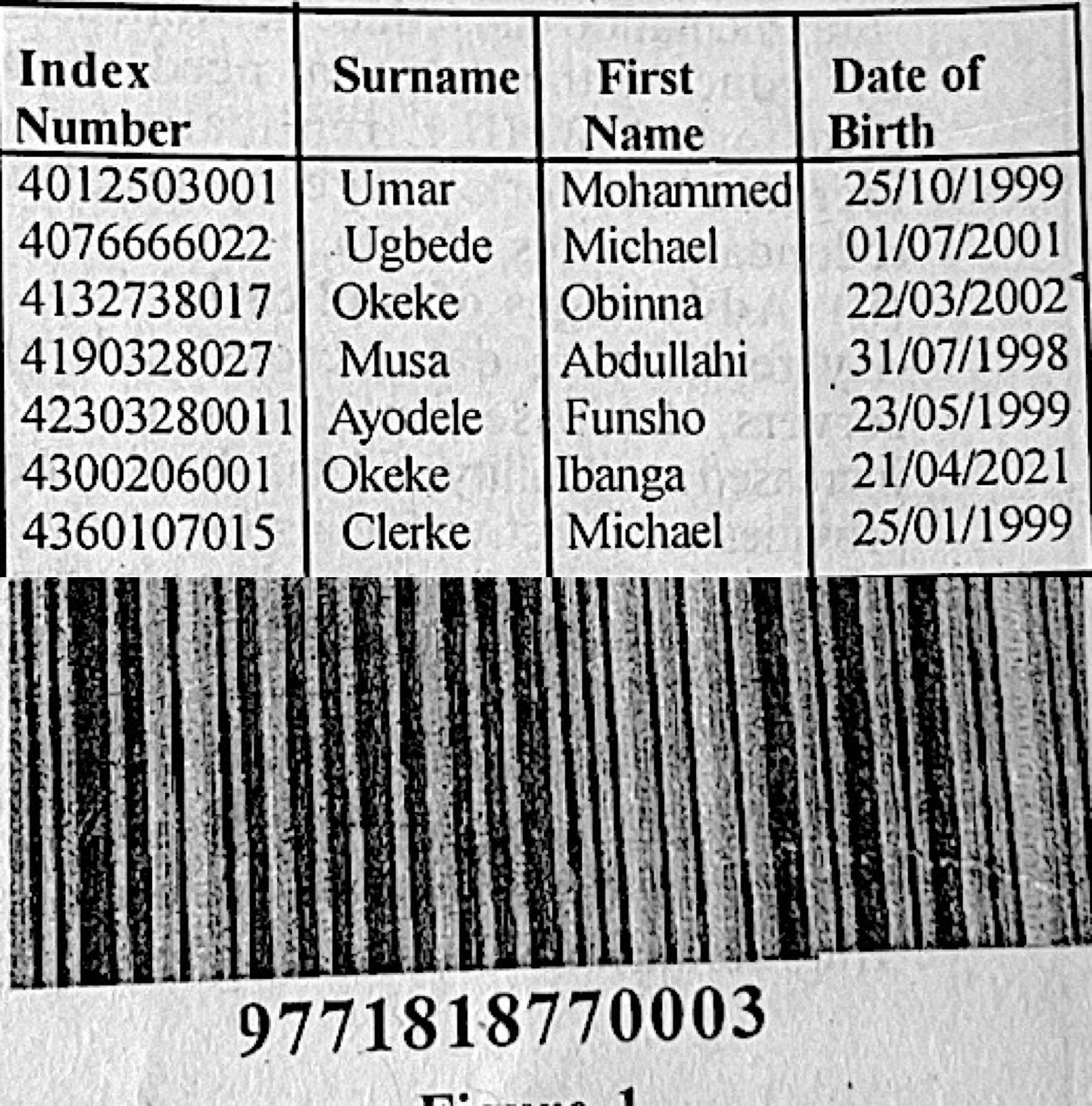
(a) A class teacher uses a database to keep students' records. Table 2 shows part of the information in the database. (i) Identify the primary key; (ii) give one reason for the answer in 6(a)(i); (iii) explain three methods the teacher could employ in order to secure the students' data.
(b) Outline the steps to create a drop-down list in an MS Excel worksheet.
(c) The image in Figure 1 is captured from a product in a supermarket. Use the image to answer questions 6(c)(i) to 6(c)(iii). (i) identify the image in Figure 1. (ii) give two other application areas of the image in Figure 1. (iii) state three benefits of using the image in Figure 1.
Show the model answer
(a)(i) Index Number.
(ii) It is different for every student (unique); surnames, first names and dates of birth can repeat (e.g. Okeke, Michael).
(iii) Any three, explained: password protection – only users with the password can open the database; encryption – data is coded so it is unreadable if stolen; regular backups – copies kept elsewhere so data can be restored; user access rights – give others read-only access; antivirus and firewall – protect against malware and hackers; physical security – lock the computer room.
(b) Type the list items in a range of cells; select the cell(s) for the drop-down; click Data → Data Validation; under Allow choose List; in Source select the range (or type the items separated by commas); click OK.
(c)(i) A barcode (product barcode read by a barcode reader).
(ii) Any two: library books; stock/inventory control in warehouses; patient wristbands in hospitals; airline baggage tags; parcel tracking; ID cards and exam scripts.
(iii) Any three: fast and accurate data entry at checkout; fewer human errors; automatic stock updating; quick price look-up and changes; itemised receipts; saves labour.
A primary key must be unique for every record.