Theory question 106
SpreadsheetPaper 2, Section B
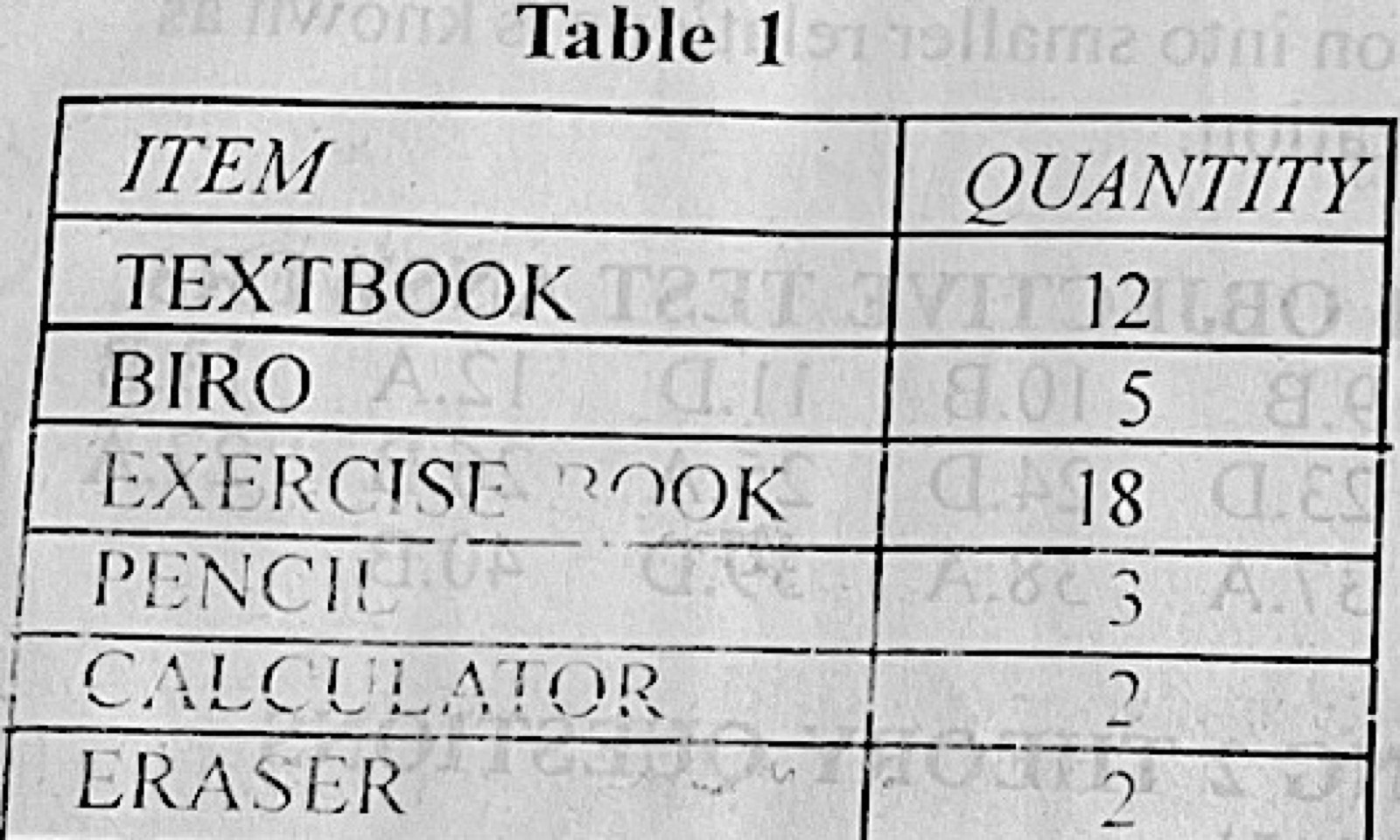
Table 1 shows the list of items and the quantity of the item needed by a student. The table was created on an MS Excel worksheet. Use the table to answer questions 6(a)(i) - (iv)
(a) Outline the steps to: (i) create a bar chart on the worksheet such that the items would be labeled on the chart and the percentage of each item included. (ii) add to the table, a new; A. column; B. row. (iii) State one function in MS Excel that can be used to determine the item with the highest quantity.
(b) Outline the steps to add page border to a document using Art Design Tool in MS Word application.
(c) An MS Word document contains the phrase “WAEC Exam”. Highlight the steps to link the phrase above to the WAEC website. (http://www.waec.org.ng)
Show the model answer
(a)(i) Select the table (items and quantities); click Insert → Column/Bar chart → choose a bar chart; with the chart selected click Chart Elements (+) → Data Labels to show the item labels; to show percentages add a column with =B2/SUM($B$2:$B$7) formatted as %, and use it for the data labels (Format Data Labels → Value From Cells).
(ii) A. Right-click a column letter → Insert (a new column appears to its left). B. Right-click a row number → Insert (a new row appears above it).
(iii) The MAX function, e.g. =MAX(B2:B7) (or use Sort Descending / LARGE).
(b) Click Design (Page Layout) → Page Borders; in the Page Border tab open the Art list and choose a design; set width and apply to Whole document; click OK.
(c) Select the phrase WAEC Exam; click Insert → Hyperlink (Ctrl + K); in the Address box type http://www.waec.org.ng; click OK.
Hyperlink = Ctrl + K; Page Borders has an Art box.