Paper 2, Section A: Essay (a) What is teleconferencing? (b) State four uses of Automated Teller Machine (ATM). (c)(i) Give the function of a modem. (ii) List the two means of transmitting information.
Show the model answer
Model answer
(a) Teleconferencing is holding a live meeting between people in different places using telecommunication (telephone, video or internet links). (b) Any four: withdrawing cash; checking account balance; transferring money; buying airtime/recharge; paying bills (electricity, DSTV); printing mini statements; changing PIN; depositing cash (some ATMs). (c)(i) A modem converts (modulates) digital signals from the computer into analogue signals for the telephone line and converts (demodulates) them back at the other end. (ii) Wired (guided) and wireless (unguided) transmission (or: ancient/traditional means and modern/electronic means).
Explanation
Modem = modulator-demodulator; say both directions.
Paper 2, Section A: Essay Hamza, Emeka, Funsho, Fejiro and Idongesit were friends from secondary school. Now, Hamza is a pilot, Emeka is a businessman, Funsho is a banker, Fejiro is a manufacturer while Idongesit is a teacher. State two ways in which each of these friends can apply ICT in their respective professions.
Show the model answer
Model answer
Pilot (Hamza): flight simulators for training; computerised navigation/autopilot and radar; weather information; flight recorders; online booking and scheduling. Businessman (Emeka): e-commerce/online selling; spreadsheets and accounting software for records; e-mail and social media for advertising and customer contact; online payments. Banker (Funsho): ATMs; online/mobile banking; electronic funds transfer; computerised customer records; cheque clearing with MICR. Manufacturer (Fejiro): computer-aided design and manufacturing (CAD/CAM); robots and automated production lines; stock control software; process monitoring. Teacher (Idongesit): presentations with projectors; e-learning and online resources; computer-based tests; keeping student records and results on computer.
Explanation
Give two different uses for each of the five people.
Paper 2, Section A: Essay (a) A secondary school has over twenty personal computers. The school management intends to connect the computers in a network. Give four reasons that must have motivated the school management into connecting the computers together. (b) List four network devices required to accomplish the task in 3(a). (c) State one function each for any two of the devices listed in 3(b).
Show the model answer
Model answer
(a) Any four: to share files and data; to share printers, scanners and internet connection; to communicate (e-mail, messages); central storage and backup; easier management and security; to save cost. (b) Any four: network interface card (NIC); cables (UTP/fibre); switch or hub; router; modem; wireless access point; server. (c) Any two: NIC – connects a computer to the network; switch/hub – connects many computers in the LAN and passes data between them; router – connects the LAN to other networks (internet) and forwards packets; modem – converts signals for internet connection; cable – carries signals between devices.
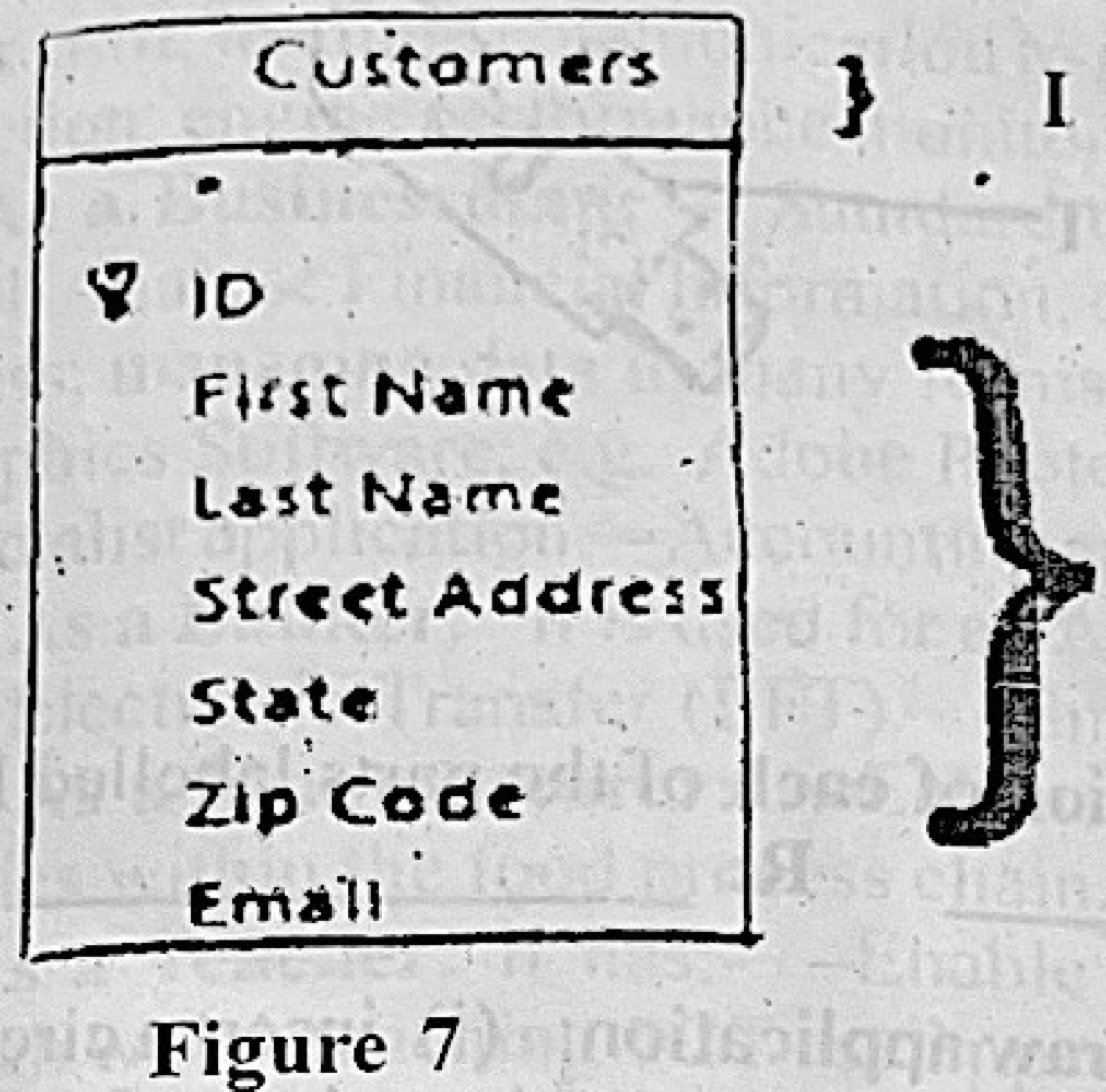
Paper 2, Section A: Essay (a) Explain the following database management terms: (i) entities (ii) attributes; (iii) relationships. (b)(i) Define cardinality in database management. (ii) Mention three cardinality relationships in database management.
Show the model answer
Model answer
(a)(i) An entity is a person, place, thing or event about which data is stored, e.g. a student (a table). (ii) An attribute is a property that describes an entity, e.g. a student's name or date of birth (a field/column). (iii) A relationship is a link between entities, e.g. a student registers for a course. (b)(i) Cardinality is the number of instances of one entity that can be related to instances of another entity. (ii) One-to-one (1:1); one-to-many (1:M); many-to-many (M:N).
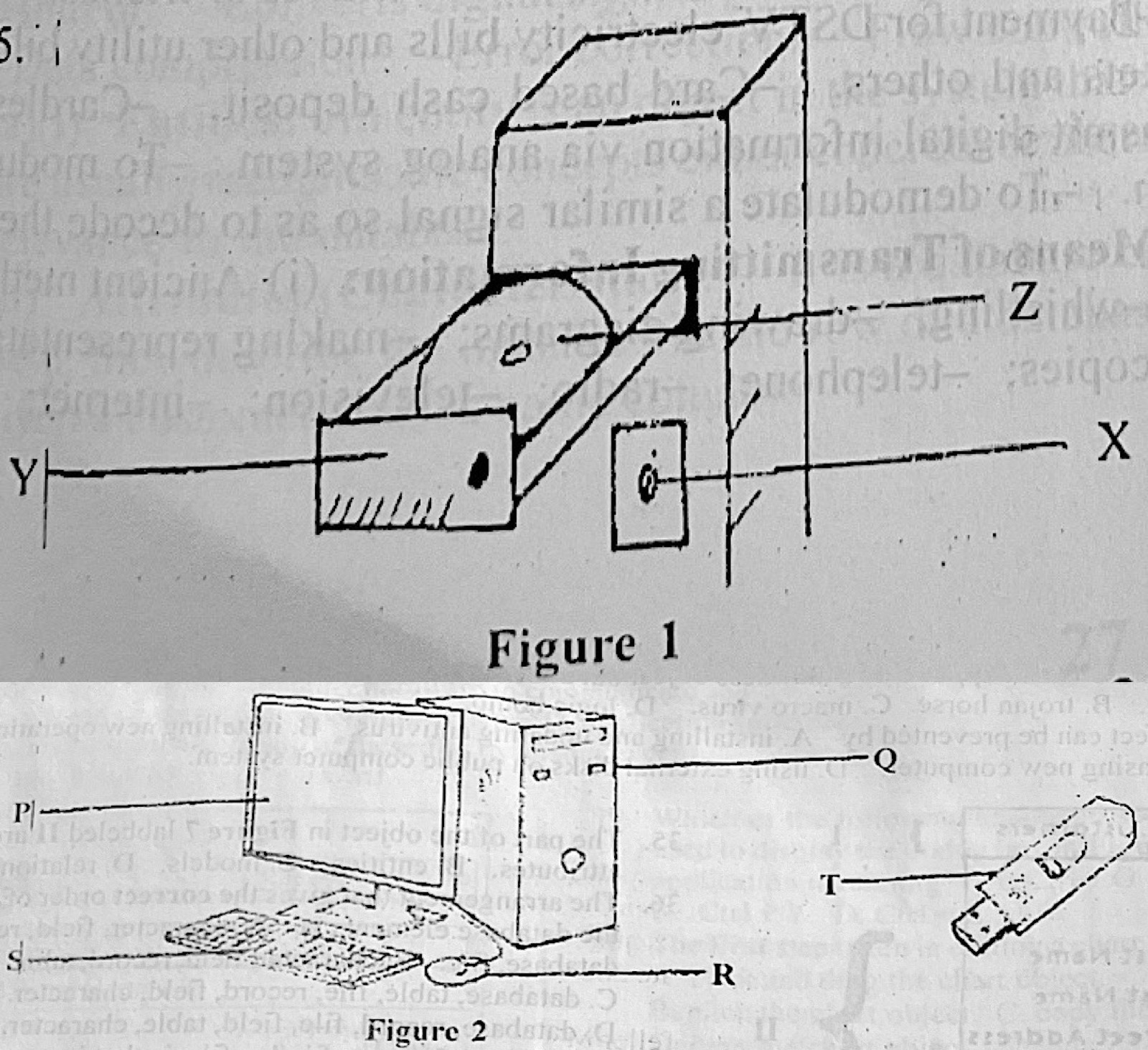
Paper 2, Section B (a) Figure 1 illustrates a part of a computer system. (i) Identify the part labelled Y. (ii) State: I. the technology used in the part labelled Z. II. the function of the part labelled X. III. one maintenance practice for the part labelled Z. (b) Figure 2 shows a setup of a computer system. State one function of each of the parts labelled P, Q, R, S, and T. (c) Outline the steps taken to perform the following tasks in CorelDraw application: (i) insert a circular shape; (ii) add the caption “Happy Birthday” around the circular shape; (iii) change the colour of the caption to green.
Show the model answer
Model answer
(a)(i) Y – the CD/DVD-ROM (optical disc) drive tray. (ii) I. Optical (laser) technology – the compact disc is read by a laser. II. X – the power/eject button, used to open and close the drive (or switch it on and off). III. Any one: clean the disc and lens with a soft lint-free cloth or lens cleaner; hold discs by the edges; keep the drive closed and free of dust. (b) P – monitor: displays output. Q – system unit: holds the CPU, memory and storage that process data. R – mouse: points and selects items on the screen. S – keyboard: types data and commands into the computer. T – flash drive: stores and carries data from one computer to another. (c)(i) Select the Ellipse tool (F7); hold Ctrl and drag to draw a circle. (ii) Select the Text tool (F8), click and type Happy Birthday; select the text, choose Text → Fit Text to Path and click the circle. (iii) Select the caption and click green on the colour palette.
Explanation
Z is a compact disc, so the technology is optical (laser).
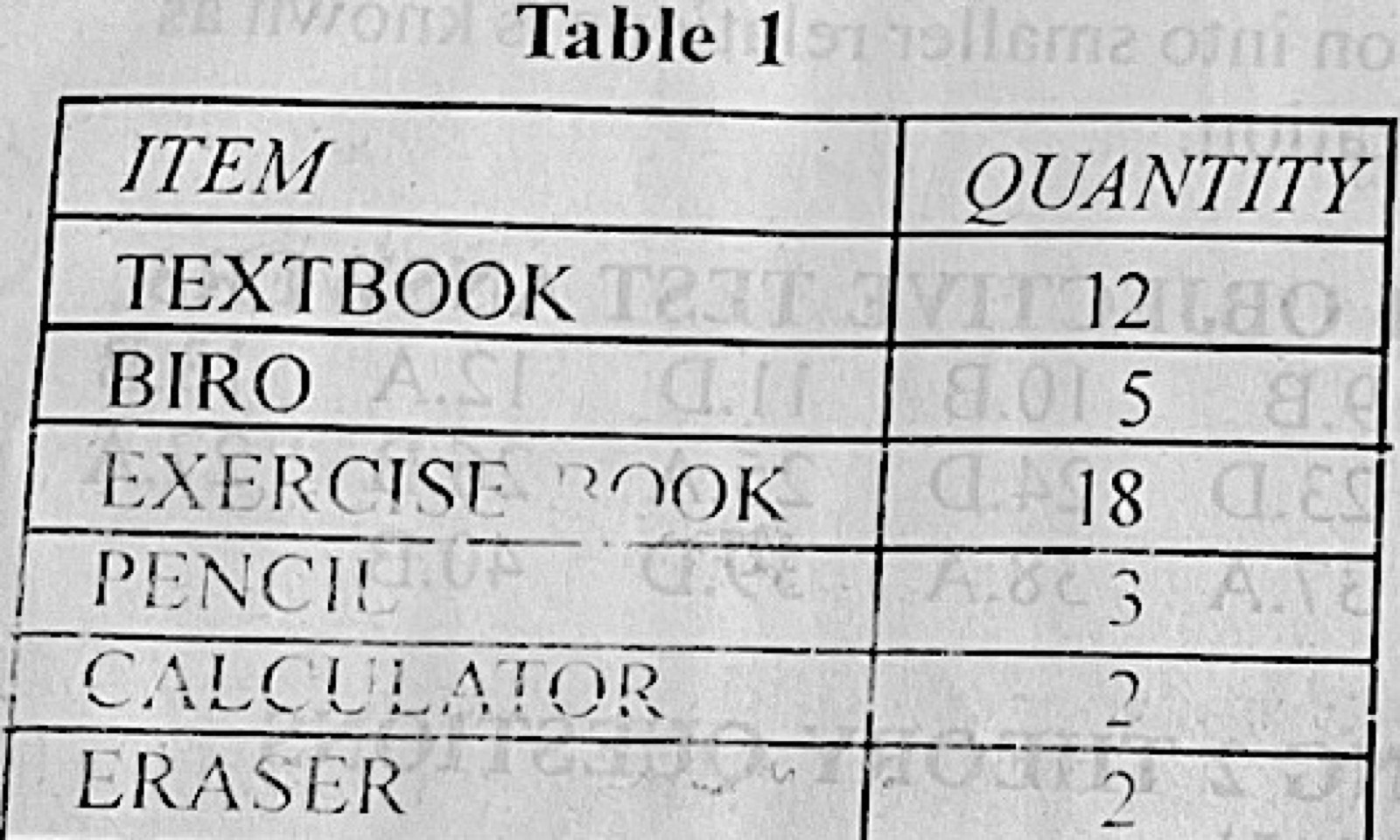
Paper 2, Section B Table 1 shows the list of items and the quantity of the item needed by a student. The table was created on an MS Excel worksheet. Use the table to answer questions 6(a)(i) - (iv) (a) Outline the steps to: (i) create a bar chart on the worksheet such that the items would be labeled on the chart and the percentage of each item included. (ii) add to the table, a new; A. column; B. row. (iii) State one function in MS Excel that can be used to determine the item with the highest quantity. (b) Outline the steps to add page border to a document using Art Design Tool in MS Word application. (c) An MS Word document contains the phrase “WAEC Exam”. Highlight the steps to link the phrase above to the WAEC website. (http://www.waec.org.ng)
Show the model answer
Model answer
(a)(i) Select the table (items and quantities); click Insert → Column/Bar chart → choose a bar chart; with the chart selected click Chart Elements (+) → Data Labels to show the item labels; to show percentages add a column with =B2/SUM($B$2:$B$7) formatted as %, and use it for the data labels (Format Data Labels → Value From Cells). (ii) A. Right-click a column letter → Insert (a new column appears to its left). B. Right-click a row number → Insert (a new row appears above it). (iii) The MAX function, e.g. =MAX(B2:B7) (or use Sort Descending / LARGE). (b) Click Design (Page Layout) → Page Borders; in the Page Border tab open the Art list and choose a design; set width and apply to Whole document; click OK. (c) Select the phrase WAEC Exam; click Insert → Hyperlink (Ctrl + K); in the Address box type http://www.waec.org.ng; click OK.
Explanation
Hyperlink = Ctrl + K; Page Borders has an Art box.