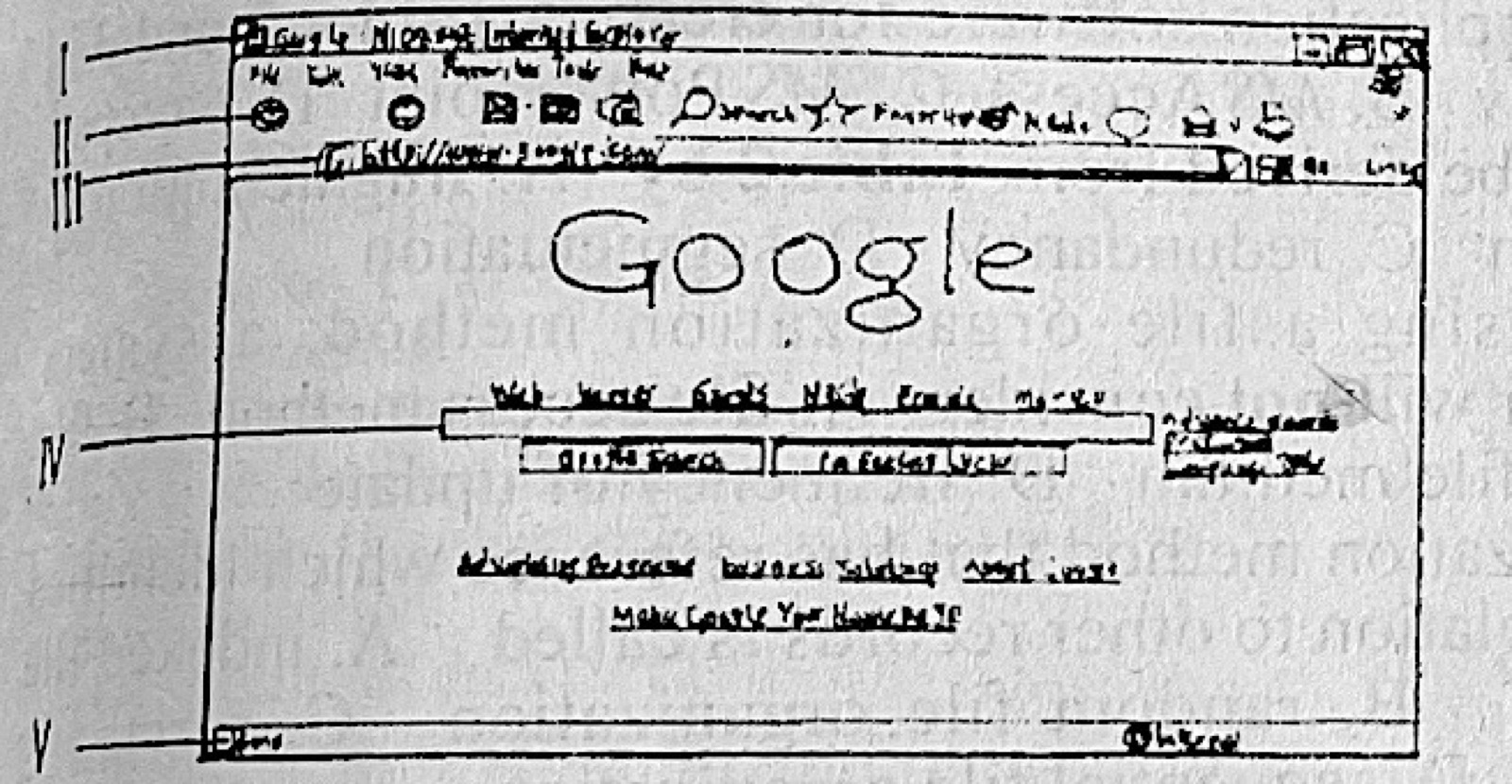
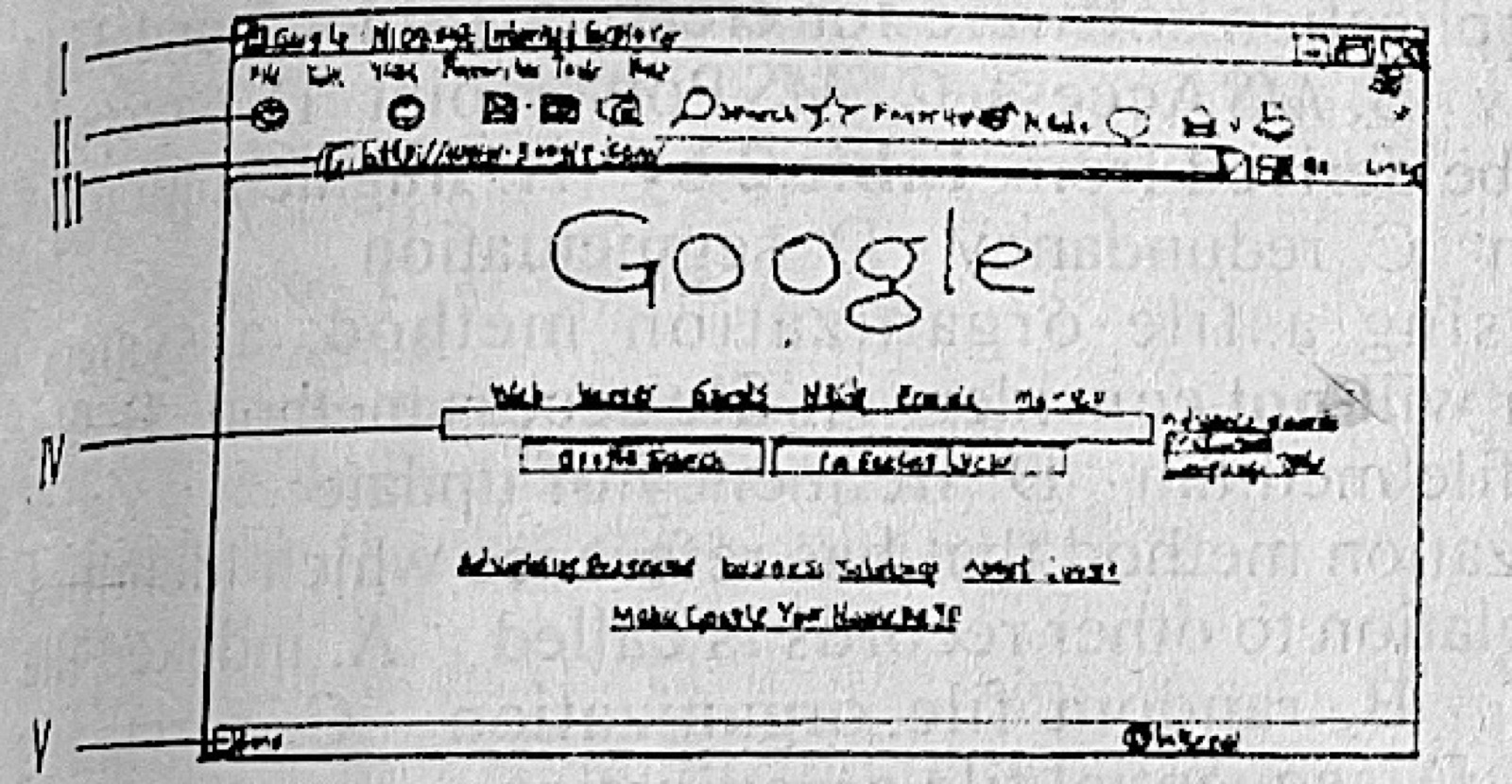
Use Figure 1 to answer questions 15 and 16. To search for information using the interface in Figure 1, the key words of the search subject is typed into the part labelled
A.I
B.II
C.IV
D.V
Show the answer and explanation
Answer: C (IV)
Explanation
Part IV is the Google search box in the middle of the page.
A user working on a computer that is running on Windows 7 issued the command: Ctrl + Alt + Del while typing a document. What interface is expected to be displayed on the screen?
A.Restart windows
B.Shutdown windows
C.Windows hibernate
D.Windows task manager
Show the answer and explanation
Answer: D (Windows task manager)
Explanation
Ctrl + Alt + Del in Windows 7 opens the security screen, from which Task Manager is started.
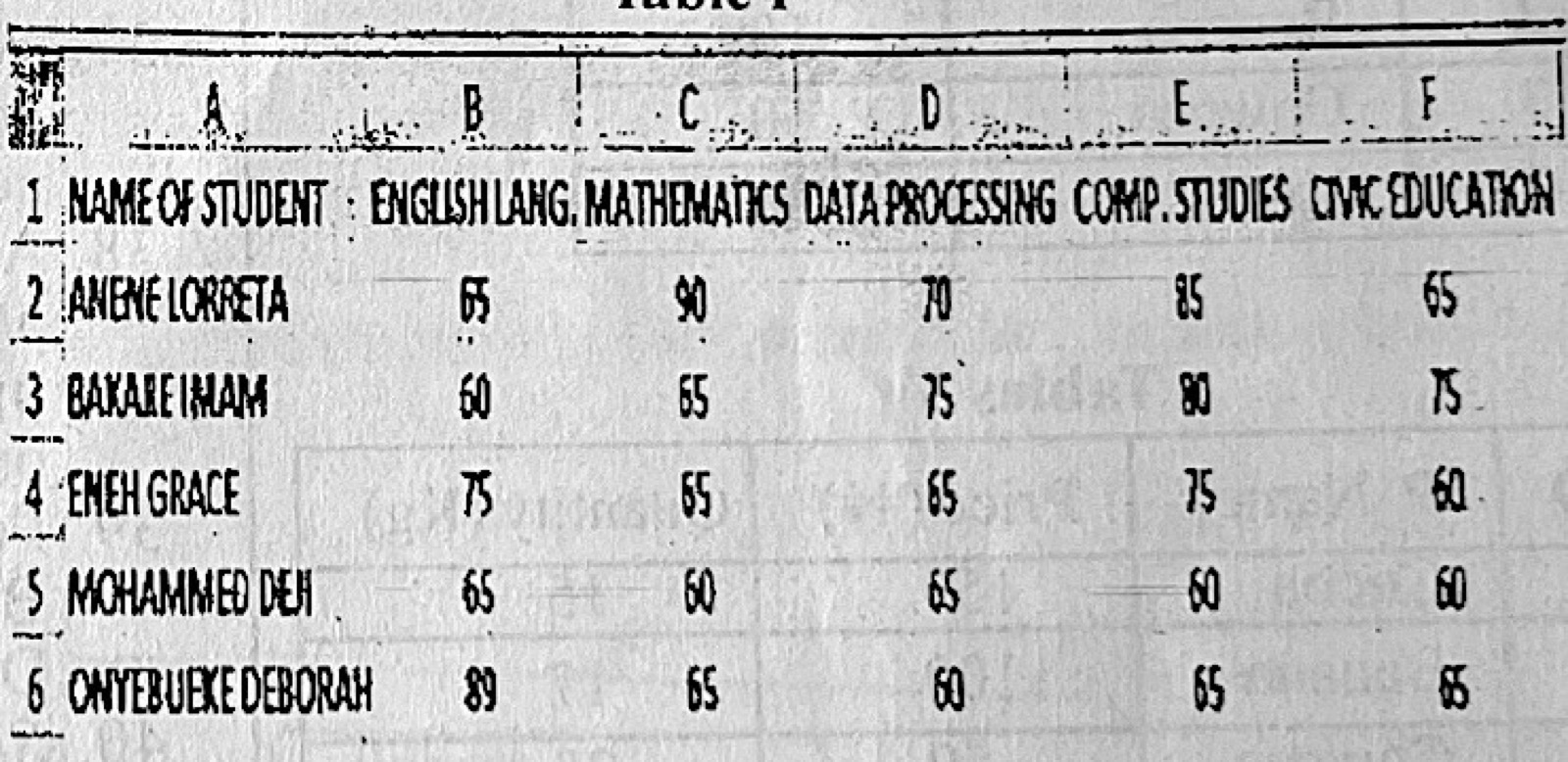
Table 1 is a portion of a Microsoft Excel Worksheet which shows the marks obtained by some students in an examination. Which of the following formulas can be used to find the average score for ENEH GRACE?
A.=AVERAGE(B4:B6)
B.=AVERAGE(B5:F5)
C.=AVERAGE(B4:F4)
D.=AVERAGE(A4:F4)
Show the answer and explanation
Answer: C (=AVERAGE(B4:F4))
Explanation
Eneh Grace is in row 4 and her marks are in columns B to F, so =AVERAGE(B4:F4).
The following statements are steps used in creating a new workbook in a Microsoft Excel application. I. Click on NewII. Click on the Microsoft Office button III. Choose blank document. Which of the following arrangements shows the correct order of operation from the steps above?
A.I, II and III
B.II, I and III
C.II, III and I
D.III, II and I
Show the answer and explanation
Answer: B (II, I and III)
Explanation
Click the Office button, then New, then choose a blank workbook.
Arrange the following steps in the correct order for editing data type in data sheet view of a Microsoft Access database. I. choose the type of data that will be entered into the fields II. Click the data sheet tab on the ribbon III. Click the field you wish to define IV. Click the ‘down’ arrow next to the data type.
A.I, III, IV and II
B.IV, III, II and I
C.II, III, I and IV
D.III, II, IV and I
Show the answer and explanation
Answer: D (III, II, IV and I)
Explanation
Select the field, open the Datasheet tab, click the Data Type drop-down arrow, then choose the type.
Paper 2, Section A: Short-structured questions (a) Define information transmission. (b) Differentiate between: (i) internet and intranet; (ii) LAN and WAN. (c) List four devices used in a LAN environment.
Show the model answer
Model answer
(a) Information transmission is sending information from one person or place to another through a communication medium. (b)(i) The internet is a worldwide public network of networks open to everyone; an intranet is a private network inside one organisation, used only by its members. (ii) A LAN covers a small area (a room, building or school); a WAN covers a large area such as countries or the whole world. (c) Any four: network interface card; hub; switch; router; cables; wireless access point; repeater; bridge; server.
Paper 2, Section A: Short-structured questions A medium scale enterprise intends to create a database to manage its staff records with the following fields: Staff ID, Name, Address, Photograph and Department. (a)(i) What is a database? (ii) List threeDBMS the firm can use to achieve the stated objectives. (b)(i) Mention two tasks that can be performed on staff photographs using graphic packages. (ii) Give three examples of graphic packages that can be used for the tasks in 2(b)(i).
Show the model answer
Model answer
(a)(i) A database is an organised collection of related data stored so that it can be easily accessed, managed and updated. (ii) Any three: Microsoft Access; MySQL; Oracle; Microsoft SQL Server; PostgreSQL; dBase. (b)(i) Any two: cropping; resizing; adjusting brightness/colour; removing red-eye; retouching; changing the background; adding text. (ii) Any three: Adobe Photoshop; CorelDraw; MS Paint; GIMP; Paint Shop Pro; PC Paintbrush.
Paper 2, Section A: Short-structured questions (a)(i) What is a presentation package? (ii) Give two examples of presentation package. (iii) State three features of a presentation package. (b) Highlight the steps followed to find and replace data in MS Excel.
Show the model answer
Model answer
(a)(i) A presentation package is software used to create slides containing text, pictures, charts, sound and video, and to show them as a slide show to an audience. (ii) Any two: Microsoft PowerPoint; Google Slides; Apple Keynote; LibreOffice Impress; Prezi. (iii) Any three: slides and slide layouts; design templates/themes; animations; slide transitions; insertion of pictures, charts, sound and video; speaker notes; slide show view. (b) Click Home → Find & Select → Replace (or press Ctrl + H); type the data to look for in 'Find what'; type the new data in 'Replace with'; click Replace (one at a time) or Replace All; click Close.
Paper 2, Section A: Short-structured questions A professional photographer uses analogue cameras and a computer system for his business. The computer is used to prepare documents and keep records of clients' accounts. Copies of these documents are stored in CD-ROMs and Floppy disks. The photographer now plans to innovate by using digital cameras and the computer for taking, editing and printing photographs. (a) State two hardware changes required on the photographer's computer to achieve the planned innovation. (b) Give one reason: (i) for each of the changes in 4(a). (ii) why the photographer should use external hard disk instead of floppy disk to store data. (c) State two advantages of switching from analogue to digital camera.
Show the model answer
Model answer
(a) Any two: add a larger hard disk or external hard disk; add more RAM; a better graphics card/high-resolution monitor; a colour photo printer; a memory card reader/USB ports; a DVD writer. (b)(i) Larger storage – photos are large files; more RAM/graphics card – editing pictures needs more memory and processing power; photo printer – to print good quality pictures; card reader – to copy photos from the camera. (ii) An external hard disk holds far more data (gigabytes/terabytes against 1.44 MB), is faster and more reliable than a floppy disk. (c) Any two: pictures can be seen immediately; no film or developing costs; photos can be edited on the computer; many pictures can be stored on one card; photos can be shared by e-mail or online quickly; bad shots can be deleted.
Paper 2, Section B: Test of Practical Work A class captain was asked to create a database in MS Access for all the students in the class without using any template and name it Student_Record. The table created is to be named Students and should have five columns/fields with the following names: ID_Number, Full Name, Date of Birth, Age, Home_Address. (a) Highlight the procedures the captain will follow to create the database. (b) List the steps the captain would take to create the table in Design View. (c) Give the data type suitable for each column/field provided. (d) Which field can be used as the primary key? (e) Mention one importance of primary keys. (f) List three SQL command statements the class captain can perform on the database. (g) Give the SQL query the captain will use to display all the columns in table Students.
Show the model answer
Model answer
(a) Open MS Access; click Blank database; type Student_Record as the file name; choose where to save; click Create. (b) Click Create → Table Design; type each field name (ID_Number, Full Name, Date of Birth, Age, Home_Address) and choose its data type; set the primary key; click Save, type Students and click OK. (c) ID_Number – Number (or Text/AutoNumber); Full Name – Text; Date of Birth – Date/Time; Age – Number; Home_Address – Text (or Memo). (d) ID_Number. (e) It identifies each record uniquely, so no two records can have the same value (no duplicates) and tables can be linked. (f) Any three: SELECT; INSERT; UPDATE; DELETE; CREATE; ALTER. (g) SELECT * FROM Students;
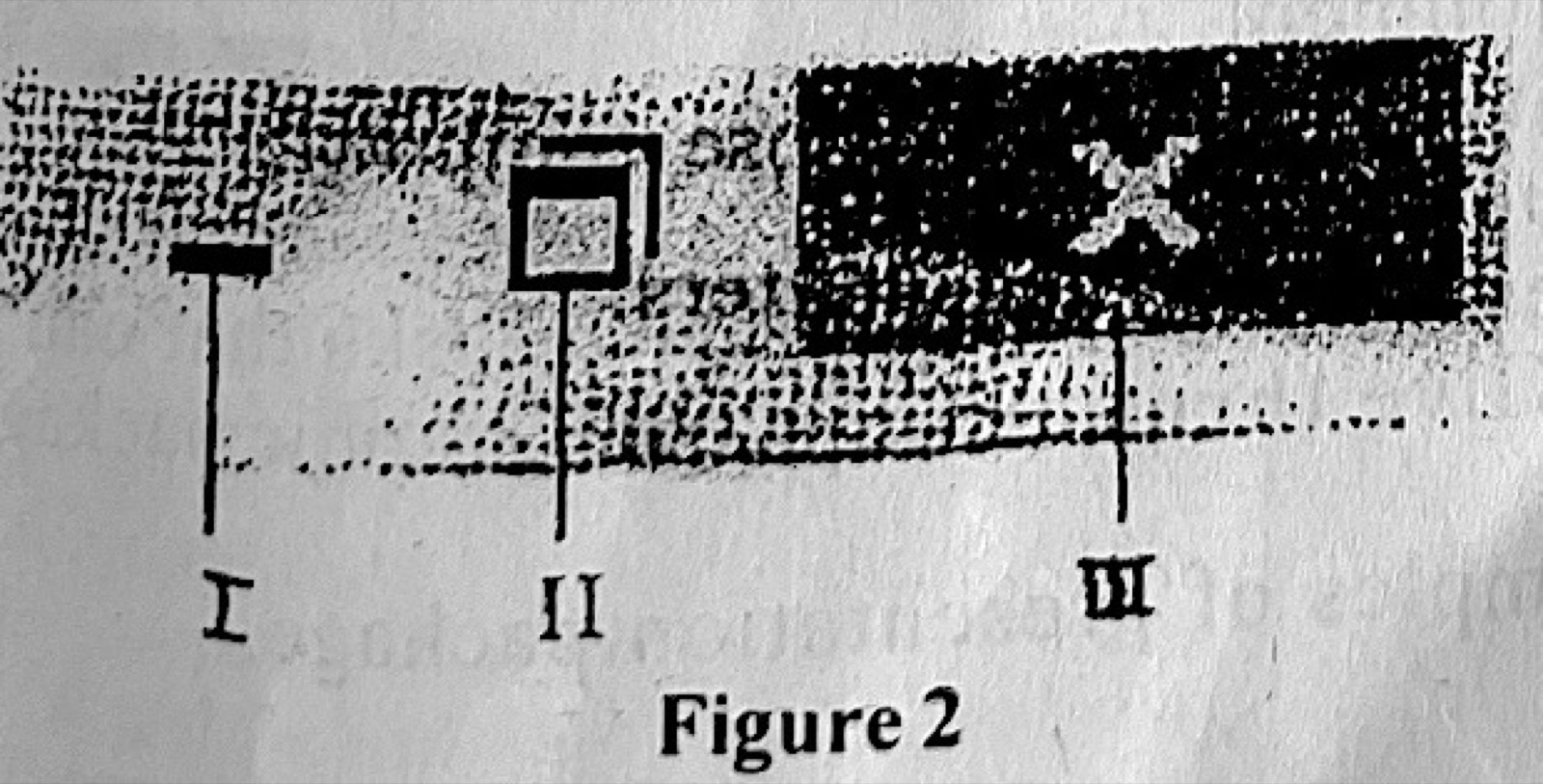
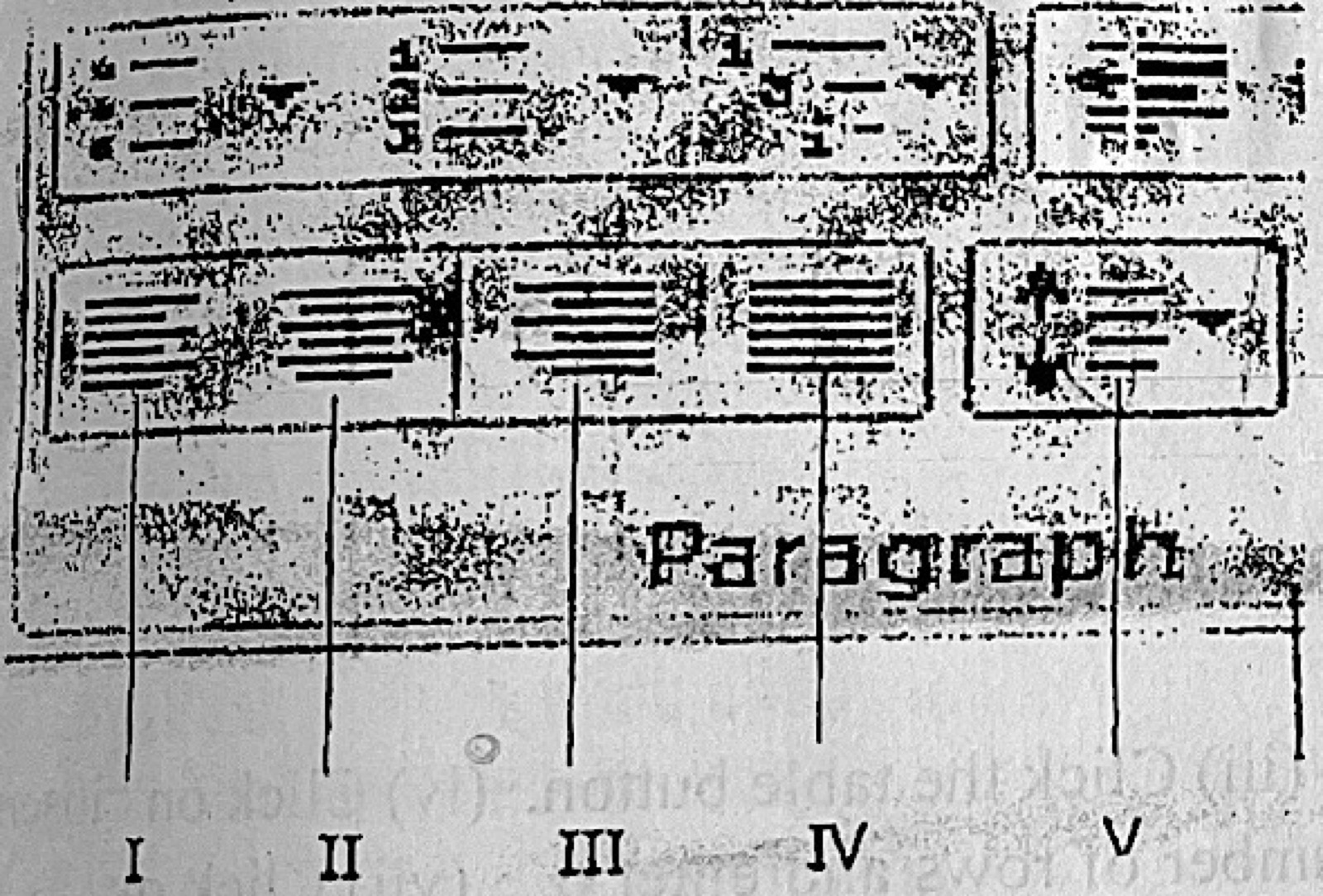
Paper 2, Section B: Test of Practical Work (a) Outline the steps taken in MS word to: (i) create a table with 4 columns and 6 rows; (ii) insert a hyperlink on a text. (b) Figure 1 is a portion of Microsoft Word interface. State the function of the parts labelled I to V in Figure 1.
Show the model answer
Model answer
(a)(i) Click Insert → Table → Insert Table; set Number of columns to 4 and Number of rows to 6; click OK. (ii) Select the text; click Insert → Hyperlink (or Ctrl + K); type the web address (or choose the file/place); click OK. (b) I – Align text left; II – Center text; III – Align text right; IV – Justify (align to both margins); V – Line and paragraph spacing.
Explanation
The buttons in the Paragraph group are the four alignments then line spacing.