Theory question 106
Information ProcessingPaper 2, Section B: Test of Practical Work
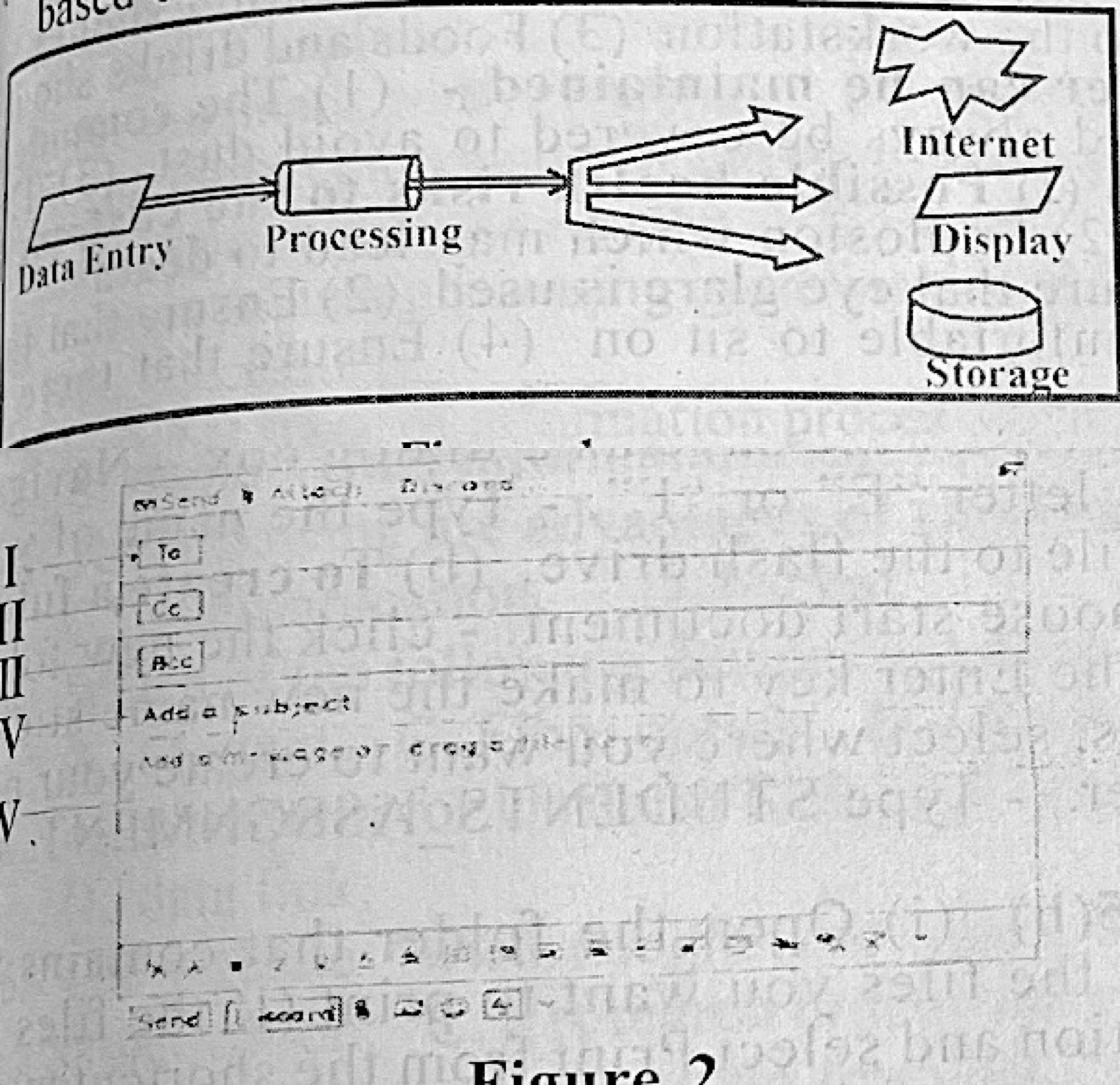
Figure 1 shows the schematic procedure of an information processing system. Input into the system are biometric based data as other details had been captured. Use the figure to answer questions 6(a) to 6(c).
(a) List: (i) two biometric data capturing devices at the data entry point; (ii) two transmission media for sending the output to the internet; (iii) one output device to give out audio output from the system; (iv) two types of data that can be viewed in the display.
(b) Give one: (i) difference between information stored in the part labelled storage and the part labelled internet in terms of access; (ii) reason the biometric data is foolproof.
(c) If data already captured into the system include: student's scores, state of origin and age; outline the two operations possible at the processing unit.
(d) Figure 2 represents the interface of an application software. Use the figure to answer questions 6(d)(i) and (ii). State one: (i) use of the parts labelled I to V: (ii) difference between the parts labelled II and III.
Show the model answer
(a)(i) Any two: fingerprint scanner; facial recognition camera; iris/retina scanner; voice recognition microphone.
(ii) Any two: fibre optic or other cable; wireless (Wi-Fi, radio, satellite, mobile network).
(iii) Speaker (or headphones).
(iv) Any two: text; numbers; pictures/images; graphics/charts; video.
(b)(i) Data in local storage is available only on that system (offline, private), while data on the internet can be reached from anywhere by authorised users online.
(ii) Biometric features (fingerprints, iris) are unique to each person and cannot easily be copied or forgotten.
(c) Any two: calculation (e.g. total and average of scores); sorting/arranging (e.g. by age or score); classification/grouping by state of origin; summarising.
(d)(i) I – To: the receiver's e-mail address; II – Cc: addresses that get a visible copy; III – Bcc: addresses that get a hidden copy; IV – Subject: the title of the message; V – message body where the text is typed.
(ii) Recipients in Cc (II) are visible to everyone; recipients in Bcc (III) are hidden from the others.
Figure 2 is an e-mail compose window: To, Cc, Bcc, Subject, body.