WAEC Data Processing 2021 past questions and answers

43 questions. Try each one, then open the answer to check yourself and read the explanation.

Question 1

History of Computers

The main component of the first generation computer was

  1. A.microchip.
  2. B.transistor.
  3. C.integrated circuit.
  4. D.electronic valve.
Show the answer and explanation

Answer: D (electronic valve.)

Explanation

First-generation computers were built with electronic valves (vacuum tubes).

Open this question

Question 2

Number Systems

The number 1011001012 in denary is

  1. A.753.
  2. B.653.
  3. C.357.
  4. D.356.
Show the answer and explanation

Answer: C (357.)

Explanation

101100101₂ = 256 + 64 + 32 + 4 + 1 = 357.

Open this question

Question 3

Data and Information

The term Garbage-In-Garbage-Out is used to explain the characteristic of the computer in terms of

  1. A.storage.
  2. B.speed.
  3. C.power.
  4. D.accuracy.
Show the answer and explanation

Answer: D (accuracy.)

Explanation

GIGO means the computer's output is only as accurate as its input, so it describes accuracy.

Open this question

Question 4

Data and Information

Which of the following statements is true?

  1. A.Data leads to information and information leads to knowledge
  2. B.Data leads to knowledge and knowledge leads to information
  3. C.Information leads to data and data leads to knowledge
  4. D.Knowledge leads to information and information leads to data.
Show the answer and explanation

Answer: A (Data leads to information and information leads to knowledge)

Explanation

Raw data is processed into information, and understanding information gives knowledge.

Open this question

Question 5

Classification of Computers

The type of computer that counts in discrete form only is referred to as

  1. A.analog computer.
  2. B.digital computer.
  3. C.hybrid computer.
  4. D.mainframe computer.
Show the answer and explanation

Answer: B (digital computer.)

Explanation

Digital computers work with discrete values (digits); analogue computers measure continuous quantities.

Open this question

Question 6

Information Transmission

Which of the following media involves point-to-point communication?

  1. A.Radio
  2. B.Satellite
  3. C.Telephone
  4. D.Television
Show the answer and explanation

Answer: C (Telephone)

Explanation

A telephone call links one caller directly to one receiver; radio and television broadcast to many.

Open this question

Question 7

ICT in Society

Fourth generation computer application can execute the following operations except

  1. A.digging of drainages.
  2. B.drainage channel design.
  3. C.management of recreational facilities.
  4. D.payroll management.
Show the answer and explanation

Answer: A (digging of drainages.)

Explanation

Computers can design drainage, manage facilities and run payroll, but physical digging is done by machines and labourers.

Open this question

Question 8

Computer Hardware

The joystick is mainly used for

  1. A.clicking on links on web pages.
  2. B.drawing and playing computer games.
  3. C.erasing of unwanted graphics.
  4. D.typing of document in a word processor.
Show the answer and explanation

Answer: B (drawing and playing computer games.)

Explanation

A joystick is mainly a games controller (also used in some drawing and simulation programs).

Open this question

Question 10

Computer Virus

Which of the following actions is not a source of computer virus?

  1. A.Checking of e-mail
  2. B.Downloading programs
  3. C.Reading from CD/DVD
  4. D.Uploading data
Show the answer and explanation

Answer: D (Uploading data)

Explanation

Viruses come into a computer through e-mail, downloads and discs; uploading sends data out of it.

Open this question

Question 11

Information Transmission

When information is conveyed from one space to another, it is referred to as information

  1. A.retrieval
  2. B.translation.
  3. C.transmission.
  4. D.transportation.
Show the answer and explanation

Answer: C (transmission.)

Explanation

Sending information from one place to another is information transmission.

Open this question

Question 13

Internet

The protocol for transferring files from one machine to another is

  1. A.SNMP.
  2. B.SMTP.
  3. C.FTP.
  4. D.FAT.
Show the answer and explanation

Answer: C (FTP.)

Explanation

FTP (File Transfer Protocol) moves files between computers; SMTP is for e-mail.

Open this question

Question 14

Computer Networks

Mr. Francis has an office complex with 20 rooms. What type of network is suitable for connecting all the computers in their various rooms into a single network?

  1. A.LAN
  2. B.MAN
  3. C.PAN
  4. D.WAN
Show the answer and explanation

Answer: A (LAN)

Explanation

One building or office complex is a small area, so a Local Area Network fits.

Open this question

Question 15

Internet

The following software are web browsers except

  1. A.Firefox.
  2. B.Google Chrome.
  3. C.Linux.
  4. D.Opera.
Show the answer and explanation

Answer: C (Linux.)

Explanation

Linux is an operating system; Firefox, Chrome and Opera are browsers.

Open this question

Question 16

Internet

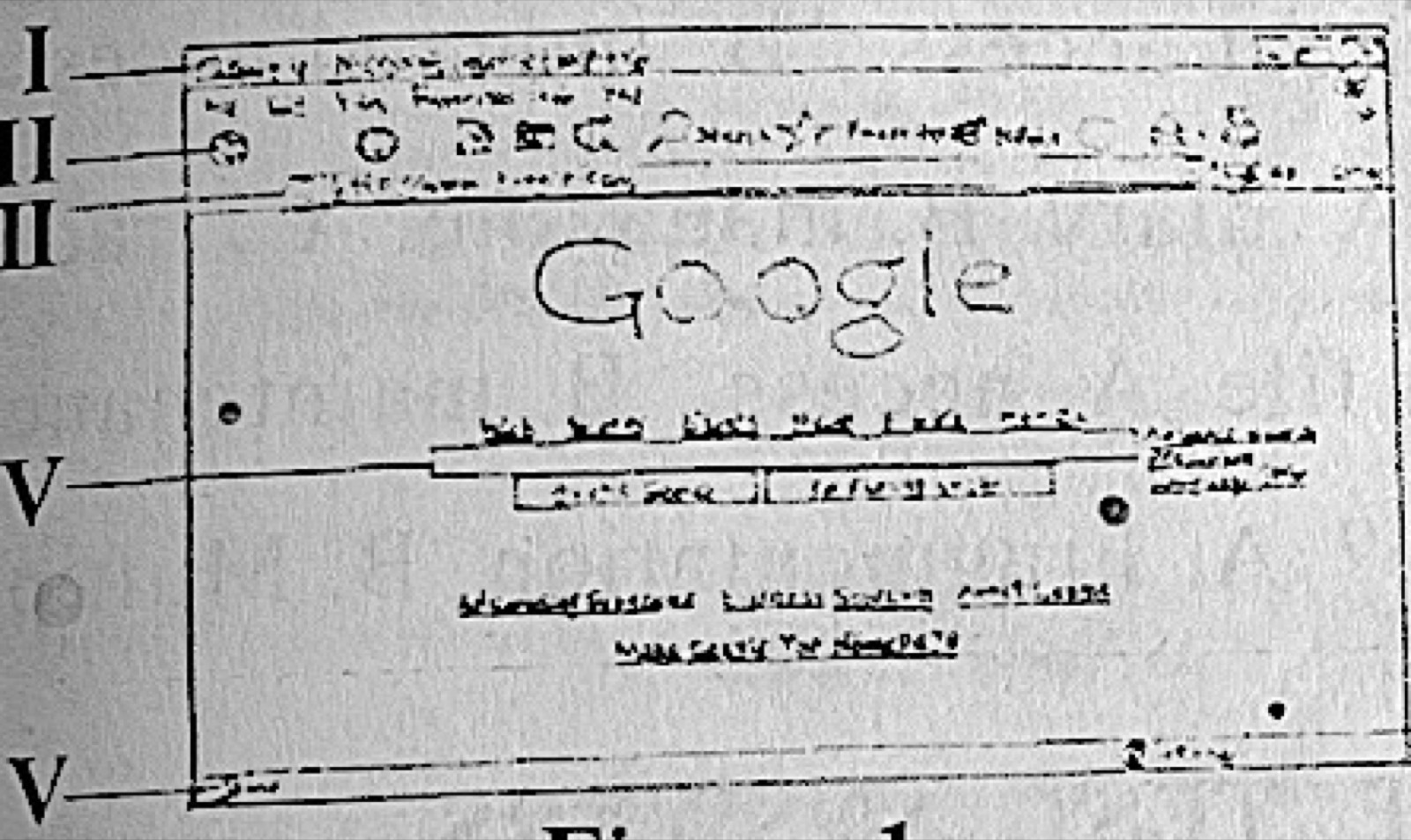
To visit the previous page using the interface in Figure 1, the user will click on the part labelled

Diagram for this question
  1. A.I.
  2. B.II.
  3. C.III.
  4. D.IV.
Show the answer and explanation

Answer: B (II.)

Explanation

The Back button sits at the left of the navigation bar, next to the address box, which is the row labelled II.

Open this question

Question 17

Software and Operating Systems

An operating system that enables more than one user to access the same data is called

  1. A.multi-tasking OS.
  2. B.multi-user OS.
  3. C.single user OS.
  4. D.virtual memory OS.
Show the answer and explanation

Answer: B (multi-user OS.)

Explanation

A multi-user OS lets several users use the system and its data at once.

Open this question

Question 18

Word Processing

The feature of a word document that shows the page, number of words and errors found in a document is the

  1. A.menu bar.
  2. B.scroll bar.
  3. C.status bar.
  4. D.title bar.
Show the answer and explanation

Answer: C (status bar.)

Explanation

The status bar at the bottom of the Word window shows the page number, word count and proofing errors.

Open this question

Question 19

Word Processing

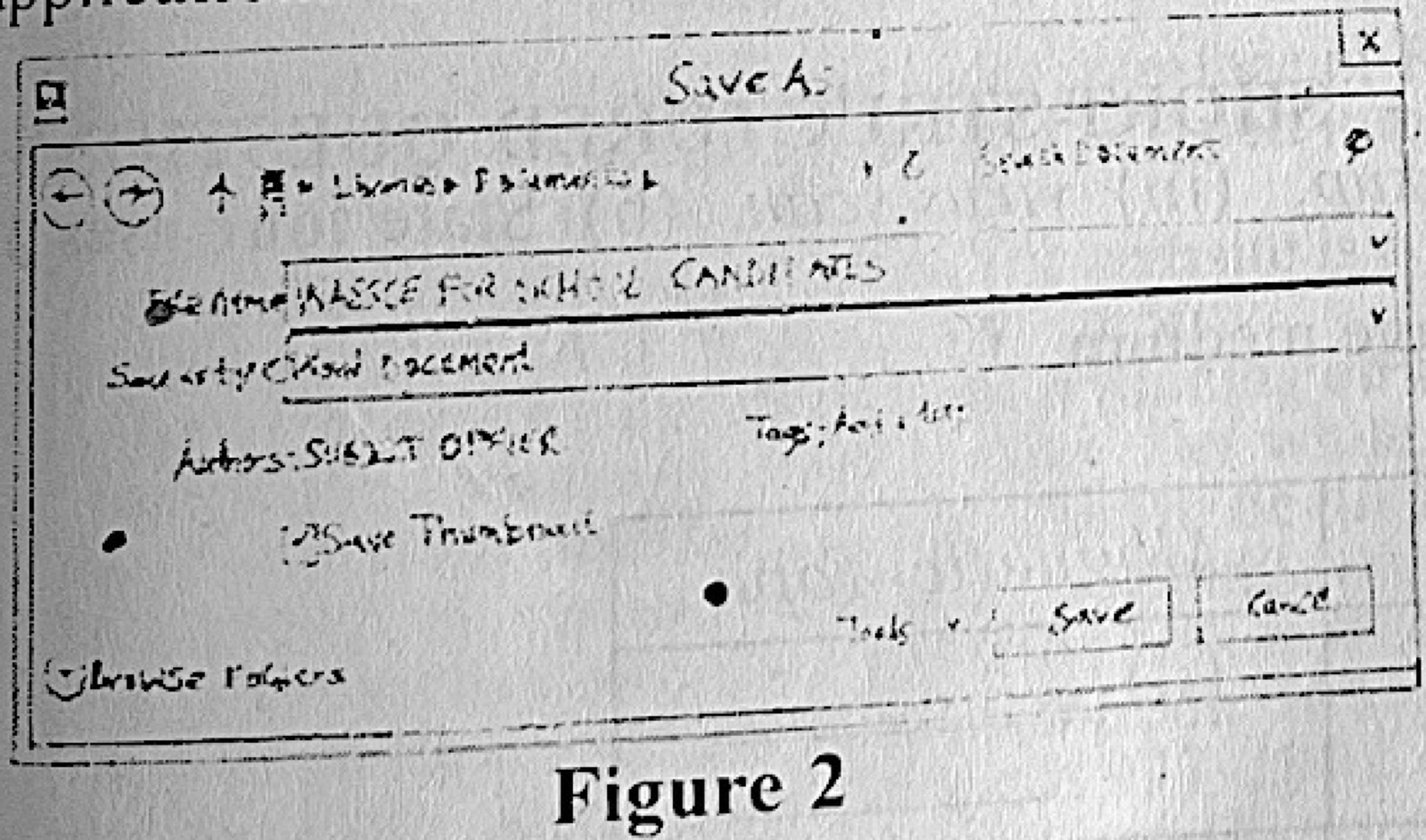
Figure 2 shows a dialog box from Microsoft Word application. Use it to answer question 19.
Which of the following command shortcuts can be used to display the dialog box in Figure 2 when the application is running?

Diagram for this question
  1. A.Ctrl + O
  2. B.Ctrl + S
  3. C.Ctrl + Y
  4. D.Ctrl + Z
Show the answer and explanation

Answer: B (Ctrl + S)

Explanation

Figure 2 is the Save As box, which Ctrl + S opens for a document not yet saved.

Open this question

Question 20

Spreadsheet

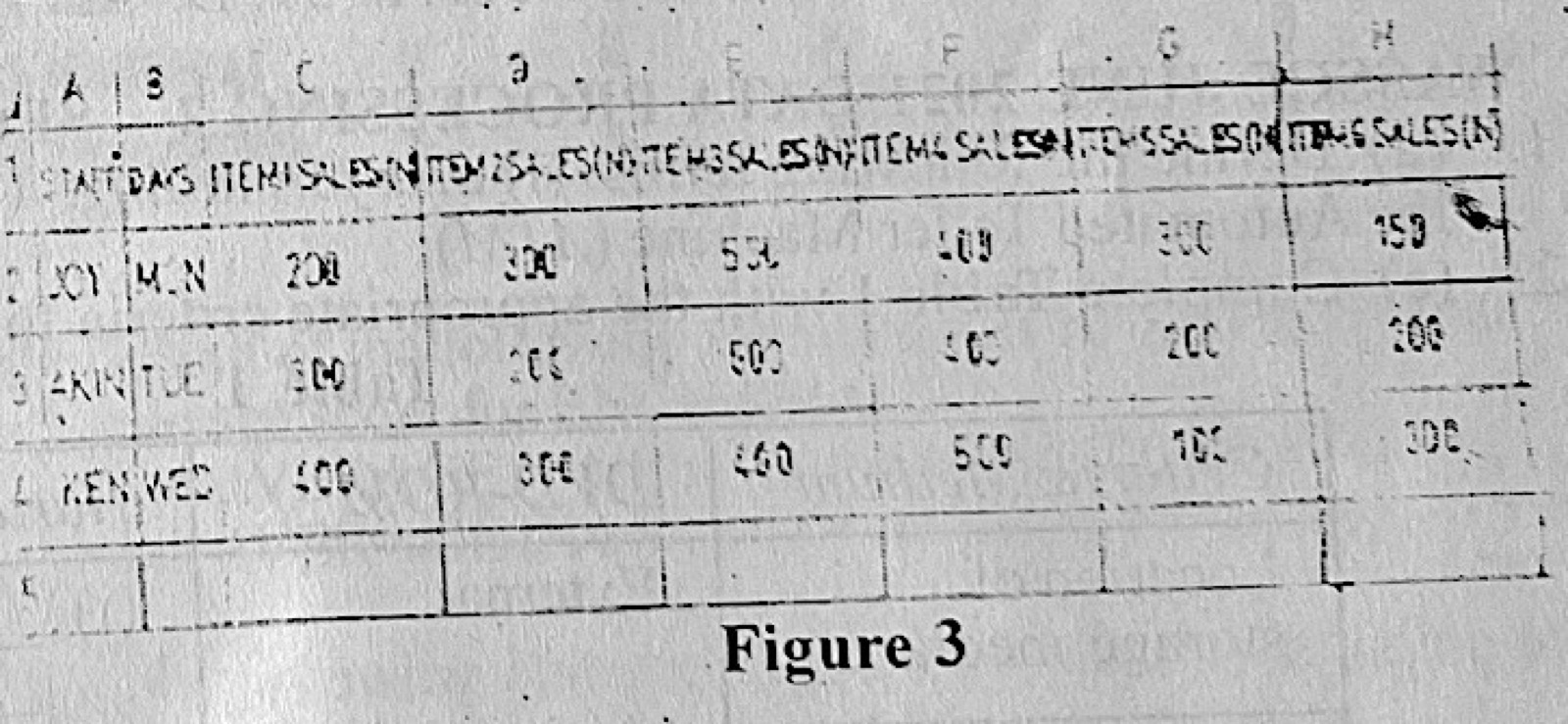
Figure 3 is an excerpt of a company's sales record on an MS Excel worksheet. Use it to answer question 20.
The highest sale by Joy is recorded in cell

Diagram for this question
  1. A.F1.
  2. B.B4.
  3. C.H3.
  4. D.E2.
Show the answer and explanation

Answer: D (E2.)

Explanation

Joy's sales are in row 2, and the largest of them (500) is in column E, cell E2.

Open this question

Question 21

Spreadsheet

The formula to calculate the average of a given range of data from cell B2 to cell D4 in a Microsoft Excel worksheet is

  1. A.=AVERAGE(B2+D4).
  2. B.=AVERAGE(B2:D4)
  3. C.=AVERAGE(B2, D4)
  4. D.=AVERAGE(B2:D4).
Show the answer and explanation

Answer: B (=AVERAGE(B2:D4))

Explanation

A range is written with a colon, so =AVERAGE(B2:D4) averages every cell from B2 to D4.

Open this question

Question 22

Database Management

The field in a database which uniquely identifies each record is called a

  1. A.composite key.
  2. B.foreign key.
  3. C.local key.
  4. D.primary key.
Show the answer and explanation

Answer: D (primary key.)

Explanation

The primary key has a different value for every record.

Open this question

Question 23

Database Management

The correct order of the steps taken in creating a database from the database template in MS Access 2007 is

  1. A.click on the Office button → click New → choose a database of your choice.
  2. B.click New → click on Office button → choose a database of your choice.
  3. C.click on database of your choice → click New → click on Office button.
  4. D.click New → choose database of your choice → click on Office button.
Show the answer and explanation

Answer: A (click on the Office button → click New → choose a database of your choice.)

Explanation

In Access 2007 you open the Office button menu, click New, then pick the template you want.

Open this question

Question 24

Presentation Package

To show the whole presentation in Microsoft PowerPoint 2007, select slide show from the

  1. A.design tab.
  2. B.home tab.
  3. C.title bar.
  4. D.menu bar.
Show the answer and explanation

Answer: D (menu bar.)

Explanation

Slide Show is one of the tabs on PowerPoint 2007's ribbon (the menu bar), not on the Design or Home tab.

Open this question

Question 25

Web Design

Web design packages include the following except

  1. A.Macromedia Dreamweaver
  2. B.iWeb
  3. C.Front Page.
  4. D.Adobe PageMaker.
Show the answer and explanation

Answer: D (Adobe PageMaker.)

Explanation

PageMaker is a desktop publishing program; Dreamweaver, iWeb and FrontPage build websites.

Open this question

Question 26

Graphics Packages

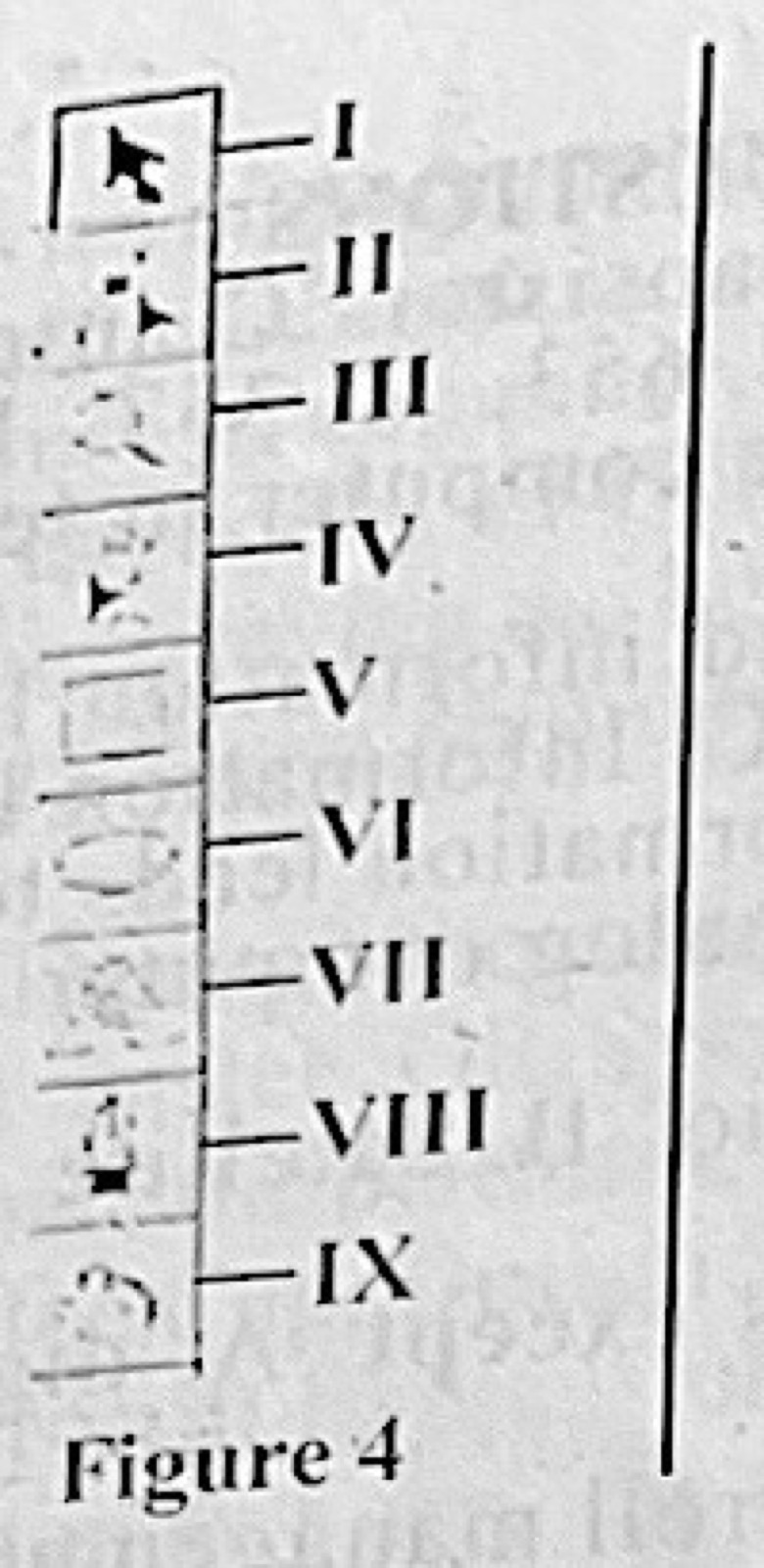
Figure 4 shows CorelDraw tool bar. The part labelled I is used to

Diagram for this question
  1. A.shape objects.
  2. B.select objects.
  3. C.draw lines and curves.
  4. D.create texts.
Show the answer and explanation

Answer: B (select objects.)

Explanation

Tool I is the Pick tool (arrow), used to select objects.

Open this question

Question 27

Computer Maintenance

One precautionary measure taken when cleaning a monitor is

  1. A.plugging of power supply cable.
  2. B.spraying a windows cleaner on the monitor.
  3. C.unplugging the power supply cable.
  4. D.using a vacuum cleaner to clean the monitor casing.
Show the answer and explanation

Answer: C (unplugging the power supply cable.)

Explanation

Unplug the monitor first so there is no risk of shock.

Open this question

Question 28

Computer Maintenance

The erratic movement of the mouse pointer is usually caused by

  1. A.damaged driver.
  2. B.dirty mouse ball.
  3. C.improper connection of mouse cable.
  4. D.outdated driver.
Show the answer and explanation

Answer: B (dirty mouse ball.)

Explanation

Dirt on the ball and rollers makes the pointer jump about.

Open this question

Question 29

Computer Ethics and Safety

The use of the internet to perform illegal activities is generally called

  1. A.cyber crime.
  2. B.packet sniffing.
  3. C.phishing.
  4. D.spamming.
Show the answer and explanation

Answer: A (cyber crime.)

Explanation

Any crime committed using the internet is cyber crime; phishing and spamming are particular kinds.

Open this question

Question 30

Computer Ethics and Safety

One safety measure to consider in a computer room is

  1. A.arranging the chairs in the room together.
  2. B.keeping liquid within the room.
  3. C.closing the door always.
  4. D.maintaining a dust-free environment.
Show the answer and explanation

Answer: D (maintaining a dust-free environment.)

Explanation

Dust harms computers and users' health, so the room should be kept dust-free.

Open this question

Question 31

Data Security

Security breaches in computing cannot be prevented through the use of

  1. A.antivirus.
  2. B.encryption.
  3. C.firewall.
  4. D.firmware.
Show the answer and explanation

Answer: D (firmware.)

Explanation

Firmware is built-in control software for hardware; antivirus, encryption and firewalls are security tools.

Open this question

Question 32

Computer Professionals

A system analyst is a person who

  1. A.designs flowchart.
  2. B.designs and implements new solutions.
  3. C.trains computer users.
  4. D.writes complex computer programs.
Show the answer and explanation

Answer: B (designs and implements new solutions.)

Explanation

A systems analyst studies problems and designs and puts in place new computer solutions.

Open this question

Question 33

Computer Virus

The malware which is programmed to initiate at a specific date or when a specific event occurs is called

  1. A.directory virus.
  2. B.logic bomb.
  3. C.polymorphic virus.
  4. D.root kit virus.
Show the answer and explanation

Answer: B (logic bomb.)

Explanation

A logic bomb waits until a set date or event, then acts.

Open this question

Question 34

Information Processing

One advantage of information processing is that

  1. A.face-to-face interaction among staff may be reduced.
  2. B.initial investment cost can be high.
  3. C.running cost becomes lower in the long run.
  4. D.it encourages the training/retraining of staff.
Show the answer and explanation

Answer: C (running cost becomes lower in the long run.)

Explanation

Computers cost a lot at first, but they save money over time, so running costs fall.

Open this question

Question 35

Database Management

The function of the SQL statement SELECT Student ID, Surname, House Name FROM Student, is that it

  1. A.retrieves the listed fields from student table.
  2. B.highlights the listed fields from student table.
  3. C.hides the selected fields from student table.
  4. D.deletes the listed fields from student table.
Show the answer and explanation

Answer: A (retrieves the listed fields from student table.)

Explanation

SELECT retrieves (displays) the named fields from the table.

Open this question

Question 37

File Organisation

A file organization that contains a reference number is called

  1. A.direct access.
  2. B.indexed access.
  3. C.random access.
  4. D.sequential access.
Show the answer and explanation

Answer: B (indexed access.)

Explanation

An indexed file keeps an index of reference numbers (keys) pointing to the records.

Open this question

Question 38

Information Transmission

The following media are used for information transmission except

  1. A.diary.
  2. B.magazine.
  3. C.radio.
  4. D.television.
Show the answer and explanation

Answer: A (diary.)

Explanation

A diary is a private record; magazines, radio and television spread information to people.

Open this question

Question 39

Data Security

To prevent the loss of data in the computer, it is better to implement file

  1. A.access.
  2. B.maintenance.
  3. C.checks.
  4. D.backup.
Show the answer and explanation

Answer: D (backup.)

Explanation

Backups keep copies so data can be restored after loss.

Open this question

Question 40

Distributed and Parallel Databases

Which of the following terms is not a feature of distributed database?

  1. A.Fragmentation
  2. B.Multiple storage
  3. C.Replication
  4. D.Single server.
Show the answer and explanation

Answer: D (Single server.)

Explanation

A distributed database spreads data over many sites, so a single server is not one of its features.

Open this question

Theory question 101

Computer Maintenance

Paper 2, Section A: Short-structured questions
(a) Define the following terms: (i) disk formatting. (ii) data backup. (iii) virus scan. (b) State four uses of the Automated Teller Machine (ATM).

Show the model answer
Model answer

(a)(i) Disk formatting is preparing a storage medium (hard disk, flash drive) for first use by setting up its file system; it erases what was on it.
(ii) Data backup is making a copy of data and keeping it elsewhere so it can be restored if the original is lost.
(iii) A virus scan is using antivirus software to search the computer or a drive for viruses and other malware and remove them.
(b) Any four: withdrawing cash; checking account balance; transferring money (intra- and inter-bank); printing mini statements; buying airtime; paying bills; changing PIN.

Explanation

Give one clear sentence for each definition.

Open this question

Theory question 102

Computer Hardware

Paper 2, Section A: Short-structured questions
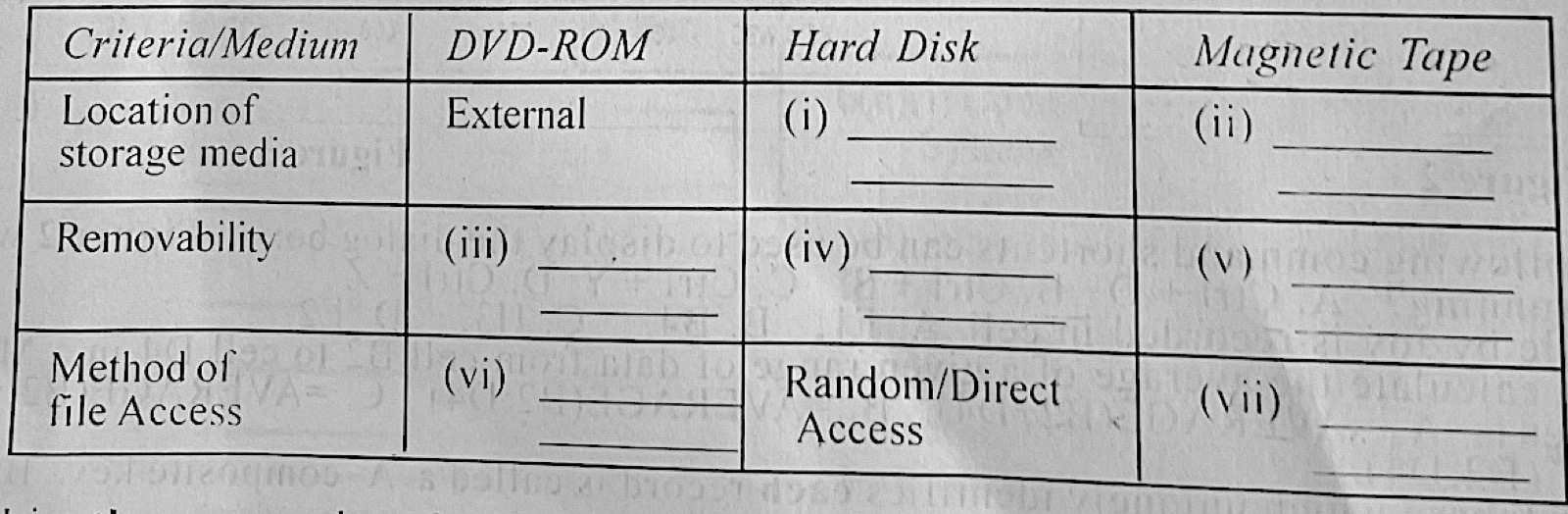
(a) Complete Table 1 with the appropriate criteria for each storage medium.
(b) List three examples of spreadsheet applications.

Diagram for this question
Show the model answer
Model answer

(a) (i) Hard disk – location: internal (inside the system unit).
(ii) Magnetic tape – location: external.
(iii) DVD-ROM – removable.
(iv) Hard disk – not removable (fixed).
(v) Magnetic tape – removable.
(vi) DVD-ROM – direct (random) access.
(vii) Magnetic tape – sequential (serial) access.
(b) Any three: Microsoft Excel; Lotus 1-2-3; Google Sheets; LibreOffice/OpenOffice Calc; VisiCalc; Apple Numbers.

Explanation

Tape is read in order (sequential); discs can jump to any file (direct).

Open this question

Theory question 103

Classification of Computers

Paper 2, Section A: Short-structured questions
(a) (i) State three ways of classifying computers. (ii) Differentiate between digital and analog computers. (b) List three positive impacts of ICT on the society. (c) Give two types of information transmission medium.

Show the model answer
Model answer

(a)(i) By size (super, mainframe, mini, micro); by type/data handled (analogue, digital, hybrid); by purpose (general purpose, special purpose).
(ii) A digital computer works with discrete values (digits 0 and 1) and gives exact results; an analogue computer works with continuously changing quantities (e.g. temperature, speed) and measures rather than counts.
(b) Any three: faster and cheaper communication; e-learning; e-banking and e-commerce; better health care; job creation; easy access to information; entertainment.
(c) Wired (guided), e.g. cables, fibre optics; wireless (unguided), e.g. radio waves, satellite.

Explanation

Digital counts, analogue measures.

Open this question

Theory question 104

Computer Ethics and Safety

Paper 2, Section A: Short-structured questions
A certain business centre provides computer and internet services to the public. The owner is concerned that there is no restraint on consumption of food and drinks by the customers and also about possible health hazards to the computer users. (a) Give two safety precautions that must be put in place to protect the workstations in the business centre from foods and drinks. (b) State two ways the computers can be maintained to ensure efficiency in serving the customers. (c)(i) Name three possible health risks to the customers while using the computers in the centre. (ii) How can the risks in 4(c)(i) be reduced?

Show the model answer
Model answer

(a) Any two: put up a notice banning food and drinks at the computers; provide a separate eating area away from the workstations; use keyboard and equipment covers; have staff enforce the rule.
(b) Any two: clean the computers and keep them dust-free; scan regularly with updated antivirus; update software; use UPS/stabilisers; service hardware regularly.
(c)(i) Any three: eye strain; back and neck pain; repetitive strain injury (wrist pain); headache; electric shock.
(ii) Use anti-glare screens and good lighting and take breaks (eye strain); use adjustable chairs and sit upright (back pain); use wrist rests and correct keyboard height (RSI); keep cables safe and equipment earthed (shock).

Explanation

Match each health risk with a way to reduce it.

Open this question

Theory question 105

Software and Operating Systems

Paper 2, Section B: Test of Practical Work
A student was given an assignment which involved typesetting a passage at home using a laptop computer. The student was required to bring the soft copy of the assignment in a flash drive with volume label STUDENT_ASSIGNMENT to the school. Highlight the steps the student would take to: (a) save the typeset work in the flash drive; (b) create a folder named ASSIGNMENTS on the desktop of a computer in the school's computer laboratory and save the typeset assignment in the folder; (c) print the assignment from the folder created in 5(b).

Show the model answer
Model answer

(a) Insert the flash drive into a USB port; in Word click File → Save As; choose the flash drive (STUDENT_ASSIGNMENT) as the location; type a file name; click Save.
(b) Right-click the desktop → New → Folder; type ASSIGNMENTS and press Enter; insert the flash drive, open it, right-click the assignment file → Copy; open the ASSIGNMENTS folder → right-click → Paste.
(c) Open the ASSIGNMENTS folder; open the assignment (double-click); click File → Print (Ctrl + P); choose the printer and number of copies; click Print. (Or right-click the file → Print.)

Explanation

Save As lets you choose the flash drive as the location.

Open this question

Theory question 106

Information Processing

Paper 2, Section B: Test of Practical Work
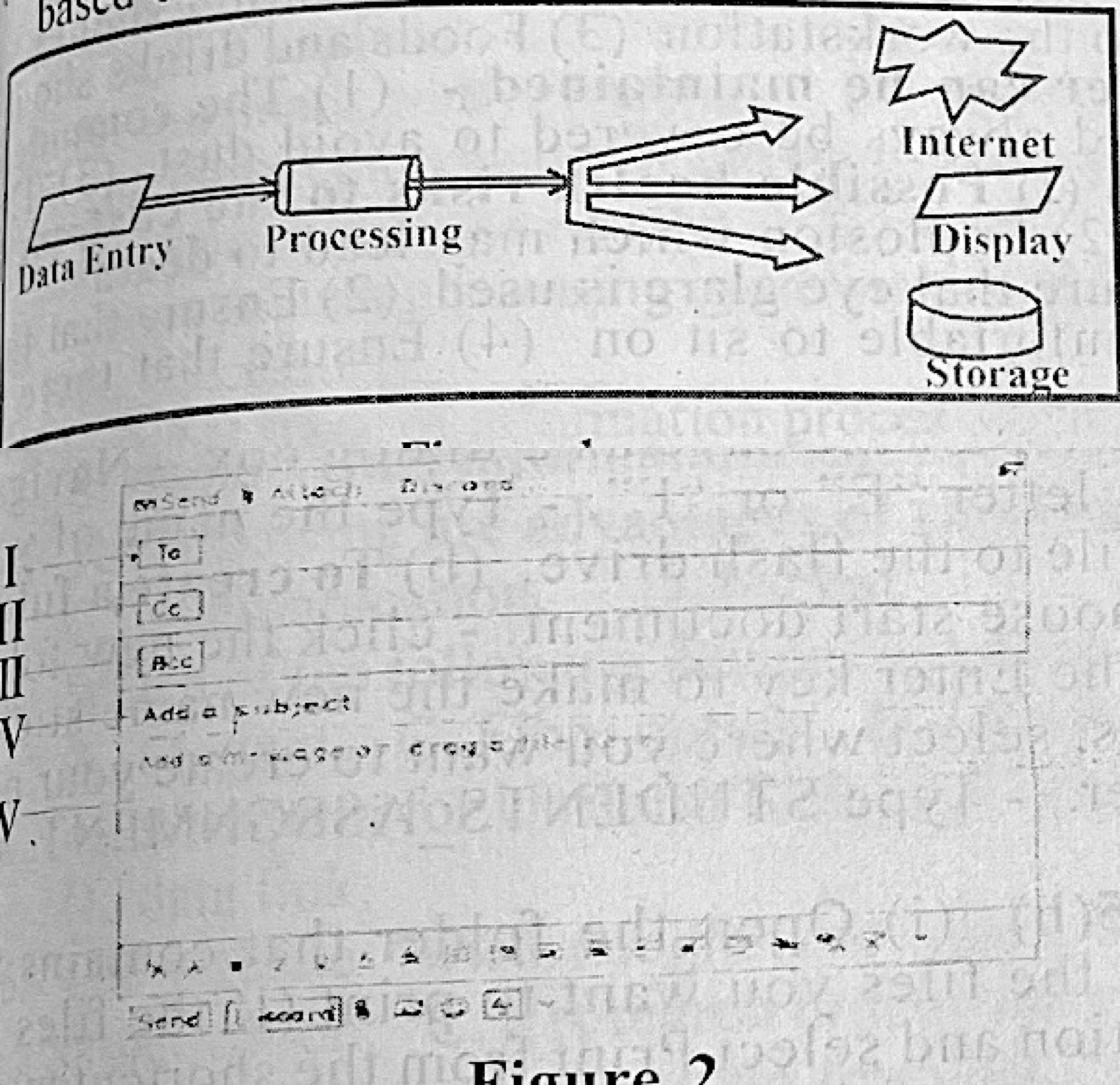
Figure 1 shows the schematic procedure of an information processing system. Input into the system are biometric based data as other details had been captured. Use the figure to answer questions 6(a) to 6(c).
(a) List: (i) two biometric data capturing devices at the data entry point; (ii) two transmission media for sending the output to the internet; (iii) one output device to give out audio output from the system; (iv) two types of data that can be viewed in the display.
(b) Give one: (i) difference between information stored in the part labelled storage and the part labelled internet in terms of access; (ii) reason the biometric data is foolproof.
(c) If data already captured into the system include: student's scores, state of origin and age; outline the two operations possible at the processing unit.
(d) Figure 2 represents the interface of an application software. Use the figure to answer questions 6(d)(i) and (ii). State one: (i) use of the parts labelled I to V: (ii) difference between the parts labelled II and III.

Diagram for this question
Show the model answer
Model answer

(a)(i) Any two: fingerprint scanner; facial recognition camera; iris/retina scanner; voice recognition microphone.
(ii) Any two: fibre optic or other cable; wireless (Wi-Fi, radio, satellite, mobile network).
(iii) Speaker (or headphones).
(iv) Any two: text; numbers; pictures/images; graphics/charts; video.
(b)(i) Data in local storage is available only on that system (offline, private), while data on the internet can be reached from anywhere by authorised users online.
(ii) Biometric features (fingerprints, iris) are unique to each person and cannot easily be copied or forgotten.
(c) Any two: calculation (e.g. total and average of scores); sorting/arranging (e.g. by age or score); classification/grouping by state of origin; summarising.
(d)(i) I – To: the receiver's e-mail address; II – Cc: addresses that get a visible copy; III – Bcc: addresses that get a hidden copy; IV – Subject: the title of the message; V – message body where the text is typed.
(ii) Recipients in Cc (II) are visible to everyone; recipients in Bcc (III) are hidden from the others.

Explanation

Figure 2 is an e-mail compose window: To, Cc, Bcc, Subject, body.
Open this question