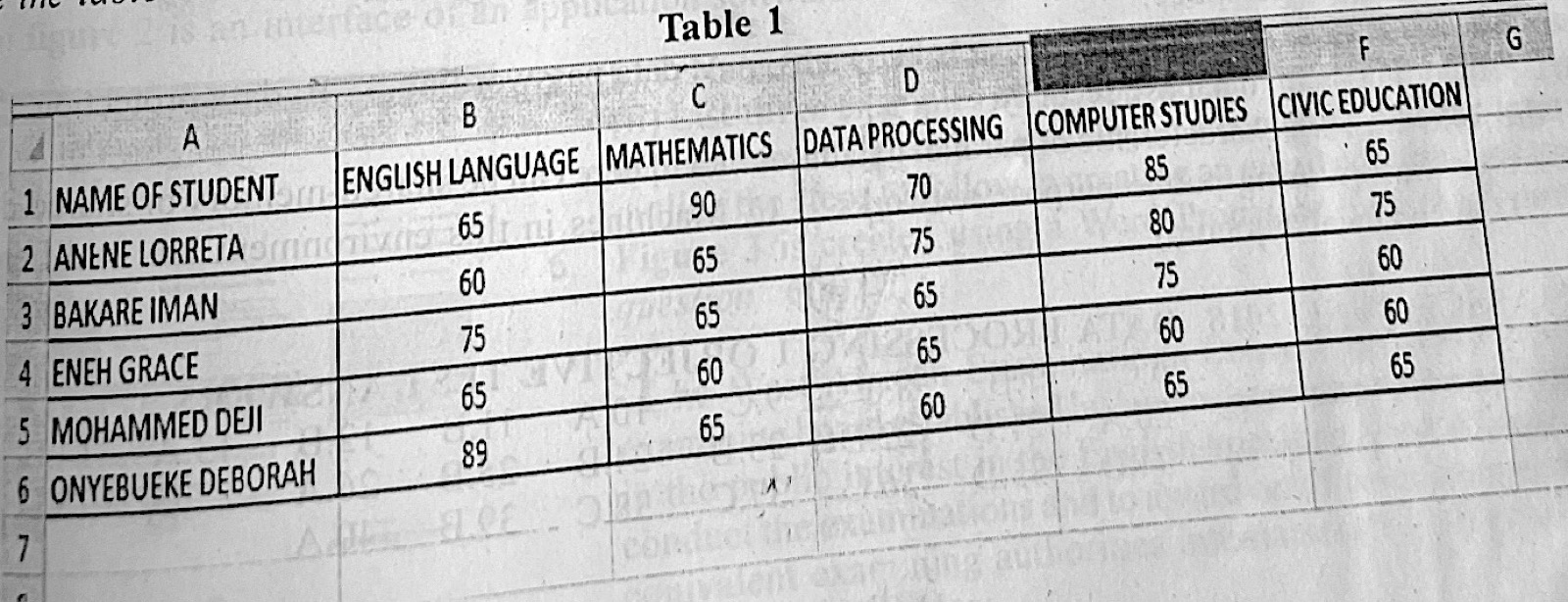
Table 1 is a part of MS Excel worksheet which shows the marks obtained by some students in an examination. Which of the following formulas would calculate the average score of the students in Mathematics?
A.=Average (C2: C6)
B.=Average (C2: F2)
C.=Average (C1: C6)
D.=Average (C1: F1)
Show the answer and explanation
Answer: A (=Average (C2: C6))
Explanation
Mathematics is column C and the students are in rows 2 to 6, so use =AVERAGE(C2:C6).
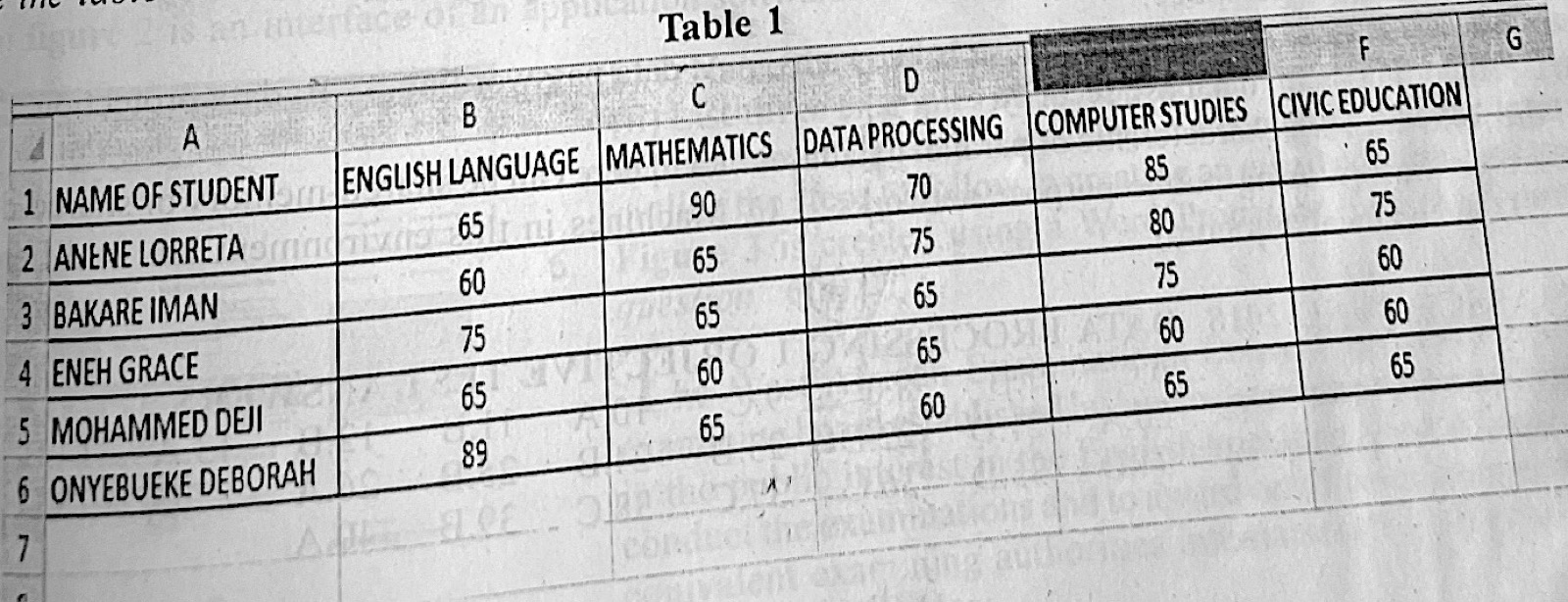
Table 1 is a part of MS Excel worksheet which shows the marks obtained by some students in an examination. Which of the following formulas would calculate the total score of ONYEBUEKE DEBORAH in the five subjects?
A.=SUM(B2: B6)
B.=SUM(A6: G6)
C.=SUM(A2: A6)
D.=SUM(B6: F6)
Show the answer and explanation
Answer: D (=SUM(B6: F6))
Explanation
Onyebueke Deborah is in row 6 and the five subjects are columns B to F, so =SUM(B6:F6).
Paper 2, Section A: Essay (a)(i) What is data model? (ii) State three types of data model. (b)(i) List three approaches to data modelling. (ii) Explain any one approach listed in 1(b)(i).
Show the model answer
Model answer
(a)(i) A data model is a plan (representation) showing how data is organised, how data items relate to each other and how they are stored and processed in a database. (ii) Any three: conceptual; logical; physical data model (or hierarchical, network, relational, object-oriented models). (b)(i) Any three: hierarchical; network; relational; object-oriented; entity-relationship approach. (ii) e.g. Relational: data is kept in tables (relations) of rows and columns, and tables are linked by keys. Or Hierarchical: records are arranged in a tree of parent and child records, each child having one parent. Or Object-oriented: data and the operations on it are stored together as objects with attributes and methods.
Explanation
Explain one approach well, with how data is arranged in it.
Paper 2, Section A: Essay (a) Vera, a secretary to the manager of the organization is saddled with the responsibility of typing a confidential report. She is also instructed to insert the word “CONFIDENTIAL” diagonally in the background of every page of the report. (i) State the most suitable application software needed by Vera to produce the report. (ii) What feature of the application software can be used to insert the word “CONFIDENTIAL” as instructed? (iii) Mention one measure that can be taken to ensure the confidentiality of the soft copy of the report in the computer. (b) Explain the following terms: (i) icon (ii) browser.
Show the model answer
Model answer
(a)(i) A word processor, e.g. Microsoft Word. (ii) Watermark (Design/Page Layout → Watermark → CONFIDENTIAL, diagonal). (iii) Any one: protect the file with a password; encrypt it; use a user account password on the computer; keep it in a hidden/protected folder. (b)(i) An icon is a small picture on the screen that stands for a program, file, folder or command; clicking it opens or runs it. (ii) A browser is a program used to find, open and view web pages on the internet, e.g. Chrome, Firefox, Edge.
Paper 2, Section A: Essay (a) Outline the steps involved in printing the first five pages of a Word document from the print dialog box on a computer with two printers installed. (b) Sadiq complained that a pop-up usually appears on the screen of his personal computer thereby disturbing him while using the computer. (i) What is the possible cause of the pop-up? (ii) State a possible source of the element causing the pop-up? (iii) What measure would be necessary to stop the pop-up from reoccurring? (c) Mr. Aneke is billed to address a large audience in an audiorium. (i) What computer application package is suitable to prepare and deliver his speech? (ii) State the output device that can be used to transmit Mr. Aneke's speech note from his computer to a large screen in the auditorium. (d) Give two types of computer network.
Show the model answer
Model answer
(a) Click File → Print (or Ctrl + P); in the printer list choose the printer to use; under Pages/Print range type 1-5; set the number of copies; click Print/OK. (b)(i) Adware or another malware/virus infection (or an unwanted program running). (ii) Any one: downloads from untrusted websites; infected flash drives; e-mail attachments; free software bundled with adware. (iii) Install/update antivirus or anti-malware and scan the computer; remove the program; turn on the pop-up blocker in the browser. (c)(i) A presentation package, e.g. Microsoft PowerPoint. (ii) A multimedia projector. (d) Any two: LAN; MAN; WAN; PAN.
Explanation
Choose the printer first, then type the page range 1-5.
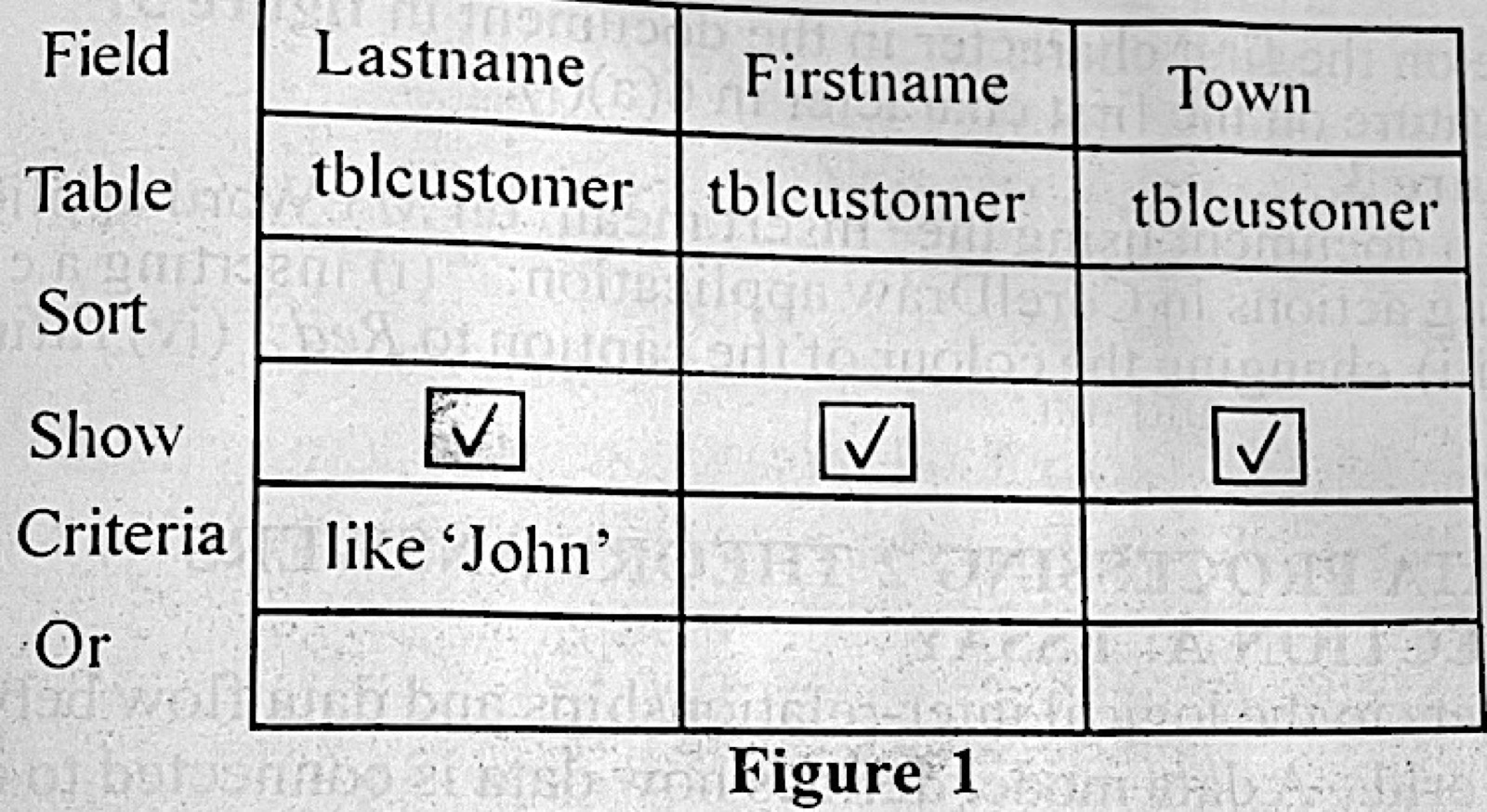
Paper 2, Section A: Essay (a) Outline the steps involved in creating the Query By Example (QBE) in figure 1 assuming the table tblcustomer exists already. (b) Write the steps to generate the SQL statement for the action in 4(a).
Show the model answer
Model answer
(a) Open the database in MS Access; click Create → Query Design; add tblcustomer and close the Show Table box; double-click (or drag) Lastname, Firstname and Town into the grid; tick Show for all three; in the Criteria row under Lastname type Like 'John'; save the query and click Run. (b) With the query open, click View → SQL View; the SQL statement is shown: SELECT tblcustomer.Lastname, tblcustomer.Firstname, tblcustomer.Town FROM tblcustomer WHERE tblcustomer.Lastname Like 'John';
Explanation
Copy the field names, table and criterion exactly from Figure 1.
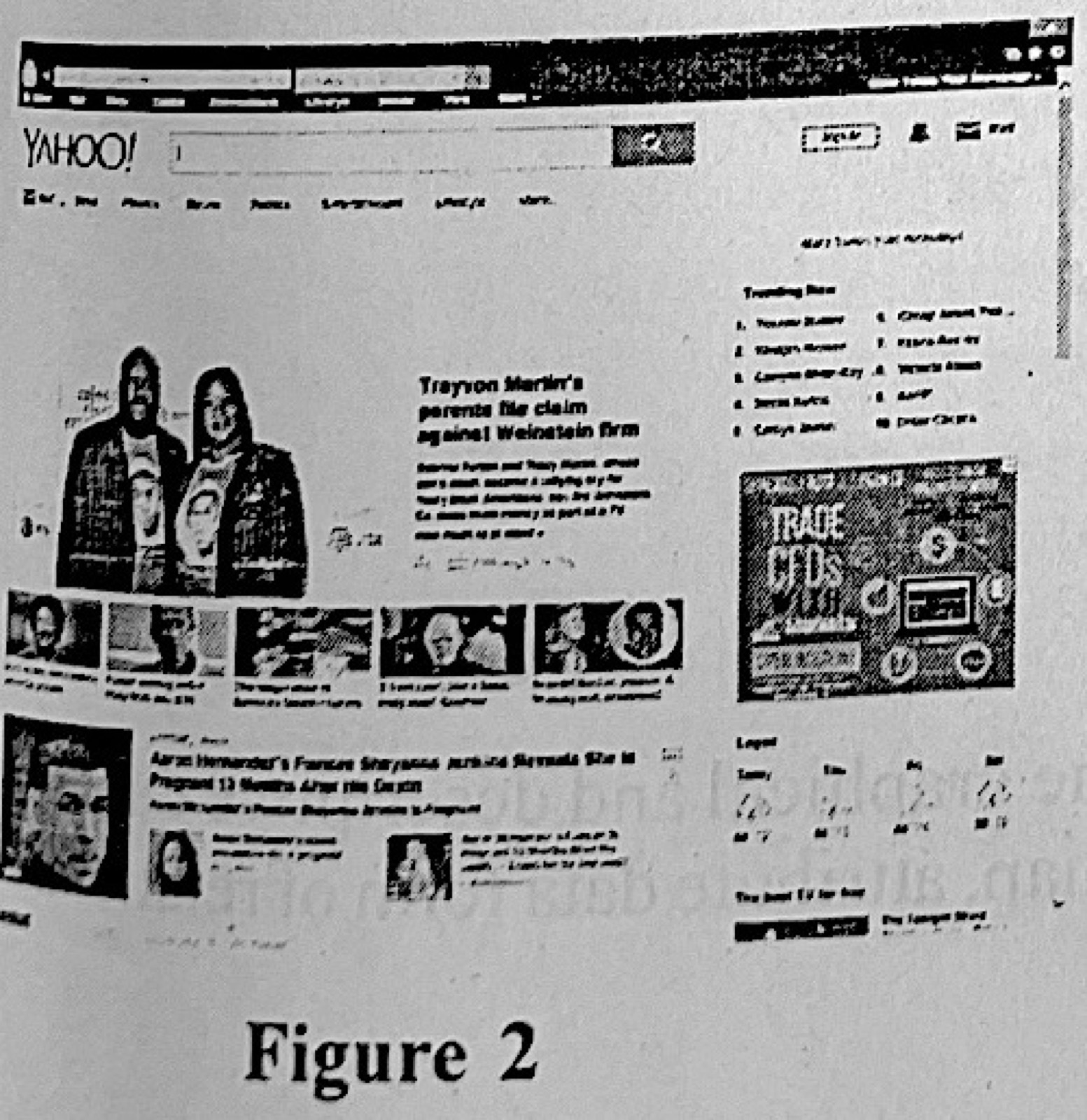
Paper 2, Section B (a) Itoro was tasked with the responsibility of producing the report of his group project. He is to submit both the soft and hard copies of the report to his form teacher. The soft copy must be sumbitted to the email: formteacher@school.edu.ng. (i) List two: I. applications required to carry out the task; II. hardware required to carry out the task. (ii) Identify two conditions to be satisfied by Itoro to submit the electronic copy of the report. (iii) On the first attempt to send the soft copy of the report, Itoro observed a ‘spinning wait cursor’/‘spinning disc pointer’ on the screen for a long time. Identify three possible reasons for the observation. (iv) State one output device that can be used to produce the hard copy of the report. (b) Figure 2 is an interface of an application software. (i) Name the type of application software represented in figure 2 (ii) List three examples of the application in 5(b)(i). (iii) Given that the application in figure 2 is running on a computer that has Internet access, outline the steps to follow in creating an email addresss/account.
Show the model answer
Model answer
(a)(i) I. Any two: word processor (MS Word); web browser; e-mail program. II. Any two: computer (system unit, monitor, keyboard, mouse); printer; modem/router or network card. (ii) Any two: he must have an e-mail account; internet connection; the report saved as a file (to attach); the teacher's correct address. (iii) Any three: slow or poor internet connection; the attachment file is large; the computer is low on memory or busy with many programs; the system is infected with a virus; the mail server is busy. (iv) A printer. (b)(i) A web browser (showing the Yahoo web portal). (ii) Any three: Google Chrome; Mozilla Firefox; Microsoft Edge/Internet Explorer; Opera; Safari. (iii) Type the mail site (e.g. www.yahoo.com) in the address bar and press Enter; click Mail → Sign up/Create account; fill in name, preferred e-mail address, password, date of birth and phone number; complete the verification (code sent to phone); accept the terms and click Continue/Create account.
Explanation
Think about what can slow sending: the connection, file size and the computer.
Paper 2, Section B Figure 3 is created using a Word Processor. Use the figure to answer question 6(a). (a)(i) What is the name given to the feature on the first character in the document in figure 3? (ii) Highlight the steps to: I. achieve the feature on the first character in 6(a)(i); II. obtain the two columns as shown in figure 3. (b) Give two objects that can be placed on a document using the ‘Insert mean’ on MS Word application. (c) Outline the steps to perform the following actions in CorelDraw application: (i) inserting a circular shape; (ii) adding the caption ‘Happy Birthday’; (iii) changing the colour of the caption to Red; (iv) fitting the caption around the circular object.
Show the model answer
Model answer
(a)(i) Drop cap. (ii) I. Click in the first paragraph; click Insert → Drop Cap → Dropped (choose lines to drop) → OK. II. Select the text to be in columns; click Page Layout (Layout) → Columns → Two (or More Columns, choose 2, tick Line between) → OK. (b) Any two: picture/clip art; table; shapes; chart; text box; WordArt; SmartArt; symbol; header and footer; hyperlink. (c)(i) Select the Ellipse tool (F7); hold Ctrl and drag on the page to draw a perfect circle. (ii) Select the Text tool (F8); click on the page and type Happy Birthday. (iii) Select the text; click red on the colour palette (or set Fill to red). (iv) Select the text, then Text → Fit Text to Path; click the circle; adjust the position.