Theory question 105
Word ProcessingPaper 2, Section B
(a) A teacher asked a student to capture and print out a one-slide presentation assignment using, MS word, showing everything on the screen. (i) What keys or combination of keys can be used to carry out this operation? (ii) Describe the procedure to be followed by the student in carrying out this assignment using the keyboard.
(b) A system analyst was hired to set up a computer laboratory for Bofe International School. (i) Mention three hardware devices the analyst would need to set up the laboratory. (ii) List three database application packages likely to be recommended by the analyst. (iii) State three Word processing packages likely to be installed.
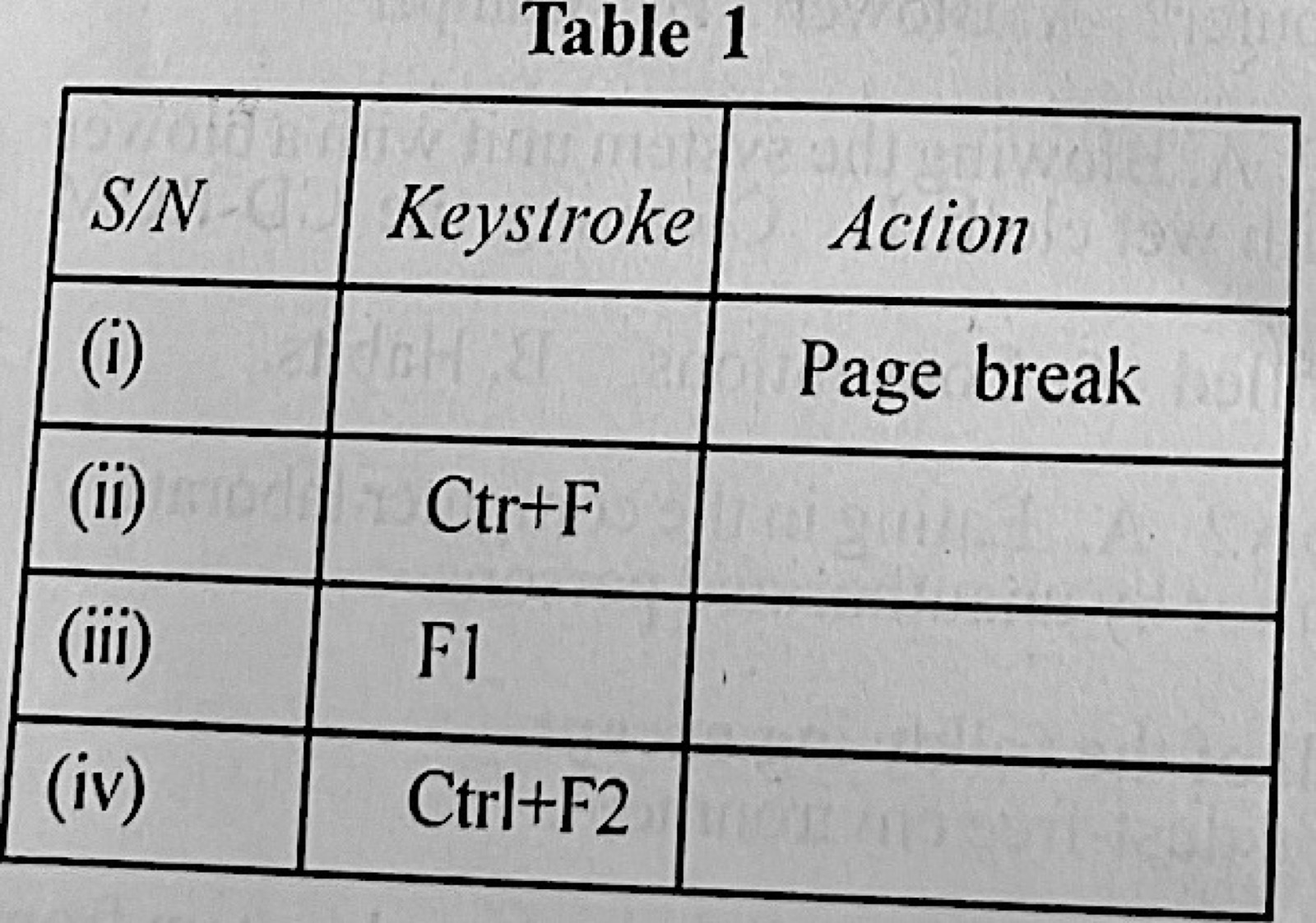
(c) Complete Table 1 on keyboard shortcuts.
Show the model answer
(a)(i) The Print Screen (PrtSc) key (Alt + PrtSc for the active window only), then Ctrl + V to paste and Ctrl + P to print.
(ii) With the slide displayed, press PrtSc; open MS Word (Windows key, type Word, Enter); press Ctrl + V to paste the screen picture; press Ctrl + P and Enter to print (Ctrl + S to save if needed).
(b)(i) Any three: computers (system units, monitors, keyboards, mice); printer; UPS/stabiliser; network switch/router; scanner; projector.
(ii) Any three: Microsoft Access; Oracle; MySQL; SQL Server; dBase; FoxPro.
(iii) Any three: Microsoft Word; WordPerfect; WordPad; LibreOffice/OpenOffice Writer; WordStar.
(c) (i) Page break – Ctrl + Enter. (ii) Ctrl + F – Find. (iii) F1 – Help. (iv) Ctrl + F2 – Print Preview.
Print Screen copies the whole screen to the clipboard, ready to paste.