WAEC Data Processing 2017 past questions and answers

44 questions. Try each one, then open the answer to check yourself and read the explanation.

Question 1

History of Computers

One characteristic feature of the second generation computers is the presence of

  1. A.vacuum tubes.
  2. B.transistors.
  3. C.micro-chips.
  4. D.integrated circuit.
Show the answer and explanation

Answer: B (transistors.)

Explanation

Second-generation computers replaced vacuum tubes with transistors.

Open this question

Question 2

Number Systems

Convert 410 to a number in base two.

  1. A.10
  2. B.11
  3. C.100
  4. D.110
Show the answer and explanation

Answer: C (100)

Explanation

4 = 1×2² + 0×2 + 0, so it is 100 in base two.

Open this question

Question 3

Data and Information

Data processed into its useful form is referred to as

  1. A.unique data.
  2. B.raw data.
  3. C.knowledge.
  4. D.information.
Show the answer and explanation

Answer: D (information.)

Explanation

Processed, meaningful data is information; raw data is unprocessed.

Open this question

Question 4

Data and Information

Which of the following is an example of qualitative data?

  1. A.Colour
  2. B.Height
  3. C.Length
  4. D.Shoe size
Show the answer and explanation

Answer: A (Colour)

Explanation

Qualitative data describes qualities, like colour; height, length and shoe size are measured numbers.

Open this question

Question 5

Classification of Computers

Which of the following is not a characteristic of a personal computer?

  1. A.Automation
  2. B.Complex
  3. C.Digital
  4. D.High speed
Show the answer and explanation

Answer: B (Complex)

Explanation

Personal computers are automatic, digital and fast, and are designed to be simple for one person to use.

Open this question

Question 6

ICT in Society

The gap between ownership, access and benefits from computer and its application is termed digital

  1. A.separation.
  2. B.divide.
  3. C.deprivation.
  4. D.annihilation.
Show the answer and explanation

Answer: B (divide.)

Explanation

The digital divide is the gap between those who have access to computers and the internet and those who do not.

Open this question

Question 7

Computer Hardware

Magnetic Ink Character Recognition (MICR) are used to read codes on

  1. A.postal orders.
  2. B.Multiple Choice Examination answer sheets.
  3. C.bank tellers.
  4. D.bank cheques.
Show the answer and explanation

Answer: D (bank cheques.)

Explanation

Banks print account and cheque numbers in magnetic ink so MICR readers can read cheques quickly.

Open this question

Question 8

Computer Hardware

The device that sends information to the CPU is the

  1. A.bus.
  2. B.input device.
  3. C.output device.
  4. D.processor.
Show the answer and explanation

Answer: B (input device.)

Explanation

Input devices such as the keyboard and mouse send data into the CPU.

Open this question

Question 9

Information Processing

Which of the following is not a procedure for information processing?

  1. A.Segregation
  2. B.Organization
  3. C.Interpretation
  4. D.Collation
Show the answer and explanation

Answer: A (Segregation)

Explanation

Collation, organisation, analysis and interpretation are steps of information processing; segregation is not one of them.

Open this question

Question 10

Information Processing

The assembling of data according to a predetermined order is known as

  1. A.collation.
  2. B.interpretation.
  3. C.organization.
  4. D.summarization.
Show the answer and explanation

Answer: C (organization.)

Explanation

Organisation of information means arranging the collected data in a planned order so it can be analysed.

Open this question

Question 11

Information Transmission

Information transmission medium from location P to location Q in space is called

  1. A.wireless transmission.
  2. B.wired transmission.
  3. C.cabled transmission.
  4. D.asynchronous transmission.
Show the answer and explanation

Answer: A (wireless transmission.)

Explanation

Sending information through the air or space without cables is wireless transmission.

Open this question

Question 12

Information Transmission

Which of the following is not a type of wireless transmission?

  1. A.Bluetooth
  2. B.Fibre optic
  3. C.Infrared
  4. D.WiFi
Show the answer and explanation

Answer: B (Fibre optic)

Explanation

Fibre optic transmission sends light through glass cables, so it is wired.

Open this question

Question 13

Computer Networks

The basic criterion for classifying a network is

  1. A.psychological consideration.
  2. B.geographical scope.
  3. C.equipment availability.
  4. D.economic reason.
Show the answer and explanation

Answer: B (geographical scope.)

Explanation

Networks are classified mainly by the area they cover: LAN, MAN, WAN.

Open this question

Question 14

Data Security

Which of the following measures are used to secure data on-line? I. Password II. Encryption III. Personal Identification Number (PIN)

  1. A.II only
  2. B.III only
  3. C.II and III only
  4. D.I, II and III
Show the answer and explanation

Answer: D (I, II and III)

Explanation

Passwords, encryption and PINs all protect data online.

Open this question

Question 15

Internet

In e-mail context, bcc stands for

  1. A.backup carbon copy.
  2. B.blank carbon copy.
  3. C.blind carbon copy.
  4. D.bulk carbon copy.
Show the answer and explanation

Answer: C (blind carbon copy.)

Explanation

Bcc means blind carbon copy: those recipients are hidden from the others.

Open this question

Question 16

Internet

An internet-based system that allows people of different geographical locations to have in-person meeting is known as

  1. A.voice messaging system.
  2. B.video conferencing system.
  3. C.on-line mailing system.
  4. D.fax system.
Show the answer and explanation

Answer: B (video conferencing system.)

Explanation

Video conferencing lets people in different places see and hear each other in a live meeting.

Open this question

Question 18

Word Processing

In Word processing applications, the symbols B, I and U are commonly used buttons found on the

  1. A.standard toolbar.
  2. B.menu bar.
  3. C.formatting toolbar.
  4. D.drawing toolbar.
Show the answer and explanation

Answer: C (formatting toolbar.)

Explanation

Bold, Italic and Underline are formatting buttons on the formatting toolbar.

Open this question

Question 19

Word Processing

Bola intends to evoke the synonym of a certain word during Word processing. What is the most appropriate tool to use?

  1. A.Assistant
  2. B.Change case
  3. C.Grammar checker
  4. D.Thesaurus
Show the answer and explanation

Answer: D (Thesaurus)

Explanation

The thesaurus suggests synonyms and antonyms for a word.

Open this question

Question 20

Spreadsheet

In a worksheet, which of the following actions would select non-contiguous cells?

  1. A.Holding down the Shift key
  2. B.Holding down the Crtl key
  3. C.Holding down the Alt Key
  4. D.Holding down Ctrl+Shift key
Show the answer and explanation

Answer: B (Holding down the Crtl key)

Explanation

Holding Ctrl while clicking selects cells that are not next to each other; Shift selects a continuous block.

Open this question

Question 21

Spreadsheet

Which of these formulas will not be executed in MS Excel?

  1. A.=SUM(examscore)
  2. B.=SUM(Examscore)-12
  3. C.=SUM(exam_score)*8
  4. D.=SUM(exam score)/3
Show the answer and explanation

Answer: D (=SUM(exam score)/3)

Explanation

Names in Excel formulas cannot contain spaces, so =SUM(exam score)/3 gives an error; the others use valid names.

Open this question

Question 22

Database Management

MS Access is an example of a

  1. A.relational model.
  2. B.network model.
  3. C.hierarchical model.
  4. D.flat file model.
Show the answer and explanation

Answer: A (relational model.)

Explanation

MS Access stores data in related tables, so it is a relational database.

Open this question

Question 23

Database Management

When a database recovery manager is invoked after a crash, restart proceeds in the following three phases: I. Undo; II. Redo; III. Analysis. Arrange these phases in the right order.

  1. A.I, II, III
  2. B.II, I, III
  3. C.III, II, I
  4. D.I, III, II
Show the answer and explanation

Answer: C (III, II, I)

Explanation

Recovery first analyses the log, then redoes committed work, then undoes unfinished transactions.

Open this question

Question 24

Presentation Package

During presentation, slide transition can be activated by

  1. A.right-click.
  2. B.mouse drag.
  3. C.mouse click.
  4. D.double-click.
Show the answer and explanation

Answer: C (mouse click.)

Explanation

In a slide show a single mouse click moves to the next slide.

Open this question

Question 25

Web Design

Planning and creating of websites is called web

  1. A.analysis.
  2. B.design.
  3. C.maintenance.
  4. D.publishing.
Show the answer and explanation

Answer: B (design.)

Explanation

Web design is the planning and creation of websites.

Open this question

Question 26

Graphics Packages

Magazines and brochures can be produced using a

  1. A.data processing software.
  2. B.graphics software.
  3. C.presentation software.
  4. D.web authoring software.
Show the answer and explanation

Answer: B (graphics software.)

Explanation

Graphics (and desktop publishing) software is used to lay out magazines and brochures with pictures.

Open this question

Question 27

Computer Maintenance

Which of the following is one of the tools used to maintain the computer?

  1. A.Blower
  2. B.Calliper
  3. C.Cotton wool
  4. D.Kerosine
Show the answer and explanation

Answer: A (Blower)

Explanation

A blower removes dust from inside the system unit and keyboard.

Open this question

Question 28

Computer Maintenance

Which of the following is not a good computer maintenance practice?

  1. A.Blowing the system unit with a blower
  2. B.Blowing the keyboard with a blower
  3. C.Cleaning the screen with wet cloth
  4. D.Cleaning the CD-ROM drive with lens cleaner
Show the answer and explanation

Answer: C (Cleaning the screen with wet cloth)

Explanation

A wet cloth can let water into the screen and damage it; use a slightly damp lint-free cloth or screen cleaner.

Open this question

Question 29

Computer Ethics and Safety

Commonly accepted practices, rules or methods in computing are called

  1. A.Conventions.
  2. B.Habits.
  3. C.Laws.
  4. D.Standards.
Show the answer and explanation

Answer: D (Standards.)

Explanation

Standards are agreed rules or methods that everyone in computing follows.

Open this question

Question 30

Computer Ethics and Safety

Which of the following is a safety measure in the computer laboratory?

  1. A.Eating in the computer laboratory
  2. B.Illumination in the computer laboratory
  3. C.Opening up the monitor by unauthorized persons
  4. D.Poor ventilation in the computer laboratory
Show the answer and explanation

Answer: B (Illumination in the computer laboratory)

Explanation

Good lighting (illumination) protects users' eyes; the other options are unsafe.

Open this question

Question 31

Computer Ethics and Safety

Safety measures to be observed when using the computer include all of the following except

  1. A.use of anti-glare protector.
  2. B.sitting posture.
  3. C.maintaining a dust-free environment.
  4. D.dropping liquids in the computer room.
Show the answer and explanation

Answer: D (dropping liquids in the computer room.)

Explanation

Liquids can spill into equipment and cause damage or shocks, so dropping liquids is unsafe.

Open this question

Question 33

Computer Virus

Which of the following is not an anti-virus?

  1. A.Avast
  2. B.AVG
  3. C.Compaq
  4. D.Norton
Show the answer and explanation

Answer: C (Compaq)

Explanation

Compaq is a computer manufacturer; Avast, AVG and Norton are antivirus programs.

Open this question

Question 34

Database Management

Which of the following is used to retrieve specific information from database tables?

  1. A.Index
  2. B.Query
  3. C.Report
  4. D.Table
Show the answer and explanation

Answer: B (Query)

Explanation

A query asks the database for records that meet given conditions.

Open this question

Question 35

Database Management

Which of these methods would delete a relationship defined between two tables in MS Access?

  1. A.Selecting Delete relationship from the Edit menu dialog box
  2. B.Selecting the relationship line and pressing Delete key
  3. C.Selecting Delete from the relationship menu
  4. D.Selecting Delete relationship from the file drop down menu
Show the answer and explanation

Answer: B (Selecting the relationship line and pressing Delete key)

Explanation

In the Relationships window you click the line joining the tables and press Delete.

Open this question

Question 36

Computer Virus

Which of the following is not an effect of computer virus? It

  1. A.distorts the computer screen.
  2. B.interferes with computer operation.
  3. C.damages the computer.
  4. D.corrupts the computer.
Show the answer and explanation

Answer: A (distorts the computer screen.)

Explanation

Viruses interfere with operation, corrupt files and can damage the system; distorting the screen is not a typical effect.

Open this question

Question 37

File Organisation

What file organization would require that all the five (5) records be read before the 6th record is written?

  1. A.Direct-access file
  2. B.Index sequential file
  3. C.Random access file
  4. D.Sequential access file
Show the answer and explanation

Answer: D (Sequential access file)

Explanation

In a sequential file records are processed one after another, so the first five must be passed before the sixth.

Open this question

Question 38

File Organisation

Which of the following is not an advantage of file organization?

  1. A.Faster processing of data input
  2. B.Post data retrieval
  3. C.Prevention of data failure and data loss
  4. D.Safety of data and information in a storage medium
Show the answer and explanation

Answer: C (Prevention of data failure and data loss)

Explanation

Organising files speeds processing and retrieval and keeps data safe, but it cannot stop hardware failure or data loss; back-ups do that.

Open this question

Question 39

Data Security

Maintaining the value and content of data is part of data

  1. A.coding.
  2. B.integrity.
  3. C.secrecy.
  4. D.security.
Show the answer and explanation

Answer: B (integrity.)

Explanation

Data integrity means data stays accurate, complete and unchanged.

Open this question

Question 40

Distributed and Parallel Databases

Which of these operations would not improve the performance of a parallel database system?

  1. A.Building indexes
  2. B.Deleting unwanted data
  3. C.Evaluating queries
  4. D.Storing data across several sites
Show the answer and explanation

Answer: D (Storing data across several sites)

Explanation

Indexes, smaller tables and query optimisation speed up a parallel database; spreading data across distant sites adds network delay.

Open this question

Theory question 101

Classification of Computers

Paper 2, Section A: Essay
(a) State four classes of computer based on size. (b) Define the term Information and Communication Technology (ICT). (c) Highlight three ways (ICT) has impacted on the society.

Show the model answer
Model answer

(a) Microcomputers (personal computers); minicomputers; mainframe computers; supercomputers.
(b) ICT is the use of computers together with telecommunication equipment to collect, process, store and transmit (share) information.
(c) Any three: faster and cheaper communication (e-mail, phones); e-learning and better teaching; e-banking and e-commerce; better health care; easier access to information; job creation (and loss); entertainment; problems such as cyber crime and health issues.

Explanation

Name the four classes from smallest to largest.

Open this question

Theory question 102

Computer Ethics and Safety

Paper 2, Section A: Essay
(a)(i) What is Computer Ethics? (ii) State three computer room management ethics.
(b) List five laboratory rules and regulations.

Show the model answer
Model answer

(a)(i) Computer ethics are the moral principles that guide how people use computers and information.
(ii) Any three: no unauthorised access to systems or files; respect copyright (no illegal copying of software); no stealing of equipment or data; no use of untrusted storage devices; arrange seats properly; keep the room clean and ventilated.
(b) Any five: no eating or drinking in the lab; do not enter without permission/teacher; scan storage devices for viruses before use; report faults to the teacher; do not move or repair equipment yourself; do not install or delete software; shut down computers properly and switch off power before leaving; keep the lab clean and tidy; record use in the log book.

Explanation

Write each rule as a short instruction.

Open this question

Theory question 103

Computer Networks

Paper 2, Section A: Essay
Mr. Okafor has a company that specializes in the production of beverages with headquarters in Abuja. He intends to monitor the sales and transactions in the company's branches across Nigeria as well as interact with his customers. (a) Through what platform can Mr. Okafor achieve his intentions? (b) What computer professional should Mr. Okafor hire to design the platform in 3(a)? (c) State two software packages needed to create the platform for Mr. Okafor. (d) If Mr. Okafor decides to connect all the offices within the headquarters in Abuja in a single network: (i) what type of network is appropriate? (ii) mention three reasons to support his decision. (e) Mention two transmission media that can be used to implement the network in 3(d)(i).

Show the model answer
Model answer

(a) A company website (web portal) connected to the internet.
(b) A web designer/developer (webmaster).
(c) Any two: Adobe Dreamweaver; Microsoft FrontPage; WordPress; a text editor with HTML (e.g. Notepad); Microsoft Expression Web.
(d)(i) A Local Area Network (LAN).
(ii) Any three: the offices are in one building/small area; files and data can be shared; printers and internet connection can be shared; staff can communicate quickly; it is cheaper and faster than a WAN; central backup and security.
(e) Any two: twisted pair (UTP) cable; coaxial cable; fibre optic cable; wireless (Wi-Fi).

Explanation

The headquarters is one site, so the network is a LAN.

Open this question

Theory question 104

Software and Operating Systems

Paper 2, Section A: Essay
(a) Define the term Software Maintenance. (b) List four types of software maintenance.
(c) State four importance of software maintenance.

Show the model answer
Model answer

(a) Software maintenance is changing software after it has been delivered to correct faults, improve performance or adapt it to a changed environment.
(b) Corrective; adaptive; perfective; preventive maintenance.
(c) Any four: fixes errors (bugs); improves performance; adapts software to new hardware or operating systems; adds new features users need; improves security; extends the life of the software.

Explanation

Learn the four types: corrective, adaptive, perfective, preventive.

Open this question

Theory question 105

Word Processing

Paper 2, Section B
(a) A teacher asked a student to capture and print out a one-slide presentation assignment using, MS word, showing everything on the screen. (i) What keys or combination of keys can be used to carry out this operation? (ii) Describe the procedure to be followed by the student in carrying out this assignment using the keyboard.
(b) A system analyst was hired to set up a computer laboratory for Bofe International School. (i) Mention three hardware devices the analyst would need to set up the laboratory. (ii) List three database application packages likely to be recommended by the analyst. (iii) State three Word processing packages likely to be installed.
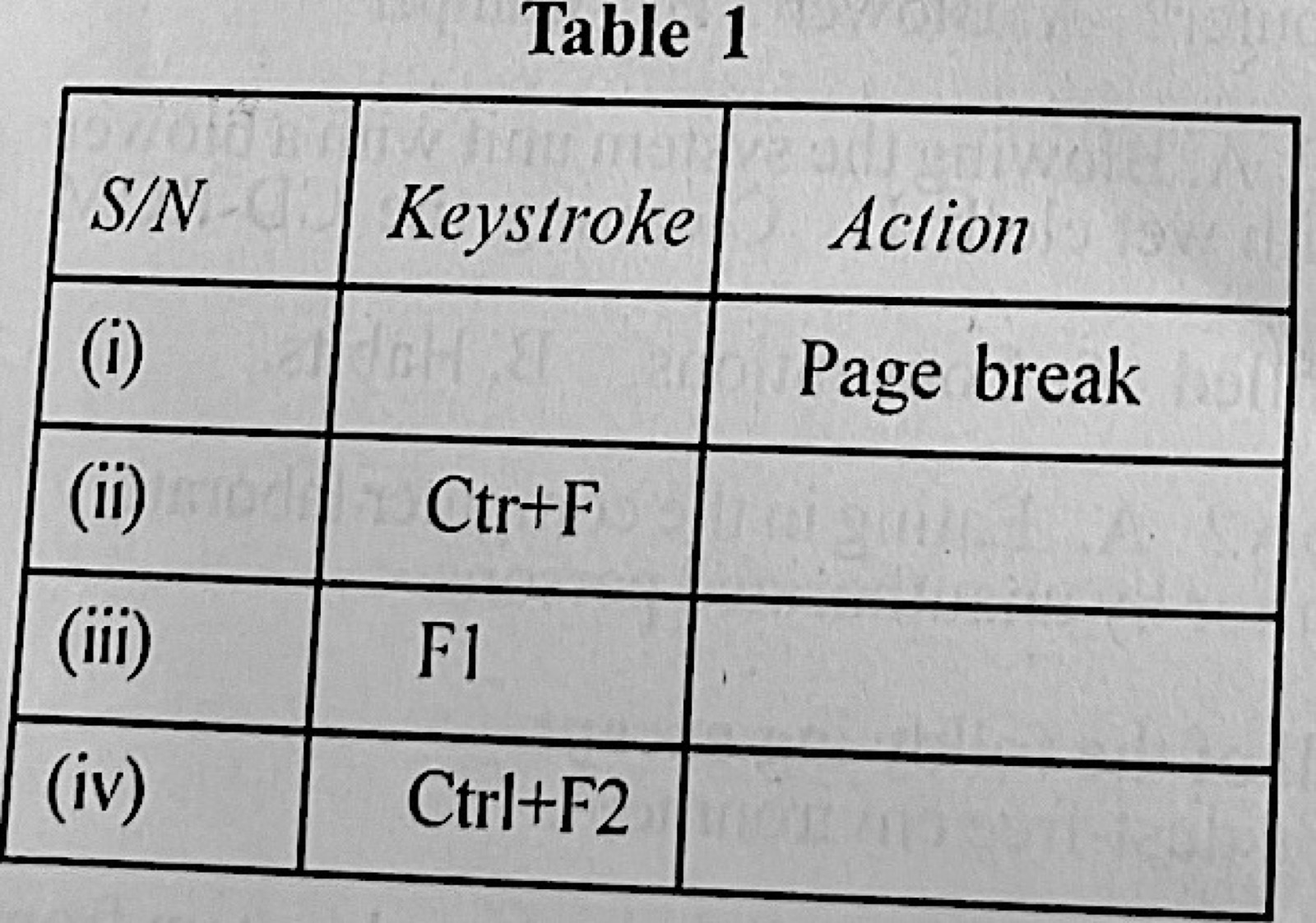
(c) Complete Table 1 on keyboard shortcuts.

Diagram for this question
Show the model answer
Model answer

(a)(i) The Print Screen (PrtSc) key (Alt + PrtSc for the active window only), then Ctrl + V to paste and Ctrl + P to print.
(ii) With the slide displayed, press PrtSc; open MS Word (Windows key, type Word, Enter); press Ctrl + V to paste the screen picture; press Ctrl + P and Enter to print (Ctrl + S to save if needed).
(b)(i) Any three: computers (system units, monitors, keyboards, mice); printer; UPS/stabiliser; network switch/router; scanner; projector.
(ii) Any three: Microsoft Access; Oracle; MySQL; SQL Server; dBase; FoxPro.
(iii) Any three: Microsoft Word; WordPerfect; WordPad; LibreOffice/OpenOffice Writer; WordStar.
(c) (i) Page break – Ctrl + Enter. (ii) Ctrl + F – Find. (iii) F1 – Help. (iv) Ctrl + F2 – Print Preview.

Explanation

Print Screen copies the whole screen to the clipboard, ready to paste.

Open this question

Theory question 106

Computer Hardware

Paper 2, Section B
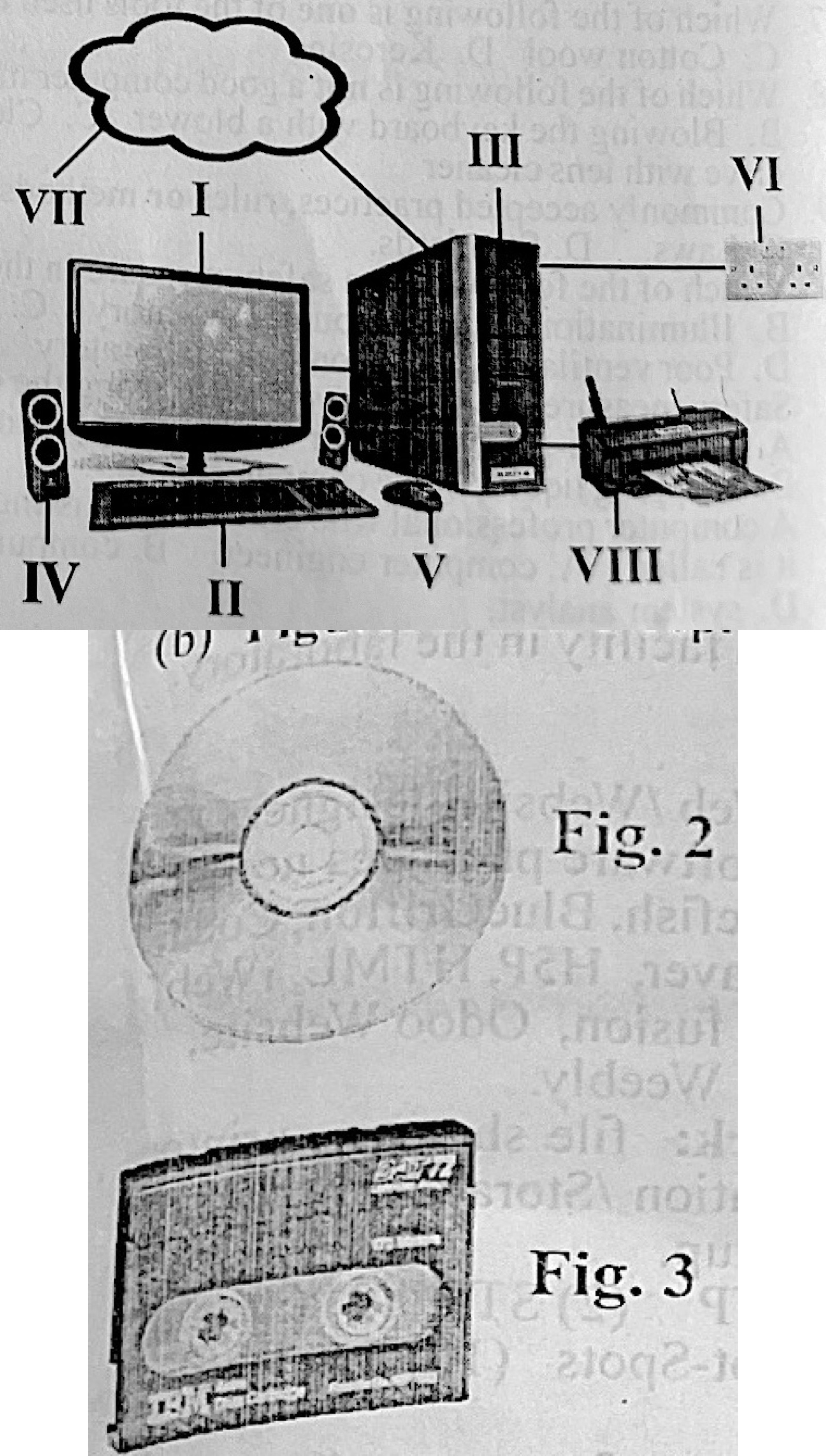
(a) Use Fig. 1 to answer question (i) to (iv). (i) What does Fig. 1 represent? (ii) Identify two output components in Fig.1. (iii) Give the names for the parts labelled III, VI and VII. (iv) State one precautionary measure that should be taken to protect the set-up from power fluctuations while in use. (v) Data entry into the system can be achieved through the parts labelled: (vi) Mention one device that can be used to access the part labelled VII.
(b) Figures 2 and 3 represent mass storage media. Use the figures to answer questions (i) to (iv). (i) Identify the media represented by: Fig. 2 ______ Fig. 3 ______ (ii) The transaction files of a company are to be recorded and accessed in the order which they arrive. Which of the media is most suitable for the purpose? (iii) In which media will the stored data be accessed faster? (iv) State the file access method for each medium. Fig. 2 ______ Fig. 3 ______
(c) A CCTV camera system has a 300 MB storage device. Each image size is 300 kB. (i) How many images can be stored by the CCTV? (ii) If the storage device is full, mention one measure that should be taken to ensure that the system continues to capture and store images without losing the already stored images.

Diagram for this question
Show the model answer
Model answer

(a)(i) A computer system (desktop computer) connected to the internet.
(ii) Any two: monitor (I); speakers (IV); printer (VIII).
(iii) III – system unit; VI – power socket (wall outlet); VII – the internet (cloud).
(iv) Use a UPS or voltage stabiliser (or surge protector).
(v) II – keyboard and V – mouse.
(vi) A modem or router (or a network interface card/Wi-Fi adapter).
(b)(i) Fig. 2 – optical disc (CD/DVD); Fig. 3 – magnetic tape (cartridge).
(ii) Magnetic tape (Fig. 3).
(iii) The optical disc (Fig. 2).
(iv) Fig. 2 – direct (random) access; Fig. 3 – sequential access.
(c)(i) 300 MB ÷ 300 kB = 300 000 kB ÷ 300 kB = 1000 images (1024 if 1 MB = 1024 kB).
(ii) Copy (back up) the stored images to another storage device or the cloud before clearing space, or add/replace with a larger storage device.

Explanation

Tape stores data in order (sequential); a disc can jump to any file (direct).
Open this question