WAEC Data Processing 2015 past questions and answers

45 questions. Try each one, then open the answer to check yourself and read the explanation.

Question 1

History of Computers

Which of the following persons invented the punch card machine?

  1. A.Blaise Pascal
  2. B.Gottfried Leibniz
  3. C.J. Prosper Eckert
  4. D.Dr. Herman Hollerith
Show the answer and explanation

Answer: D (Dr. Herman Hollerith)

Explanation

Herman Hollerith built the punched-card tabulating machine used for the 1890 US census.

Open this question

Question 3

Data and Information

The operation of checking input data against specified criteria is referred to as

  1. A.data verification.
  2. B.data validation.
  3. C.data cross check.
  4. D.data control.
Show the answer and explanation

Answer: B (data validation.)

Explanation

Validation checks that input obeys set rules (range, type, format); verification only checks it was copied correctly.

Open this question

Question 4

Data and Information

Which of the following is not a source of data collection?

  1. A.Observation
  2. B.Interview
  3. C.Questionnaire
  4. D.Classification
Show the answer and explanation

Answer: D (Classification)

Explanation

Observation, interviews and questionnaires gather data; classification is a way of organising data already collected.

Open this question

Question 5

Classification of Computers

Which of the following is true about digital computers?

  1. A.They consist of magnetic core memory
  2. B.They recognize data as a continuous measurement of a physical quantity
  3. C.They represent numbers through a string of binary digits
  4. D.They are mainly used for scientific purposes
Show the answer and explanation

Answer: C (They represent numbers through a string of binary digits)

Explanation

Digital computers work with discrete binary digits (0s and 1s); continuous measurement describes analogue computers.

Open this question

Question 6

Internet

Facebook, Twitter and WhatsApp are examples of

  1. A.social media.
  2. B.social communication.
  3. C.networking media.
  4. D.search engines.
Show the answer and explanation

Answer: A (social media.)

Explanation

Facebook, Twitter and WhatsApp are social media platforms where people share content and chat.

Open this question

Question 7

ICT in Society

Which of the following is not an application of computers?

  1. A.Bank notes counter
  2. B.Point of sale terminal
  3. C.Automated teller machine
  4. D.Traffic light control
Show the answer and explanation

Answer: A (Bank notes counter)

Explanation

POS terminals, ATMs and traffic light controllers are computer-controlled systems; a bank note counter is a simple counting machine.

Open this question

Question 8

Computer Hardware

Which of the following is a secondary storage device?

  1. A.RAM
  2. B.Bubble memory
  3. C.Floppy disk
  4. D.EPROM
Show the answer and explanation

Answer: C (Floppy disk)

Explanation

A floppy disk stores data permanently outside main memory; RAM and EPROM are primary memory.

Open this question

Question 9

Information Processing

Information analysis procedures include the following except

  1. A.skin and scan.
  2. B.recognizing interrelationships.
  3. C.interpret and conclude.
  4. D.identifying propaganda and bias.
Show the answer and explanation

Answer: A (skin and scan.)

Explanation

Analysing information means finding relationships, interpreting, concluding and spotting bias; skimming and scanning are reading techniques, not analysis.

Open this question

Question 10

Information Processing

The advantages of electronic data processing include the following except

  1. A.automatic processing.
  2. B.hacking.
  3. C.fast and reliable processing.
  4. D.storage capacity.
Show the answer and explanation

Answer: B (hacking.)

Explanation

Hacking is a threat to computer systems, not an advantage of electronic data processing.

Open this question

Question 11

Information Transmission

Which of the following is not a transmission medium?

  1. A.Twisted pair cables
  2. B.Coaxial cables
  3. C.Wireless
  4. D.Modem
Show the answer and explanation

Answer: D (Modem)

Explanation

A modem is a device that converts signals; cables and wireless links are the media that carry them.

Open this question

Question 12

Information Transmission

Information transmission by television is classified as

  1. A.multimedia transmission.
  2. B.polymedia transmission.
  3. C.unimedia transmission.
  4. D.monomedia transmission.
Show the answer and explanation

Answer: A (multimedia transmission.)

Explanation

Television sends pictures, sound and text together, so it is multimedia transmission.

Open this question

Question 13

Computer Networks

Which of the following are the basic components of a computer network? I. A minimum of two computers II. Printers III. Network interface card

  1. A.I and II only
  2. B.I and III only
  3. C.II and III only
  4. D.I, II and III
Show the answer and explanation

Answer: B (I and III only)

Explanation

A network needs at least two computers and a way to connect them, such as a network interface card; a printer is optional.

Open this question

Question 14

Internet

Social networking does not promote

  1. A.personal publicity.
  2. B.business expansion.
  3. C.e-commerce.
  4. D.e-payment.
Show the answer and explanation

Answer: D (e-payment.)

Explanation

Social networks help people publicise themselves, grow businesses and sell online, but payments are handled by banking and payment services.

Open this question

Question 15

Internet

Companies that provide internet access are referred to as

  1. A.fixed network operators.
  2. B.network service providers.
  3. C.internet service providers.
  4. D.internet network operators.
Show the answer and explanation

Answer: C (internet service providers.)

Explanation

Internet Service Providers (ISPs) sell access to the internet.

Open this question

Question 16

Word Processing

While typing a MS word document, Akin inserted footer in the document in order to

  1. A.enhance the overall appearance of the document.
  2. B.make the document more readable.
  3. C.insert page numbers.
  4. D.make it appear on the document when printed.
Show the answer and explanation

Answer: C (insert page numbers.)

Explanation

A footer holds text that repeats at the bottom of every page, most often the page numbers. Inserting a footer is the usual way to number the pages of a Word document.

Open this question

Question 17

Spreadsheet

The spreadsheets symbol used to convert a number to a label is

  1. A.quotation mark (“ ”).
  2. B.equality sign (=).
  3. C.underscore ( _ )
  4. D.apostrophe sign ( ‘ )
Show the answer and explanation

Answer: D (apostrophe sign ( ‘ ))

Explanation

Typing an apostrophe before a number makes the spreadsheet treat it as text (a label).

Open this question

Question 18

Spreadsheet

In spreadsheets, data would not be accepted into a cell by pressing the

  1. A.Enter key.
  2. B.Arrow key.
  3. C.Esc key.
  4. D.Tab key.
Show the answer and explanation

Answer: C (Esc key.)

Explanation

Enter, Tab and the arrow keys all confirm an entry; Esc cancels it, so the data is not accepted.

Open this question

Question 19

Database Management

A field in a database table is also known as

  1. A.index.
  2. B.relation.
  3. C.attribute.
  4. D.key.
Show the answer and explanation

Answer: C (attribute.)

Explanation

A field (column) describes one property of a record, so it is called an attribute.

Open this question

Question 20

Software and Operating Systems

The property of a systems software that enables it to execute more than one program at a time is referred to as

  1. A.compiling.
  2. B.virtual memory.
  3. C.multitasking.
  4. D.load modules.
Show the answer and explanation

Answer: C (multitasking.)

Explanation

Multitasking lets the operating system run several programs at the same time.

Open this question

Question 21

Word Processing

Which of these operations would not close MS word application?

  1. A.Pressing the Alt + F4 keys
  2. B.Clicking the X button on the title bar
  3. C.Choosing exit from the file menu drop down box
  4. D.Selecting close from the file menu drop down dialogue box
Show the answer and explanation

Answer: D (Selecting close from the file menu drop down dialogue box)

Explanation

Close on the File menu closes only the current document; Word itself stays open.

Open this question

Question 22

Database Management

The feature in a database application that acts as an interface between the user and the database is called a

  1. A.query
  2. B.report
  3. C.form
  4. D.table
Show the answer and explanation

Answer: C (form)

Explanation

A form is the screen through which users enter and view data in a database.

Open this question

Question 23

Web Design

Planning and creating websites are stages in

  1. A.web analysis.
  2. B.web maintenance.
  3. C.web design.
  4. D.web publishing.
Show the answer and explanation

Answer: C (web design.)

Explanation

Web design is the planning and building of websites.

Open this question

Question 24

Database Management

The type of data entered into a table in database follow a set of rules known as

  1. A.protocols.
  2. B.regulators.
  3. C.algorithms.
  4. D.constraints.
Show the answer and explanation

Answer: D (constraints.)

Explanation

Constraints are the rules a database applies to the data allowed in a table, such as NOT NULL or UNIQUE.

Open this question

Question 25

Word Processing

Which of the following drawing tools would create special effects on texts?

  1. A.Smart Art
  2. B.Shape tool
  3. C.Text box
  4. D.Word Art
Show the answer and explanation

Answer: D (Word Art)

Explanation

WordArt turns text into decorative styled text with effects such as shadows and curves.

Open this question

Question 26

Computer Ethics and Safety

The study of the effect of interaction between the computer and human users is referred to as computer

  1. A.ergonomy.
  2. B.economy.
  3. C.ergophobia.
  4. D.biomechanics.
Show the answer and explanation

Answer: A (ergonomy.)

Explanation

Ergonomics studies how people and computers interact so that work is safe and comfortable.

Open this question

Question 27

Presentation Package

In MS PowerPoint, the action of holding down the left mouse key and moving the mouse around the slide would

  1. A.highlight an item.
  2. B.drag an item.
  3. C.select an item.
  4. D.move an item.
Show the answer and explanation

Answer: B (drag an item.)

Explanation

Holding the left button down while moving the mouse is dragging.

Open this question

Question 28

File Organisation

A file kept in case of an accident or natural disaster is called

  1. A.master.
  2. B.transition.
  3. C.back-up.
  4. D.reference.
Show the answer and explanation

Answer: C (back-up.)

Explanation

A back-up file is a copy kept so data can be restored after loss.

Open this question

Question 29

Computer Maintenance

Which of the following is not a preventive maintenance measure?

  1. A.Regular update of the operating system
  2. B.Proper shut down of the system
  3. C.Use of uninterrupted power supply
  4. D.Data recovery
Show the answer and explanation

Answer: D (Data recovery)

Explanation

Data recovery is done after a loss has happened, so it is corrective, not preventive.

Open this question

Question 30

Computer Ethics and Safety

Which of the following is not a safety equipment in a computer laboratory?

  1. A.Surge protector
  2. B.Metal detector
  3. C.Smoke detector
  4. D.Fire extinguisher
Show the answer and explanation

Answer: B (Metal detector)

Explanation

Surge protectors, smoke detectors and fire extinguishers protect the lab; a metal detector is a security device.

Open this question

Question 31

Computer Professionals

Which of the following is not a computer professional?

  1. A.Network Administrator
  2. B.Web Master
  3. C.System Analyst
  4. D.File Manager
Show the answer and explanation

Answer: D (File Manager)

Explanation

Network administrators, webmasters and systems analysts are recognised computer professions; a file manager is a program.

Open this question

Question 32

Computer Virus

The following are destructive softwares except

  1. A.drivers.
  2. B.worms.
  3. C.trojan horses.
  4. D.logic bomb.
Show the answer and explanation

Answer: A (drivers.)

Explanation

Drivers are useful programs that let the computer use hardware; the others are malware.

Open this question

Question 33

File Organisation

The type of file organization in a DVD-ROM is

  1. A.direct access.
  2. B.sequential.
  3. C.serial.
  4. D.hierarchical.
Show the answer and explanation

Answer: A (direct access.)

Explanation

A DVD-ROM lets the drive jump straight to any file, so it uses direct (random) access.

Open this question

Question 34

Data Security

Which of these measures would not secure data in a database?

  1. A.Encryption
  2. B.Data integration
  3. C.Personal Identification Number
  4. D.Username and passwords
Show the answer and explanation

Answer: B (Data integration)

Explanation

Data integration combines data from different sources; it does not protect data.

Open this question

Question 35

Database Management

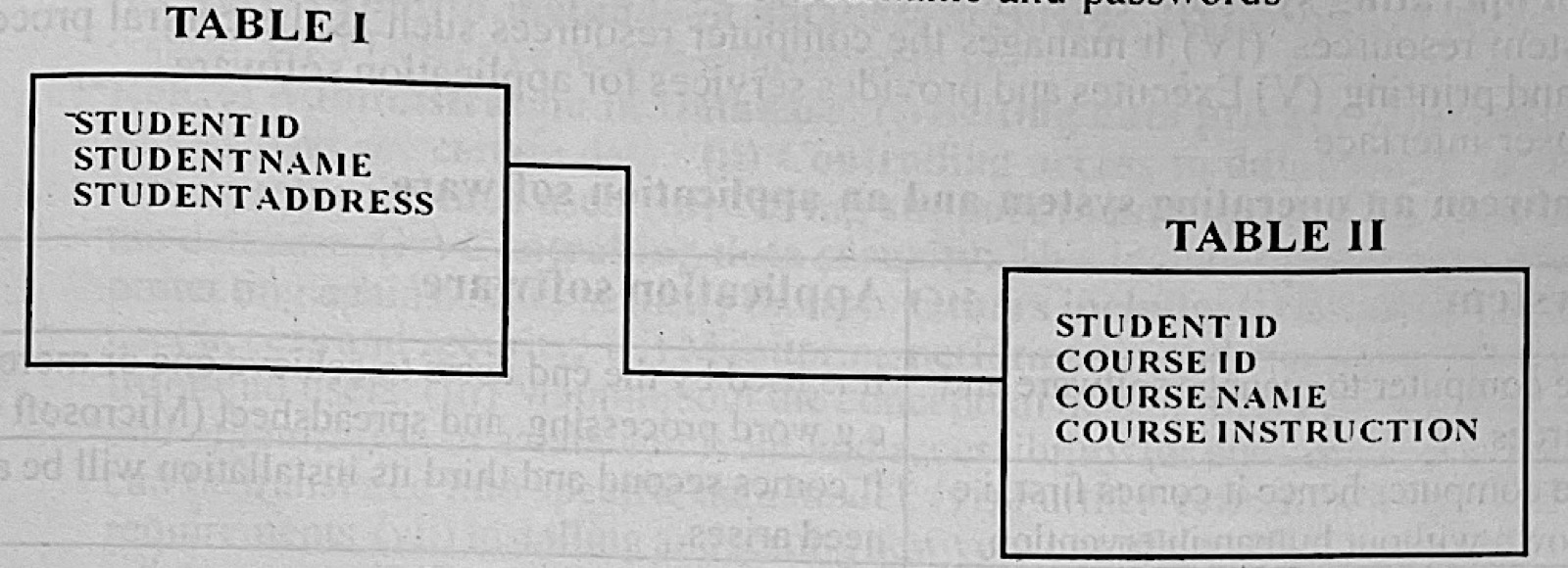
The diagram above illustrates the relationship between two tables in a database. Use it to answer questions 35 and 36.
The student ID in Table II is referred to as

Diagram for this question
  1. A.primary key.
  2. B.foreign key.
  3. C.normal key.
  4. D.composite key.
Show the answer and explanation

Answer: B (foreign key.)

Explanation

Student ID in Table II refers to the primary key of Table I, which makes it a foreign key.

Open this question

Question 36

Database Management

The diagram above illustrates the relationship between two tables in a database.
What type of relationship exists between Tables I and II?

Diagram for this question
  1. A.One to one
  2. B.Three to four
  3. C.Four to three
  4. D.One to many
Show the answer and explanation

Answer: D (One to many)

Explanation

One student in Table I can appear in many course records in Table II, a one-to-many relationship.

Open this question

Question 37

Computer Virus

A program developed to protect the computer from malicious software is referred to as

  1. A.trojan.
  2. B.driver.
  3. C.antivirus.
  4. D.spyware.
Show the answer and explanation

Answer: C (antivirus.)

Explanation

Antivirus software detects and removes malicious programs.

Open this question

Question 38

Distributed and Parallel Databases

One of the advantages of a parallel database is

  1. A.data sharing.
  2. B.data security.
  3. C.faster processing of data.
  4. D.uniform memory access.
Show the answer and explanation

Answer: C (faster processing of data.)

Explanation

A parallel database splits work across several processors, so queries run faster.

Open this question

Question 39

Database Management

In a relational database management system, files are organized as relations and

  1. A.tuple.
  2. B.modules.
  3. C.tables.
  4. D.forms.
Show the answer and explanation

Answer: C (tables.)

Explanation

In a relational database data is stored in relations, which are tables of rows and columns.

Open this question

Question 40

Computer Networks

The exchange of information over a network follow a set of rules called

  1. A.transmission rules.
  2. B.transfer rules.
  3. C.channels.
  4. D.protocols
Show the answer and explanation

Answer: D (protocols)

Explanation

Protocols are the agreed rules computers follow to exchange data, e.g. TCP/IP.

Open this question

Theory question 101

Software and Operating Systems

Paper 2, Section A
(a) (i) Define an operating system. (ii) State two functions of an operating system (iii) List two differences between an operating system and an application system software
(b) Starting from the Save As dialogue box, outline the steps involved in paswording a document in a word processing package.

Show the model answer
Model answer

(a)(i) An operating system is the system software that controls the computer's hardware and software resources and provides a platform on which other programs run.
(ii) Any two: manages memory; manages the processor (scheduling tasks); manages files and storage; controls input/output devices; provides the user interface; provides security (user accounts, passwords).
(iii) Any two: the OS controls the computer while application software does a user task (e.g. word processing); the OS is needed for the computer to work, applications are optional; the OS is loaded first at boot, applications run on top of it; the OS works mostly without user involvement, applications are used directly by the user.
(b) In the Save As dialogue box click Tools (or Options) → General Options; type a password to open (and/or modify); click OK; retype the password to confirm and click OK; type a file name and click Save.

Explanation

Give definitions in one sentence and make each difference a clear contrast.

Open this question

Theory question 102

Database Management

Paper 2, Section A
(a) Define the following: (i) Database: (ii) Database Management system
(b) Mention three functions of a database management system.
(c) Mention two ways through which data can be destroyed
(d) State three precautionary measures to prevent data loss

Show the model answer
Model answer

(a)(i) A database is an organised collection of related data stored so that it can be easily accessed, managed and updated.
(ii) A DBMS is software used to create, store, retrieve, update and control access to data in a database (e.g. MS Access, Oracle, MySQL).
(b) Any three: data definition (creating/changing table structures); data storage and retrieval (queries); updating data (insert, modify, delete); security and access control; backup and recovery; controlling concurrent use by many users; maintaining data integrity.
(c) Any two: virus attack; accidental deletion; hardware failure or disk crash; power failure; fire, flood or other disaster; theft or sabotage/hacking.
(d) Any three: keep regular back-ups (off-site); install and update antivirus software; use passwords/access control; use a UPS and surge protectors; train users and handle storage media carefully.

Explanation

Definitions first, then list the required number of points clearly.

Open this question

Theory question 103

Software and Operating Systems

Paper 2, Section A
(a) (i) Define application package (ii) State one use each of any four application packages.
(b) List two benefits of a presentation package
(c) Outline three guideline for creating a good MS Power Point Presentation

Show the model answer
Model answer

(a)(i) An application package is a ready-made program (or set of programs) written to carry out a particular user task, e.g. word processing.
(ii) Any four: word processor (MS Word) – typing and formatting documents; spreadsheet (Excel) – calculations, results and budgets; database (Access) – storing and retrieving records; presentation (PowerPoint) – making slide shows; graphics (CorelDraw) – designing cards and posters; desktop publishing (Publisher) – newsletters and flyers.
(b) Any two: makes lessons/talks more interesting with pictures, sound and animation; helps the audience understand and remember; slides are easy to edit and reuse; can be printed as handouts or shown on a projector.
(c) Any three: keep text short (few bullet points per slide); use a large readable font; use contrasting colours for text and background; use a consistent design/theme; use pictures and charts where helpful; avoid too many animations and sound effects; check spelling.

Explanation

Pair each package with a real use, and give guidelines about content and design, not menu steps.

Open this question

Theory question 104

Data Security

Paper 2, Section A
(a) Define: (i) Data security (ii) Data risk assessment
(b) (i) Explain the term access control in database security
(ii) List two access control methods in database security
(c) State three roles of a database administrator.

Show the model answer
Model answer

(a)(i) Data security is the protection of data from unauthorised access, change, corruption or loss.
(ii) Data risk assessment is identifying the threats to an organisation's data, judging how likely and how harmful they are, and deciding controls to reduce them.
(b)(i) Access control decides who can use the database and what each user may do (view, add, change, delete), usually after the user is identified and authenticated.
(ii) Any two: user names and passwords; role-based access (privileges/permissions); discretionary access control; mandatory access control; biometrics or access cards.
(c) Any three: designing and creating the database; granting and controlling user access; backing up and recovering data; monitoring and tuning performance; installing and upgrading the DBMS; keeping data secure and consistent; supporting users.

Explanation

Define each term in one sentence, then give clear separate points.

Open this question

Theory question 105

Internet

Paper 2, Section B: Test of Practicals
Given an internet connected computer, outline a step by step procedure for carrying out the following operations:
(a) How to log on to www.mybooks.com and obtain the prices of book W, X, Y, Z and M;
(b) How to tabulate the prices in a worksheet, showing the prices in dollars and the naira equivalent, for each book and save the workbook as “Prices of Books”. Assume that the prices of the books are given in dollars, [ use $1,00 = N120.00];
(c) How to send the workbook in 5(b) as an attachment to your father's email address (myfather@yahoo.com) with the subject “Price of Books”.

Show the model answer
Model answer

(a) Open a web browser (e.g. Chrome, Firefox); type www.mybooks.com in the address bar and press Enter; search or browse for books W, X, Y, Z and M; note (or copy) the price of each.
(b) Open Excel; in A1:C1 type headings Book, Price ($), Price (N); type the book names in A2:A6 and the dollar prices in B2:B6; in C2 type =B2*120 and copy the formula down to C6; format the cells; click File → Save As, type Prices of Books and click Save.
(c) Open the browser and sign in to your e-mail account; click Compose; type myfather@yahoo.com in the To box; type Price of Books in the Subject box; click Attach, browse to Prices of Books and click Open; wait for the upload, then click Send.

Explanation

Write each step in order, naming the exact button, menu or formula.

Open this question

Theory question 106

Word Processing

Paper 2, Section B: Test of Practicals
A student was asked to record the type of vehicle that entered the school compound the school's main gate on a Monday morning. The passage below is an excerpt from the student's report on the assignment. “Report on the vehicular traffic at the gate on Monday. 1. Introduction: I was directed by the school principal to sit at the main gate and record type and number of vehicles that passed through the gate on Monday morning. 2. Observation: I arrived the gate at about 8:00 am and left at 12 noon. During this period, I made the following observation: Car, bus, bus, car, car, lorry, motorcycle. bus, bus, car, car, car, lorry, motorcycle, tricycle, motorcycle, car, tricycle, motorcycle, bus, bus.”
(a) Beginning from the desktop, outline a step by step procedure of how to type the passage in MS word, using A4 paper size and potrait orientation.
(b) State the procedure for carrying out the following operations in the passgage: (i) Begin the second and third sentences in new paragraphs; (ii) Write the first sentence in capital letters, undeline it and bold it; (iii) Begin the first letter of a sentence with capital letters; (iv) Represent the student's observation in a table with three columns under the headings; Serial Number, Type of vehicle, Number of vehicle; (v) Merge the first two cells of the last row of the table, type “Total” and give the total number of vehiclesobserved in the column for number of vehicles; (vi) Save the document with the name “Vehicular traffic”; (vi) Print the document.

Show the model answer
Model answer

(a) Click Start → All Programs → Microsoft Office → Microsoft Word (or double-click the Word icon on the desktop); click Page Layout → Size → A4; click Orientation → Portrait; type the passage.
(b)(i) Click just before the second sentence and press Enter; do the same before the third sentence.
(ii) Select the first sentence; press Shift+F3 (or Home → Change Case → UPPERCASE); click B (Bold) and U (Underline).
(iii) Select the text and use Change Case → Sentence case (or retype the first letter with Shift held).
(iv) Insert → Table → 3 columns and enough rows; type headings Serial Number, Type of vehicle, Number of vehicle; enter: 1 Car 7, 2 Bus 6, 3 Lorry 2, 4 Motorcycle 4, 5 Tricycle 2.
(v) Select the first two cells of the last row → right-click → Merge Cells; type Total; in the third cell type 21.
(vi) File → Save As → type Vehicular traffic → Save.
(vii) File → Print (Ctrl+P) → choose printer and number of copies → OK/Print.

Explanation

Count each vehicle type carefully from the list before filling the table: car 7, bus 6, lorry 2, motorcycle 4, tricycle 2, total 21.

Open this question