WAEC Data Processing 2020 past questions and answers

46 questions. Try each one, then open the answer to check yourself and read the explanation.

Question 1

History of Computers

The use of Visual Display Unit was a major breakthrough in the

  1. A.First generation computers.
  2. B.second generation computers.
  3. C.third generation computers.
  4. D.fifth generation computers.
Show the answer and explanation

Answer: C (third generation computers.)

Explanation

Third-generation computers brought monitors (VDUs) and keyboards in place of punched cards and printouts.

Open this question

Question 2

Number Systems

In hexadecimal system, D is equivalent to

  1. A.15.
  2. B.14.
  3. C.13.
  4. D.10.
Show the answer and explanation

Answer: C (13.)

Explanation

Hexadecimal A–F stand for 10–15, so D = 13.

Open this question

Question 3

Data and Information

A teacher computed the average score of students in a given test. The result of the computation describes

  1. A.record.
  2. B.information.
  3. C.data.
  4. D.file.
Show the answer and explanation

Answer: B (information.)

Explanation

The average is processed, meaningful data, which is information.

Open this question

Question 4

Number Systems

The sum of 1102 and 1012 is

  1. A.11012.
  2. B.11102.
  3. C.11002.
  4. D.10112.
Show the answer and explanation

Answer: D (10112.)

Explanation

110₂ = 6 and 101₂ = 5; 6 + 5 = 11 = 1011₂.

Open this question

Question 5

History of Computers

One advantage of the first generation computers is

  1. A.processing speed.
  2. B.portability.
  3. C.heating effect.
  4. D.burglar-proof.
Show the answer and explanation

Answer: A (processing speed.)

Explanation

First-generation computers were huge and overheated, but they calculated far faster than people or mechanical machines.

Open this question

Question 6

Computer Hardware

Magnetic Ink Character Recognition is applied on

  1. A.voice recognition devices.
  2. B.mobile devices.
  3. C.large data capturing machines.
  4. D.bank cheques.
Show the answer and explanation

Answer: D (bank cheques.)

Explanation

MICR reads the magnetic-ink numbers printed on bank cheques.

Open this question

Question 7

ICT in Society

Internet banking entails

  1. A.applying computer networks in banking operations.
  2. B.applying computers to automate banking operations.
  3. C.generating tokens and One-Time-Passwords for online payments.
  4. D.using ATM for banking operations.
Show the answer and explanation

Answer: A (applying computer networks in banking operations.)

Explanation

Internet banking means carrying out banking over computer networks (the internet).

Open this question

Question 8

Computer Hardware

Which of the following parts of the computer ensures the smooth operation of its hardware?

  1. A.Main memory.
  2. B.Control unit.
  3. C.Auxiliary storage.
  4. D.Arithmetic and Logic Unit.
Show the answer and explanation

Answer: B (Control unit.)

Explanation

The control unit directs and coordinates all the other parts of the computer.

Open this question

Question 9

Information Processing

Basic computer operations include the following except

  1. A.control.
  2. B.input.
  3. C.output.
  4. D.process.
Show the answer and explanation

Answer: A (control.)

Explanation

The basic operations are input, processing, output (and storage); control is a function of the control unit, not one of them.

Open this question

Question 10

Information Processing

One disadvantage of electronic data processing is

  1. A.handling complex computation.
  2. B.medium for effective storage.
  3. C.processing data at a phenomenal speed.
  4. D.vulnerability to attack.
Show the answer and explanation

Answer: D (vulnerability to attack.)

Explanation

Electronic data can be hacked or attacked by viruses; the other options are advantages.

Open this question

Question 11

Data and Information

Which of the following sources of information is received by the user in visual mode only?

  1. A.Television.
  2. B.Radio.
  3. C.Photograph.
  4. D.Computer.
Show the answer and explanation

Answer: C (Photograph.)

Explanation

A photograph is only seen; television and computers also give sound, and radio is only heard.

Open this question

Question 12

Information Transmission

Which of the options A to D is not a medium of information transmission?

  1. A.Cable.
  2. B.Satellite.
  3. C.Television set.
  4. D.Wireless channel.
Show the answer and explanation

Answer: C (Television set.)

Explanation

A television set receives and displays information; cables, satellites and wireless channels carry it.

Open this question

Question 13

Computer Networks

A company has four computer systems, one printer and one scanner for its daily operations. One factor that can motivate the company to connect all the devices in a network is the need to

  1. A.provide efficient services.
  2. B.save running cost.
  3. C.share software only.
  4. D.use a wireless connection.
Show the answer and explanation

Answer: B (save running cost.)

Explanation

Networking lets the four computers share one printer and one scanner, which saves cost.

Open this question

Question 14

Internet

One similarity between the internet and intranet is that they both

  1. A.were invented by the same company.
  2. B.use the same technology.
  3. C.have the same coverage.
  4. D.are open to the public.
Show the answer and explanation

Answer: B (use the same technology.)

Explanation

An intranet uses the same internet technologies (TCP/IP, web browsers) but is private to an organisation.

Open this question

Question 15

Internet

The process of copying data or information from the internet to a personal computer is termed

  1. A.browsing.
  2. B.downloading.
  3. C.retrieving.
  4. D.surfing.
Show the answer and explanation

Answer: B (downloading.)

Explanation

Downloading copies files from the internet to your computer.

Open this question

Question 16

Information Transmission

An entrepreneur who wishes to send digital data over a telephone line would need a

  1. A.hub.
  2. B.modem.
  3. C.router.
  4. D.switch.
Show the answer and explanation

Answer: B (modem.)

Explanation

A modem converts digital data to signals that can travel on a telephone line and back again.

Open this question

Question 17

Software and Operating Systems

Graphical User Interface is considered user-friendly because of the following reasons except that it

  1. A.compels the user to learn all the commands before operating the system.
  2. B.displays all the options available to the user for easy access.
  3. C.is easier for users to operate and understand.
  4. D.makes the icons and menus familiar to the user.
Show the answer and explanation

Answer: A (compels the user to learn all the commands before operating the system.)

Explanation

With a GUI you click icons and menus, so you do not need to memorise commands.

Open this question

Question 18

Word Processing

The symbols dialog box of MS Word application is located on the

  1. A.format menu.
  2. B.help menu.
  3. C.insert menu.
  4. D.view menu.
Show the answer and explanation

Answer: C (insert menu.)

Explanation

Symbols are added through Insert → Symbol.

Open this question

Question 19

Word Processing

Pressing the key combination Ctrl + J on a selected text in a Microsoft Word document would

  1. A.align the text.
  2. B.deselect the text.
  3. C.justify the paragraph.
  4. D.juxtapose the text.
Show the answer and explanation

Answer: C (justify the paragraph.)

Explanation

Ctrl + J justifies text so both margins are straight.

Open this question

Question 20

Spreadsheet

The Merge button in Spreadsheet application is used to

  1. A.combine adjacent tables.
  2. B.convert selected cells into a single cell.
  3. C.merge two tables.
  4. D.split a cell into two or more cells.
Show the answer and explanation

Answer: B (convert selected cells into a single cell.)

Explanation

Merge joins the selected cells into one larger cell.

Open this question

Question 21

Spreadsheet

If cell A20 in MS Excel contains the value 5, then the formula “=A20^3” will return a value equal to

  1. A.15.
  2. B.25.
  3. C.75.
  4. D.125.
Show the answer and explanation

Answer: D (125.)

Explanation

^ means 'to the power of', so 5³ = 5 × 5 × 5 = 125.

Open this question

Question 22

Database Management

A database contains list of customers and their phone numbers. What type of relationship describes a customer having multiple phone numbers?

  1. A.Many-to-many.
  2. B.Many-to-one.
  3. C.One-to-many.
  4. D.One-to-one.
Show the answer and explanation

Answer: C (One-to-many.)

Explanation

One customer is linked to many phone numbers: a one-to-many relationship.

Open this question

Question 23

Database Management

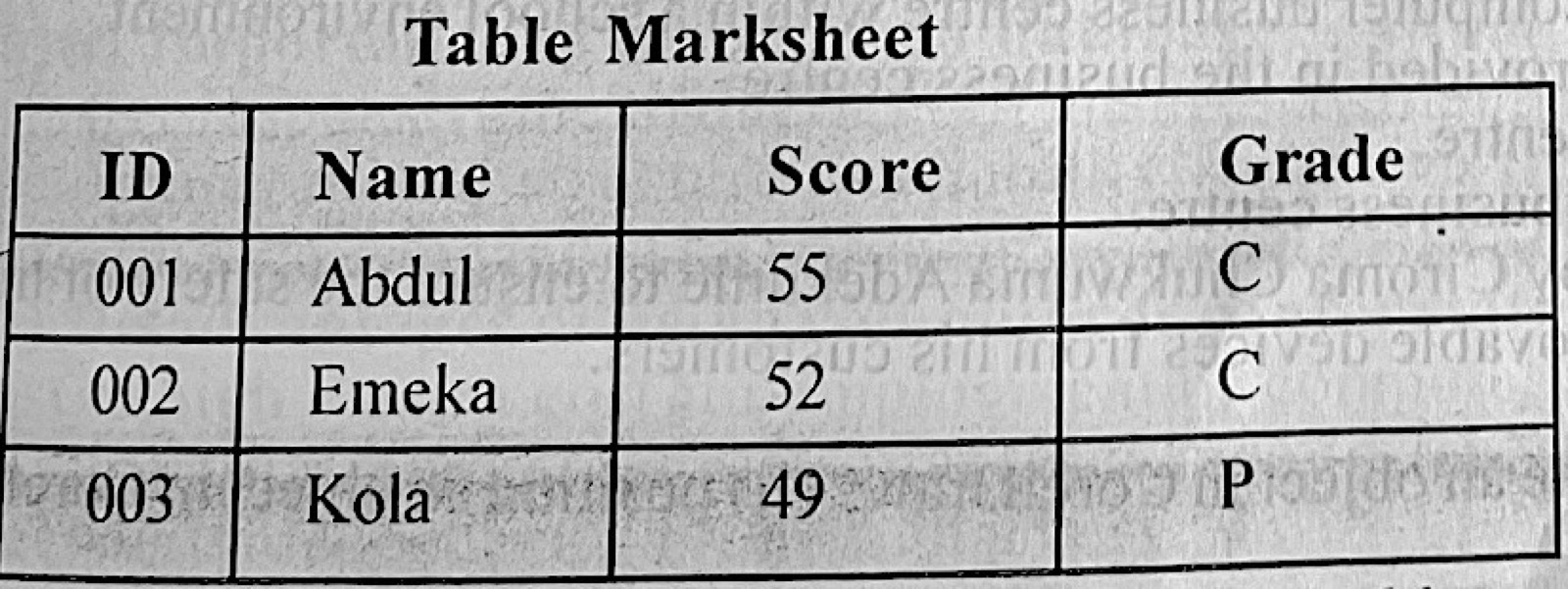
The DBMS statement, select* from Marksheet in table Marksheet will display all records in the fields:

Diagram for this question
  1. A.ID and Name only.
  2. B.ID, Score and Grade only.
  3. C.Score and Grade only.
  4. D.ID, Name, Score and Grade.
Show the answer and explanation

Answer: D (ID, Name, Score and Grade.)

Explanation

The asterisk (*) in SELECT * means all fields, so ID, Name, Score and Grade are shown.

Open this question

Question 24

Presentation Package

Which of the following objects is not located on the slide layout tab?

  1. A.Animations.
  2. B.Charts.
  3. C.Lists.
  4. D.Titles.
Show the answer and explanation

Answer: A (Animations.)

Explanation

Slide layouts hold placeholders for titles, lists (bullets) and charts; animations are added separately.

Open this question

Question 25

Web Design

The following programming tools are employed by a web developer except

  1. A.COBOL.
  2. B.CSS.
  3. C.HTML.
  4. D.PHP.
Show the answer and explanation

Answer: A (COBOL.)

Explanation

COBOL is an old business programming language, not a web tool; HTML, CSS and PHP build websites.

Open this question

Question 26

Computer Hardware

Graphics can be captured using the following devices except

  1. A.webcam.
  2. B.scanners.
  3. C.joystick.
  4. D.digital camera
Show the answer and explanation

Answer: C (joystick.)

Explanation

A joystick controls movement in games; it cannot capture pictures.

Open this question

Question 27

Computer Maintenance

Which of the following substances is used for cleaning the mouse ball?

  1. A.Distilled water.
  2. B.Engine oil.
  3. C.Isopropyl alcohol.
  4. D.Kerosene.
Show the answer and explanation

Answer: C (Isopropyl alcohol.)

Explanation

Isopropyl alcohol cleans dirt off the ball and rollers and dries quickly.

Open this question

Question 28

Computer Maintenance

One characteristic of a dirty mouse is that the mouse

  1. A.is not recognized by the system.
  2. B.unmounts itself from the system.
  3. C.pointer changes appearances.
  4. D.pointer moves erratically.
Show the answer and explanation

Answer: D (pointer moves erratically.)

Explanation

Dirt on the ball or sensor makes the pointer jump or move unevenly.

Open this question

Question 29

Computer Ethics and Safety

One responsible way of using the computer is

  1. A.software piracy.
  2. B.phishing.
  3. C.pharming.
  4. D.ethical hacking.
Show the answer and explanation

Answer: D (ethical hacking.)

Explanation

Ethical hacking tests systems with permission to find weaknesses; the others are crimes.

Open this question

Question 30

Computer Ethics and Safety

Any activity carried out to protect the user from hazards while using the computer is called

  1. A.computer ethics.
  2. B.computer maintenance.
  3. C.laboratory rules.
  4. D.safety measure.
Show the answer and explanation

Answer: D (safety measure.)

Explanation

Actions that protect the user from harm are safety measures.

Open this question

Question 31

Data Security

In order to protect a computer on the world wide web from threats, the user should

  1. A.install the latest operating system version.
  2. B.install a single user antivirus software.
  3. C.implement an internet security software.
  4. D.deploy online transaction applications.
Show the answer and explanation

Answer: C (implement an internet security software.)

Explanation

Internet security software combines antivirus, firewall and web protection against online threats.

Open this question

Question 32

Computer Professionals

Responsibilities of a database administrator include the following except performing

  1. A.database backup.
  2. B.data recovery.
  3. C.network maintenance.
  4. D.user authentication.
Show the answer and explanation

Answer: C (network maintenance.)

Explanation

Network maintenance is the network administrator's job, not the DBA's.

Open this question

Question 33

Computer Virus

The following tools are used for protecting the computer against virus attack except

  1. A.Avast anti malware.
  2. B.Kaspersky.
  3. C.Norton.
  4. D.Trojan horse.
Show the answer and explanation

Answer: D (Trojan horse.)

Explanation

A Trojan horse is malware; the others are antivirus tools.

Open this question

Question 34

Computer Virus

Which of the following software replicates itself without being executed by the user?

  1. A.worm.
  2. B.Trojan.
  3. C.Plug-ins.
  4. D.Driver.
Show the answer and explanation

Answer: A (worm.)

Explanation

A worm copies itself and spreads on its own without the user running it.

Open this question

Question 35

Database Management

In the model: Furniture (Table, Chair, Wardrobe), Furniture is

  1. A.a relation.
  2. B.a schema.
  3. C.a tuple.
  4. D.an attribute.
Show the answer and explanation

Answer: A (a relation.)

Explanation

In Furniture(Table, Chair, Wardrobe) the name outside the brackets is the relation and the items inside are its attributes.

Open this question

Question 36

Database Management

Which of the following database operations does not require a Data Manipulation language?

  1. A.Modification of information.
  2. B.Insertion of new information.
  3. C.Deletion of information.
  4. D.Creation of information.
Show the answer and explanation

Answer: D (Creation of information.)

Explanation

DML is used to insert, modify, delete and retrieve data; creating the structure is done with the Data Definition Language.

Open this question

Question 37

File Organisation

The file organization method which allows records to be accessed in any sequence is

  1. A.index.
  2. B.random.
  3. C.sequential.
  4. D.serial.
Show the answer and explanation

Answer: B (random.)

Explanation

Random (direct) organisation lets you reach any record in any order.

Open this question

Question 38

File Organisation

A file organization that has reference which identifies a record in relation to other records is called

  1. A.indexed file organization.
  2. B.random file organization.
  3. C.sequential file organization.
  4. D.serial file organization.
Show the answer and explanation

Answer: A (indexed file organization.)

Explanation

An indexed file keeps a reference (index) that locates each record among the others.

Open this question

Question 39

Computer Professionals

Providing access control to a school record is the responsibility of a

  1. A.database administrator.
  2. B.programmer.
  3. C.systems administrator.
  4. D.system analyst.
Show the answer and explanation

Answer: A (database administrator.)

Explanation

The database administrator decides who may view or change records in the database.

Open this question

Question 40

Distributed and Parallel Databases

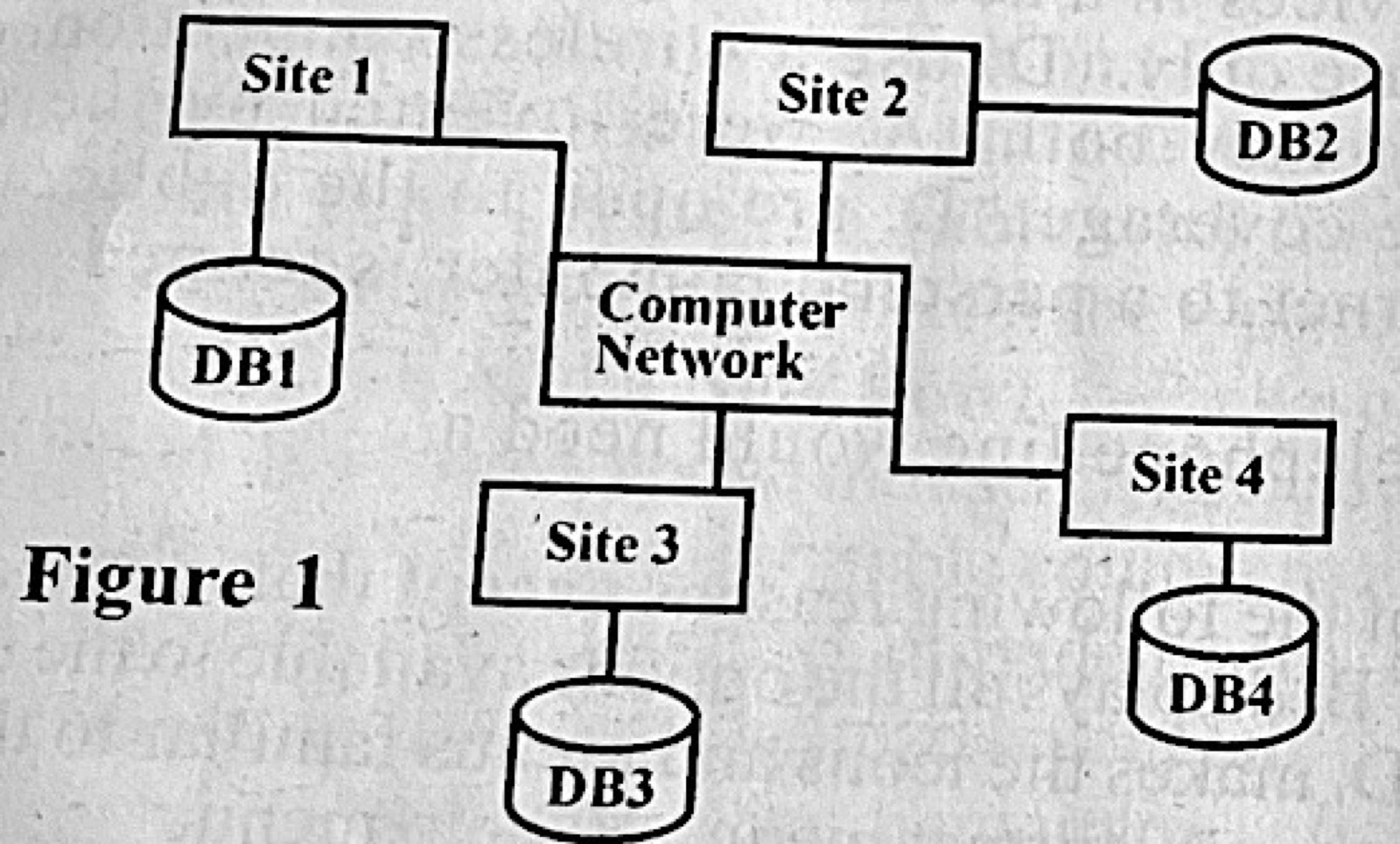
Figure 1 depicts

Diagram for this question
  1. A.a distributed database.
  2. B.a parallel database.
  3. C.an extranet.
  4. D.an intranet.
Show the answer and explanation

Answer: A (a distributed database.)

Explanation

Each site has its own database (DB1–DB4) and the sites are joined by a network, which is a distributed database.

Open this question

Theory question 101

Spreadsheet

Paper 2, Section A: Short-structured questions (answer three)
(a) What is a function in MS Excel?
(b) List two categories of functions in MS Excel.
(c) What is cell referencing in MS Excel?
(d) (i) State two types of cell referencing in MS Excel. (ii) Give one example of each type in 1 (d) (i).

Show the model answer
Model answer

(a) A function is a built-in (predefined) formula that performs a calculation on given values (arguments), e.g. SUM, AVERAGE.
(b) Any two: mathematical and trigonometric; statistical; financial; logical; text; date and time; lookup and reference; database.
(c) Cell referencing is identifying a cell (or range) by its column letter and row number, e.g. B3, so a formula can use its value.
(d)(i) Any two: relative; absolute; mixed.
(ii) Relative – =A3*C3 (changes when copied); absolute – =$A$3*$C$3 (does not change); mixed – =$A3*B$2 (only one part fixed).

Explanation

The $ sign fixes the column or row in a reference.

Open this question

Theory question 102

ICT in Society

Paper 2, Section A: Short-structured questions (answer three)
Ciroma Chukwuma Adekunle has just opened a computer business centre within a school environment.
(a) State three computer services that may be provided in the business centre.
(b) List three devices required in the business centre.
(c) Give two application software needed in the business centre.
(d) Outline two precautions that must be taken by Ciroma Chukwuma Adekunle to ensure the safety of his computers if he must accept documents in movable devices from his customers.

Show the model answer
Model answer

(a) Any three: typing and printing documents; photocopying; scanning; internet browsing; online registration and result checking; lamination and binding; graphic design (cards, posters).
(b) Any three: computers; printer; scanner; photocopier; UPS; modem/router; laminating machine.
(c) Any two: word processor (MS Word); spreadsheet (Excel); presentation package (PowerPoint); graphics package (CorelDraw); antivirus; web browser.
(d) Any two: scan every flash drive with an up-to-date antivirus before opening files; disable autorun; keep regular backups; use a separate computer for customers' devices.

Explanation

Think of what a school business centre actually does each day.

Open this question

Theory question 103

Computer Networks

Paper 2, Section A: Short-structured questions (answer three)
(a) State the keyboard shortcut keys to: (i) rotate an object in CorelDraw; (ii) position an object in CorelDraw; (iii) navigate to cell A1 in MS Excel worksheet.
(b) Give one reason for including the plus sign (+) in the search texts in a search engine.
(c) With the aid of diagrams, differentiate between LAN and WAN.

Show the model answer
Model answer

(a)(i) Alt + F8 (Transform – Rotate docker).
(ii) Alt + F7 (Transform – Position docker).
(iii) Ctrl + Home.
(b) The + sign tells the search engine that the word must appear in the results (include this exact term).
(c) LAN – a network covering a small area such as one building or school, usually owned by one organisation and fast; diagram: a few computers joined to one cable/switch. WAN – a network covering a large area (cities or countries), joining many LANs through telephone lines, satellites or the internet; diagram: several LANs linked through a cloud.

Explanation

Draw a bus/star of PCs for LAN and several LANs joined through a cloud for WAN.

Open this question

Theory question 104

Distributed and Parallel Databases

Paper 2, Section A: Short-structured questions (answer three)
A school decides to harmonize the operations of its two campuses using a distributed database system as well as install air conditioners and uninterruptible power supply in the computer laboratory.
(a) State three: (i) importance of using the distributed database system; (ii) disadvantages of using computers to process information in the school.
(b) Give two reasons for installing the: (i) air conditioners; (ii) Uninterruptible power supply devices.

Show the model answer
Model answer

(a)(i) Any three: each campus has its data locally, so access is faster; data is still available if one site fails (reliability); easy sharing of data between campuses; each campus keeps control of its own data (local autonomy); easy to expand.
(ii) Any three: high cost of equipment and maintenance; need for trained staff; risk of viruses and hacking; dependence on electricity; loss of data if not backed up; health problems from long use.
(b)(i) Any two: keeps the computers cool so they do not overheat; reduces dust and humidity; makes users comfortable.
(ii) Any two: supplies power during outages so work is not lost; allows proper shutdown; protects against surges and voltage fluctuations.

Explanation

Link each point to the school's two-campus situation.

Open this question

Theory question 105

Word Processing

Paper 2, Section B: Test of Practical Work
A Director gave a manuscript to the secretary for typesetting. The secretary is expected to provide the total number of words, lines of text, number of pages and number of paragraphs contained in the document. After proofreading the printout, the Director effected certain corrections on the printout and instructed that the corrected version be saved with the filename “updated” while the original document be saved with the filename “initial”. (a) Outline the steps the secretary would take to display the number of words, lines of text, number of pages and number of paragraphs contained in the corrected version of the document. (b) Highlight the steps the secretary would take to display the original and corrected versions of the document as well as the corrections effected on the document on the screen for the Director to see at the same time for comparison. (c) List the steps to secure the document with password in order to prevent unauthorized access to the document.

Show the model answer
Model answer

(a) Open the file 'updated'; click Review → Word Count (or Tools → Word Count); the box shows pages, words, paragraphs and lines.
(b) Click Review → Compare → Compare…; choose 'initial' as Original document and 'updated' as Revised document; click OK – Word shows both versions and the marked changes side by side. (Or open both and use View → View Side by Side.)
(c) File → Save As → Tools → General Options; type a password to open; click OK; retype the password; click OK and Save. (Or File → Info → Protect Document → Encrypt with Password.)

Explanation

Compare is on the Review tab.

Open this question

Theory question 106

Presentation Package

Paper 2, Section B: Test of Practical Work
You are provided with a computer system that has a Microsoft PowerPoint application running. Outline the steps to be followed in performing the following tasks; (a) creating a four-slide presentation; (b) modifying the presentation to show the following on the Footer of all slides except the title slide: A. Today's date; B. Slide number; C. Your surname. (c) inserting a picture saved in the picture folder of your computer hard drive on the second slide. (d) typing your name as the main title and personal profile as the subtitle. (e) making each slide to run for five seconds continuously until the “Esc” key is pressed during slide show.

Show the model answer
Model answer

(a) Click File → New → Blank presentation (Ctrl + N); press Ctrl + M (Home → New Slide) three times to have four slides.
(b) Click Insert → Header & Footer; tick Date and time (Update automatically); tick Slide number; tick Footer and type your surname; tick 'Don't show on title slide'; click Apply to All.
(c) Select slide 2; click Insert → Pictures; open the Pictures folder, choose the picture and click Insert.
(d) On slide 1 click 'Click to add title' and type your name; click 'Click to add subtitle' and type your personal profile.
(e) Click Transitions; under Advance Slide untick On Mouse Click and tick After, set 00:05; click Apply To All; then Slide Show → Set Up Slide Show → tick 'Loop continuously until Esc' → OK.

Explanation

Header & Footer has the 'Don't show on title slide' box.
Open this question